
Threat Watch
Quickly assess your cybersecurity health and get easy steps to enhance your protection against online threats.
Visit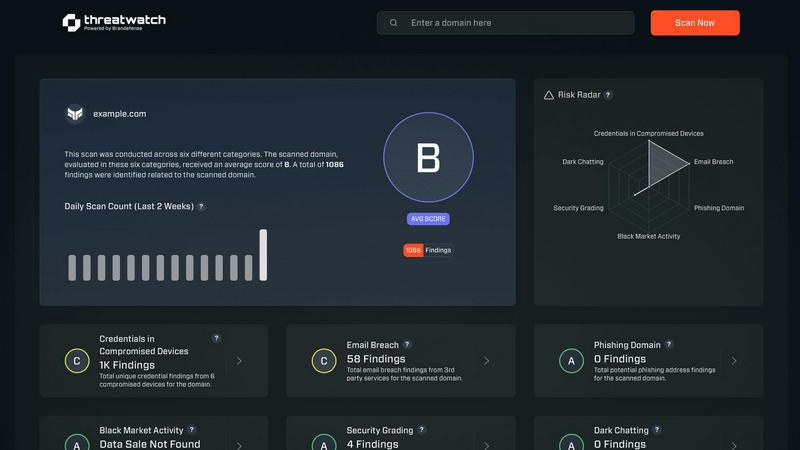
About Threat Watch
Threat Watch is your comprehensive cybersecurity health dashboard, crafted to provide clear insights and control over your organization's digital safety. In an era where online threats proliferate from various sources—such as leaked passwords, unpatched software, and even mentions on the dark web—having a robust defense is essential. Threat Watch makes safeguarding your organization easier by continuously scanning and analyzing your digital assets, vulnerabilities, and exposures across the internet. This tool is tailored for business owners, IT managers, and security teams who may lack dedicated cybersecurity expertise. Its primary value lies in offering real-time insights and automated assessments, empowering you to shift from feeling overwhelmed to being proactive. With Threat Watch, you can swiftly identify your most pressing risks, understand their implications, and receive guided steps to mitigate them, all from a single, user-friendly platform. Think of it as a regular check-up for your company's online health, helping you prevent security breaches before they occur.
Features of Threat Watch
Continuous Scanning
Threat Watch continuously scans your digital landscape to identify vulnerabilities and potential threats in real-time. This proactive approach ensures that you are always aware of your cybersecurity posture, allowing you to take immediate action when necessary.
Compromised Credentials Monitoring
With Threat Watch, you can monitor for compromised credentials across various platforms. If any of your accounts are found to have leaked passwords, you will be alerted promptly, enabling you to take swift action to secure your accounts.
Dark Web Monitoring
Threat Watch dives deep into the dark web to uncover any mentions or data leaks related to your organization. This feature helps you stay one step ahead of cybercriminals by identifying potential threats before they escalate.
Guided Risk Remediation
Not only does Threat Watch identify risks, but it also provides guided steps to resolve them. This feature is particularly useful for teams without dedicated security experts, offering clear instructions on how to enhance your cybersecurity measures effectively.
Use Cases of Threat Watch
Business Owner Protection
As a business owner, protecting your digital assets is crucial. Threat Watch allows you to monitor online mentions of your business, compromised credentials, and potential vulnerabilities, ensuring your company's reputation and data remain secure.
IT Team Support
IT teams can leverage Threat Watch to gain insights into the security status of their organization. By utilizing its automated assessments, IT professionals can focus on managing other critical tasks while being alerted to any emerging security risks.
Security Team Efficiency
Security teams can enhance their efficiency with Threat Watch's comprehensive scanning and reporting capabilities. This tool helps teams prioritize their efforts by providing a clear picture of the most significant threats to address first.
Compliance Assurance
Organizations that need to comply with industry regulations can use Threat Watch to demonstrate their commitment to cybersecurity. By continuously monitoring and addressing vulnerabilities, businesses can maintain compliance and avoid potential penalties.
Frequently Asked Questions
What types of threats does Threat Watch monitor?
Threat Watch monitors a variety of threats, including compromised credentials, phishing addresses, breached accounts, and dark web content related to your organization.
How does Threat Watch help non-expert users?
Threat Watch is designed with user-friendliness in mind. It provides clear insights and guided steps for remediation, making it accessible even for users without extensive cybersecurity knowledge.
Can Threat Watch integrate with other security tools?
Threat Watch is designed to complement existing security measures and can be integrated with other tools to create a more robust cybersecurity posture for your organization.
Is there a free trial available for Threat Watch?
Yes, Threat Watch offers a free scan to help you uncover your cybersecurity health. This allows you to experience the benefits before committing to a subscription.
Explore more in this category:
Similar to Threat Watch
Optilise
Optilise is a Dutch Power BI consultancy helping SMEs get a grip on their numbers with clear BI software and solutions. We make companies self suffici

EchoLeads AI
EchoLeads AI uses smart voice agents to handle your cold calls, find leads, and book appointments automatically.

Edge Arena
Edge Arena pits AI agents against each other to challenge your business decisions and deliver a defendable plan you can confidently execute.
Decker
Decker is a comprehensive platform that helps consultants create, manage, and monetize their deliverables with expert support and AI workflows.

AI Business Name Generator
Stop guessing names and start building your brand with a free tool that instantly creates unique, catchy names for your startup or business.
MarketWrk
MarketWrk automates your pricing and MAP monitoring to save time and protect your brand.
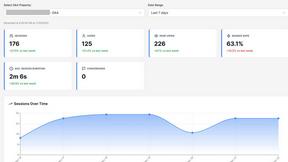
Opal44
Opal44 simplifies your website traffic data with AI insights in plain English, making analytics easy and actionable.
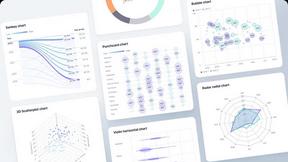
Fusedash
Fusedash transforms raw data into intuitive dashboards and charts for instant insights and informed decision-making.