
Subclip
Subclip is an AI video editor that helps you quickly add subtitles, remove silences, dub with voice cloning, and export to social media.
Visit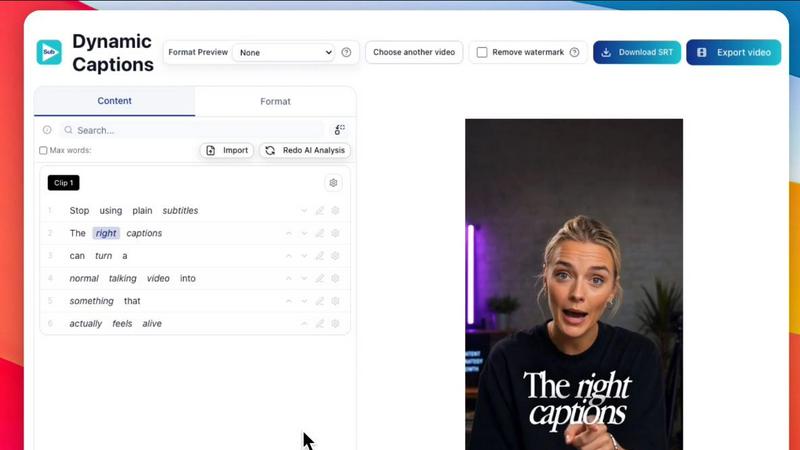
About Subclip
Subclip is an AI-powered video editor designed to transform the way creators, marketers, educators, and content teams produce videos. The core idea behind Subclip is simple: edit videos like you edit a document. Instead of scrubbing through hours of raw footage on a complex timeline, you work with a text transcript of your video. You can drag, delete, and rearrange words or sentences in the transcript, and Subclip automatically updates the video timeline to match. This intuitive approach removes the steep learning curve of traditional editing software, saving you up to 80% of your production time.
Subclip is built for anyone who creates video content. Whether you are a YouTuber, podcaster, online course creator, social media manager, or part of a marketing agency, Subclip streamlines your entire workflow. It offers a comprehensive suite of AI-driven tools all in one browser-based platform. You can generate accurate, customizable subtitles in over 48 languages with a single click. You can clone your own voice and use it to re-record parts of your video, ensuring a natural and consistent narration. The tool also lets you dub your videos into 21+ languages while preserving your original tone, emotion, and even background music. Additional features include automatic silence and filler word removal, background noise cleaning, and AI clipping that identifies your best moments for short-form content. Subclip is designed for speed and simplicity, replacing the complexity of traditional editors with intelligent features that help you go from raw footage to a finished, published video in a fraction of the time. It supports direct export to popular video editors like DaVinci Resolve, Final Cut Pro, and Adobe Premiere Pro, as well as scheduling directly to platforms like YouTube and X (Twitter).
Features of Subclip
Transcript-Based Video Editing
Edit your video by simply editing its text transcript, just like you would in a Google Doc. You can select and delete mistakes, rearrange sentences, or trim pauses, and the video timeline updates automatically. This eliminates the need for manual scrubbing and cutting, making the editing process incredibly fast and accessible for beginners and professionals alike. You can also export the edited timeline as an NLE file for further refinement in professional software.
AI Dubbing with Voice Cloning
Translate your video into 21+ languages while keeping your authentic voice. Subclip uses advanced AI to clone your voice, preserving your original tone, emotion, and speaking style in the new language. This feature is perfect for creators and businesses looking to expand their global audience without the cost and time of hiring voice actors or re-recording audio. The background music and sound effects from your original video are also preserved during the dubbing process.
One-Click Auto-Captions and Subtitles
Generate stunning, accurate subtitles for your videos with a single click. Subclip supports local transcription in over 48 languages, ensuring fast and private processing. You can fully customize the text style, font, colors, and animation to match your brand or creative vision. This feature is unlimited, allowing you to generate captions for as many videos and minutes as you need, making your content more accessible and engaging for social media.
AI Clipping and Audio Enhancement
Subclip’s intelligent engine automatically scans your long-form videos to identify high-energy segments, punchlines, and key emotional shifts. It then creates short, high-retention clips ready for platforms like TikTok, Instagram Reels, and YouTube Shorts. Additionally, the audio enhancement tools allow you to remove background noise, clean up room echo, and polish podcast audio with one click. You can also automatically remove all silences and filler words from your video, making your content sound professional and concise.
Use Cases of Subclip
Content Creators and Podcasters
Long-form content creators can dramatically increase their output by using Subclip to repurpose their videos. You can record a one-hour podcast or vlog, and then use the AI clipping feature to instantly generate multiple short, viral-ready clips. The transcript-based editing lets you quickly remove dead air, mistakes, and filler words. You can then add dynamic captions and schedule these clips directly to your social media channels, all without leaving the platform.
Online Course Creators and Coaches
For educators and coaches who produce training videos, Subclip is a game-changer. You can record a course in your native language and then use the AI dubbing feature to translate the entire course into 20+ languages using your own cloned voice. This allows you to reach a global student base without the expense of re-recording. The silence removal and voice enhancement tools also ensure that your instructional content is clear, professional, and easy to follow.
Marketing Agencies and Freelancers
Agencies handling multiple clients can increase their output at a fraction of the cost using Subclip. The platform offers unlimited transcription and export, making it ideal for high-volume content production. The team collaboration feature allows multiple editors to work on the same project, share feedback, and manage a shared workspace. With direct export to professional editors like Premiere Pro and DaVinci Resolve, agencies can seamlessly integrate Subclip into their existing post-production pipeline.
Vloggers and Social Media Managers
Vloggers can streamline their entire creation process with Subclip. After recording their footage, they can use the platform to add captions, insert B-roll, adjust audio, and remove noise, all with simple clicks. The built-in scheduling feature allows them to plan and publish content directly to YouTube and X from a single calendar. This eliminates the need to upload and download large video files for every render, saving significant time and bandwidth.
Frequently Asked Questions
How does the transcript-based video editing work?
Instead of scrubbing through a traditional timeline, Subclip generates a text transcript of your video. You can edit the video by clicking on the text and deleting, cutting, or rearranging words and sentences. The software automatically applies these changes to the video timeline. This makes editing as simple as editing a document, removing the need for complex cutting and dragging on a timeline.
What languages does Subclip support for dubbing and subtitles?
Subclip supports AI dubbing into 21+ languages, allowing you to translate your video while preserving your voice and tone. For subtitles and transcription, the platform supports over 48 languages. This wide range of language support makes it an excellent tool for creators and businesses looking to reach a global audience.
Can I export my project to other video editing software?
Yes. Subclip allows you to export your edited timeline as an NLE file, which is compatible with professional video editing software including DaVinci Resolve, Final Cut Pro, and Adobe Premiere Pro. This feature is designed for users who want to do the initial rough cut in Subclip and then perform more advanced editing or color grading in their preferred software.
Is my data and video content secure on Subclip?
Subclip processes video transcription locally on your device for supported languages, which enhances privacy and speed. For cloud-based features like AI dubbing, the platform uses secure servers. The platform is designed with data security in mind, and you can review their privacy policy for more specific details on data handling and storage practices.
Pricing of Subclip
Subclip operates on a Freemium pricing model. It offers a free tier that allows new users to try out the core features, including a limited amount of video minutes for transcription and export. For users who need more capacity and advanced features, Subclip provides affordable paid plans. These plans offer increased video minute limits, access to all AI features like voice cloning and multi-language dubbing, and priority support. Specific pricing for the paid tiers is available on the Subclip website.
Similar to Subclip

HubVanta
HubVanta is a free AI creative toolkit for generating images, videos, voices, and visual edits from one browser workspace.
Oravaa
Oravaa helps you replace repetitive phone tasks with natural, human-sounding voice AI that handles calls, qualifies leads, and books appointments.

Hush Touch | Voice-to-Text for MacOS
Hush Touch offers smart offline voice-to-text for Mac, learning your vocabulary and simplifying dictation for just $20.

Glossa
Glossa offers real-time AI translation of sermons into 100+ languages, breaking language barriers for your congregation.

Bantr: Offline & Unlimited TTS for Mac
Bantr offers unlimited offline text-to-speech on your Mac, ensuring privacy and studio-quality voiceovers with no.

KaiCalls
KaiCalls is your 24/7 AI phone agent that answers calls and books appointments automatically.

Vowen
Vowen is your free, private voice assistant that turns speech into text and actions on your computer.