Rallied AI vs StreamVox - AI Live Translator
Side-by-side comparison to help you choose the right tool.

Rallied AI
Rallied AI automates L1 and L2 ticket resolutions, freeing your team to focus on impactful projects and boosting MSP efficiency.
Last updated: April 4, 2026

StreamVox instantly translates any audio on your PC with AI subtitles, breaking language barriers in calls, games, and videos.
Last updated: April 4, 2026
Visual Comparison
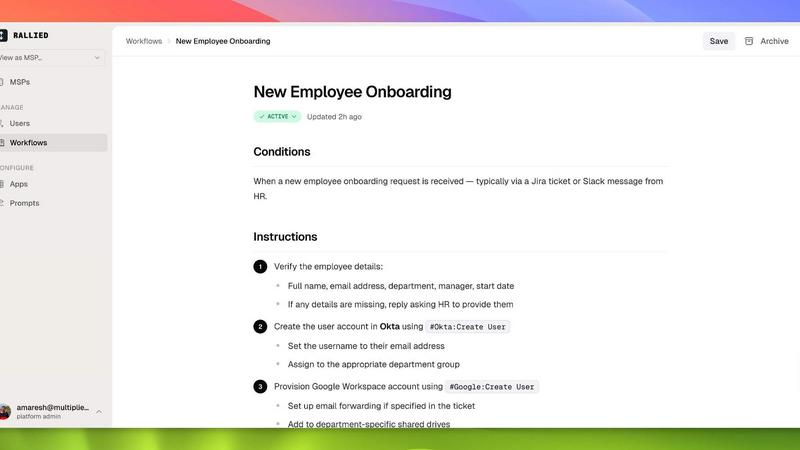
Rallied AI
StreamVox - AI Live Translator

Feature Comparison
Rallied AI
Autonomous Ticket Resolution
Rallied AI autonomously resolves L1 and L2 tickets, handling common issues like password resets, account unlocks, and permission changes. This feature ensures that routine tasks are completed efficiently without needing human intervention, freeing up valuable time for your technical staff.
Smart Triage and Dispatch
Rallied intelligently triages incoming tickets by asking end users relevant questions to categorize issues by priority. It fills in necessary triage fields and can pull documentation from integrated systems like IT Glue or Hudu, ensuring that tickets are routed to the right technician swiftly.
Efficient Onboarding and Offboarding
Streamline your onboarding and offboarding processes with Rallied AI. It simplifies the setup of new hires by managing tasks like M365 license provisioning and Active Directory account creation from a single message or ticket. Offboarding is just as easy, ensuring that access is revoked promptly when contractors leave.
Comprehensive Integration
Rallied connects with a wide range of tools within your tech stack, including ConnectWise, Autotask, and Microsoft 365. This extensive integration capability allows Rallied to operate efficiently within your existing workflows, ensuring smooth operations and minimal disruption during deployment.
StreamVox - AI Live Translator
Smart Per-App Audio Capture
This intelligent feature lets you choose exactly which application's audio you want to translate. Instead of capturing all your PC's sound, you can isolate audio from just Zoom, Chrome, Discord, or a specific game. This automatically filters out background noise from other apps, ensuring your subtitles are clean, accurate, and only show the conversation you care about. It's perfect for multitasking without getting confused by translations from unrelated audio.
Fully Customizable Transparent Overlay
The translated text appears in a sleek, floating window that stays on top of any other application you're using. You have full control over how it looks: adjust the font size from small (12px) to very large (72px), change the text color for better visibility, and modify the window's transparency with a simple slider. This means you can make the subtitles subtle for movies or bold and clear for fast-paced gaming, and all your preferences are saved automatically.
Bidirectional Translation with Multiple Audio Modes
StreamVox doesn't just translate what you hear; it can also translate what you say. It offers three primary audio modes: capture System Audio (like from a video), use your Microphone for your speech, or employ the Per-App Capture. This bidirectional capability is ideal for two-way conversations in apps like Discord or Zoom, allowing all participants to communicate in their preferred language with live subtitles facilitating understanding.
Extensive Language Support & Privacy Focus
The app supports an impressive array of 49+ input languages and can translate them into 49+ AI-powered target languages. Furthermore, the application's own interface is available in 12 languages, making it accessible to a global audience. Crucially, all this power comes with a strong commitment to privacy. Your audio data is processed in real-time for translation and is never recorded, stored, or sent to external servers, keeping your conversations completely confidential.
Use Cases
Rallied AI
Streamlining IT Support Operations
Rallied AI can dramatically enhance the efficiency of IT support operations. By automating the resolution of routine tickets, your team can focus on higher-value tasks, resulting in improved service delivery and customer satisfaction.
Reducing Operational Costs
For MSPs experiencing high ticket volumes, Rallied AI provides a cost-effective alternative to hiring additional staff. It can handle a significant number of L1 and L2 tickets, saving your business thousands of dollars each month in labor costs.
Enhancing Employee Experience
With Rallied managing basic IT requests, employees can receive faster resolutions to their issues. This leads to a more satisfied workforce, as they spend less time waiting for support and more time on their core responsibilities.
Accelerating New Hire Integration
Rallied AI ensures that new employees are set up quickly and efficiently. By automating the onboarding process, including account creation and access management, Rallied helps new hires start contributing sooner, enhancing overall productivity.
StreamVox - AI Live Translator
International Business Meetings & Calls
Participate confidently in Zoom, Microsoft Teams, or Google Meet calls with colleagues or clients from around the world. StreamVox provides real-time subtitles in your language, allowing you to follow technical discussions, presentations, and casual conversation without missing a beat. The low latency ensures the translation keeps pace with the natural flow of dialogue.
Enjoying Foreign Media & Live Streams
Watch movies on Netflix, videos on YouTube, or live streams on Twitch that don't have subtitles in your language. Simply play the content and let StreamVox overlay live translations directly onto the video player. This means you can enjoy anime, international news, or a creator's stream immediately, without waiting for official subtitles to be released.
Cross-Language Gaming & Communication
Enhance your multiplayer gaming experience by understanding in-game voice chat from teammates who speak different languages. StreamVox can capture audio from games like Valorant or Discord chats, translating conversations in real-time so you can coordinate strategies and socialize without language being a barrier to teamwork and fun.
Translating Mobile Phone Calls on Your PC
By connecting your iPhone or Android phone to your Windows PC using Microsoft's built-in Phone Link app, you can route your mobile call audio through StreamVox. See live subtitles for your phone conversations directly on your desktop monitor, making it easier to understand important calls, whether personal or professional, without straining to hear.
Overview
About Rallied AI
Rallied AI is a groundbreaking AI technician designed specifically for Managed Service Providers (MSPs). It autonomously resolves Level 1 (L1) and Level 2 (L2) support tickets by seamlessly connecting to your entire tech stack. Rallied allows teams to interact with it through popular communication platforms like Slack and Microsoft Teams, making it feel like a real coworker. The primary value proposition of Rallied AI is to alleviate the workload of your high-skilled technicians, enabling them to focus on strategic projects that drive business growth. By automating routine tasks such as password resets, account unlocks, and onboarding processes, Rallied significantly reduces operational costs and improves efficiency. With Rallied, MSP owners and service managers can optimize their resources while enhancing service delivery.
About StreamVox - AI Live Translator
StreamVox is your personal, real-time language bridge for everything you do on your Windows PC. Imagine watching a foreign film, joining an international conference call, or playing a game with global teammates and instantly understanding every word. That's the magic of StreamVox. It's a powerful desktop application that listens to any audio on your computer—be it from your system, a specific app like Zoom or Discord, or your microphone—and displays live, translated subtitles directly on your screen. Designed for gamers, remote workers, students, and content lovers, its core value is breaking down language barriers instantly and privately. With a focus on ultra-low latency, your translated conversations feel natural, and with a privacy-first promise, your audio is processed in real-time and never stored. Whether you're a beginner looking to understand more or a professional needing seamless cross-language communication, StreamVox adapts to your world.
Frequently Asked Questions
Rallied AI FAQ
What if it breaks something?
Rallied AI operates under parameters set by your organization. You can determine which tasks it can execute autonomously and where it should defer to human intervention, ensuring control over critical operations.
We've tried AI tools before, what makes Rallied different?
Rallied AI is built with MSPs in mind, eliminating the need for extensive setup and a full-time administrator. Unlike other tools, Rallied starts working immediately upon deployment, making it a practical solution for busy teams.
How does Rallied handle high ticket volumes?
Rallied AI is designed to efficiently manage a high volume of tickets, handling L1 and L2 issues autonomously. This capability allows your tech team to focus on more complex tasks, improving overall operational efficiency.
How quickly can we get started?
After an initial kickoff call to map your tech stack, Rallied AI can be connected and deployed within the same week. The 30-day free trial includes custom integrations and workflow tuning, allowing you to see immediate benefits without long delays.
StreamVox - AI Live Translator FAQ
Is StreamVox free to use?
Yes, StreamVox offers a completely free Starter plan forever. This plan gives you 20 minutes of live translation every 24 hours, access to all 49+ languages, and the core audio capture features. It's a great way to test the app daily for short calls or videos before deciding to upgrade for more usage time.
How does the Per-App audio capture work?
Per-App capture is a smart audio isolation feature. When you select this mode, StreamVox will show you a list of all running applications that are producing sound (like Chrome, Zoom, or a game). You simply select the specific app you want to translate from, and StreamVox will only process audio from that source, ignoring all other system and application noise for clearer, more relevant subtitles.
Is my conversation audio kept private?
Absolutely. StreamVox is built with a privacy-first design. The audio from your calls, games, or videos is processed locally on your PC in real-time by the AI to generate translation. This audio data is never recorded to your hard drive, stored on any server, or sent over the internet. Once the translation is displayed, the audio data is discarded.
Can I use StreamVox with my phone?
Yes, you can! By using the free Microsoft Phone Link application that comes with Windows, you can connect your smartphone to your PC. Once connected, you can set StreamVox to capture your "System Audio," which will include the audio from your mobile phone calls, allowing you to see live subtitles for those calls right on your computer screen.
Alternatives
Rallied AI Alternatives
Rallied AI is a cutting-edge AI technology designed specifically for Managed Service Providers (MSPs). By autonomously managing Level 1 and Level 2 tickets, Rallied AI seamlessly integrates with your existing tech stack, enabling users to interact with it through popular platforms like Slack or Teams. This innovative solution empowers MSPs to streamline their operations and enhance customer support. Despite its impressive capabilities, users often seek alternatives to Rallied AI due to various factors such as pricing, feature sets, or specific platform requirements. When evaluating alternatives, it's essential to consider factors like ease of integration, scalability, and the overall user experience. These elements can significantly impact how well the solution will meet your unique business needs and improve your operational efficiency.
StreamVox - AI Live Translator Alternatives
StreamVox - AI Live Translator is a Windows software that provides real-time AI subtitles and translation for any audio on your computer. This category of software is essential for breaking down language barriers in live situations like video calls, gaming with international friends, or watching foreign media. People often look for alternatives to software like this for various reasons. They might need a solution for a different operating system, require a specific feature not offered, or have budget constraints that don't fit the available pricing tiers. It's a common and smart step to compare options. When evaluating alternatives, consider your core needs. Key factors include the languages supported, the accuracy of the translation, how it captures audio from different apps, and the overall cost. The right tool for you depends on which features are non-negotiable for your daily use.