

Alternatives to Cece AI
Cece AI is your email-based executive assistant that effortlessly handles scheduling, follow-ups, quotes, and invoices so you can focus on growing.
Explore 20 alternatives to Cece AI. Compare features, pricing, and find the best fit for your needs.


GigUp
GigUp helps freelancers discover relevant Upwork jobs through AI matching, automated monitoring, and instant alerts.

Safe Outreach
AI-powered platform that evaluates the safety of LinkedIn automation tools and helps reduce the risk of account restrictions.

How Long How Many Tool
Timers and hourly checks to figure how out long until a certain time or how many days away.


ButterShare
Realtime peer-to-peer file transfer in the browser. Send files directly between devices, no account and no upload to a server.

Emailyy
Free email tools for signatures, subject lines, HTML previews, word counts, and email headers. Browser-based, simple to use, and no signup required.

Uniclip
Clip pages, take full-page screenshots and batch-capture list data to Notion, Feishu, Obsidian, Markdown, CSV or JSON.

TroveKey
Search tabs, Chrome bookmarks and history, run browser commands, and save webpages and social posts locally—no account.
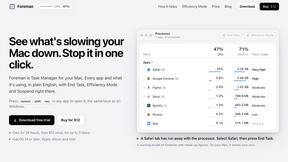
Foreman
See every app and what it's using in plain English, and end or slow down the one that's hogging your Mac.
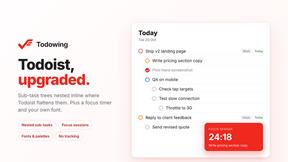
Todowing
Chrome extension for Todoist that shows sub-tasks nested inline in Today, Upcoming, Filter, and Label views instead of a flat list.
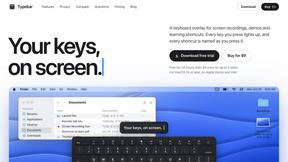
Typebar
Every key you press lights up on an on-screen keyboard, and each shortcut is named as you press it.

Notchpals
Little characters peek out of your Mac's notch to remind you to drink water, eat, sit up and get to bed. Quiet during calls. $4.99 once.

LightScreen
Free light screen tool online. Turn any display into a flashlight, ambient light, or solid-color screen. No download or sign-up.


Kovnerov
Personal site of Vlad Kovnerov: analytics dashboards, web development, Telegram bots and browser tools for sellers and subscription tracking.
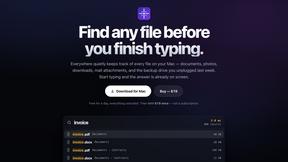
Everywhere
Fast file search for the Mac. Results as you type, files inside Mail and Photos, works with Wi-Fi off. $19 once.

Basalt
Eighteen PDF tools in one native Mac window: merge, split, compress, OCR, Bates numbering, forms, signing and redaction. Offline. $29 once.

Voice Keyboard Pro
Hold a key, say what you mean, let go. Clean, punctuated text lands at the cursor in any app on your Mac or iPhone.
About Cece AI Alternatives
Cece AI is an AI executive assistant designed specifically for small business owners who want to reduce the time they spend on email, admin tasks, and follow-ups. It falls under the Productivity & Management category, operating directly inside your email inbox to handle scheduling, customer responses, quotes, invoices, and reminders without needing extra software or a new hire. While Cece AI is practical and straightforward, many users start looking for alternatives for a few common reasons. You might find that its pricing doesn't fit your budget, or you need features that go beyond email-based assistance, such as project management integration or a mobile app. Others may prefer a tool that works across different platforms, like Slack or text messaging, instead of being limited to email. When choosing an alternative, focus on what matters most for your daily workflow. Look for a tool that matches how you communicate with your team and customers, offers clear pricing without hidden costs, and provides the specific features you rely on most, like automated follow-ups or invoice creation. It is also helpful to test a free trial or demo version to see if the interface feels intuitive and beginner-friendly, as the goal is to save time, not add complexity to your routine.
FAQs about Cece AI Alternatives
What is Cece AI?
Cece AI is an AI executive assistant that works directly through your email inbox to help small business owners manage administrative tasks. It can schedule meetings, respond to customers, create quotes, send invoices, track follow-ups, and manage reminders. Instead of being a separate chatbot, Cece AI integrates into your existing email workflow by allowing you to CC it on messages for instant task execution.
Who is Cece AI for?
Cece AI is built for small business owners and entrepreneurs who are overwhelmed by email overload, admin work, and unfinished follow-ups. It is especially useful for solo operators or small teams who want to reduce the need for hiring a full-time assistant. The tool is designed for those who prefer working inside their inbox rather than learning a new platform or software.
Is Cece AI free?
Based on the provided information, Cece AI is described as a practical tool that helps avoid adding another full-time hire, but no specific details about a free tier or pricing model are mentioned. Typically, AI executive assistant services offer a free trial or a limited free plan, but you should check the official Cece AI website for the most accurate and current pricing information.
What are the main features of Cece AI?
The main features of Cece AI include scheduling meetings, responding to customer inquiries, creating quotes, sending invoices, tracking follow-ups, and managing reminders. All of these tasks are performed by CCing Cece AI on an email thread, turning messy conversations into completed actions. The tool also requires you to set up your calendar, business profile, price book, and preferences in a dashboard before daily use.