
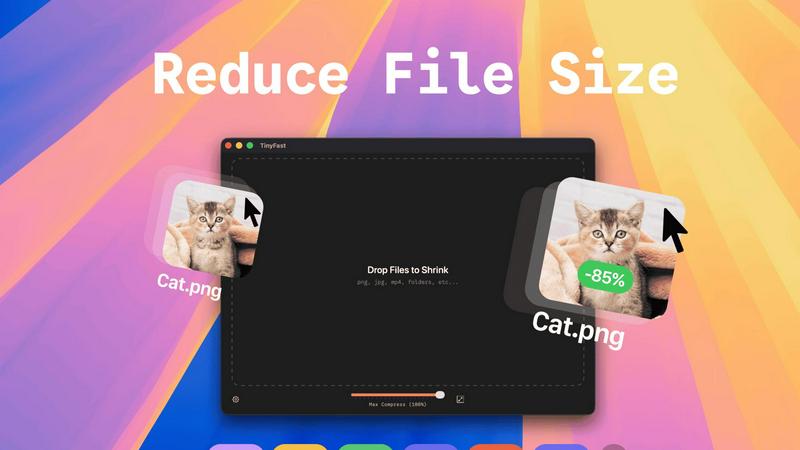
About TinyFast
TinyFast is your super-powered, privacy-focused file shrinker that lives right on your Mac. It's designed to make your digital life simpler by compressing a wide variety of files—like images (PNG, JPEG), videos (MP4, MOV), documents (PDF), and more—directly on your computer. The magic happens locally, which means your files never have to travel over the internet to some unknown server. You simply drag your file into the app and drag the smaller, optimized version back out. It’s incredibly fast because there are no upload or download waits. This app is built especially for developers, designers, and creators who value their time, their workflow speed, and the security of their confidential assets. Whether you're preparing images for a website, sending video clips via email, or managing project files, TinyFast ensures you can reduce file sizes dramatically without compromising on privacy or quality. It's the fast, safe, and simple solution for anyone who needs to save space and share files efficiently without the hassle and risk of online tools.
Features of TinyFast
Blazing-Fast Local Compression
TinyFast shrinks large files in seconds using optimized native engines built for speed. Because everything happens on your Mac, there's no waiting for files to upload to the internet or download back to your computer. This local processing makes the entire compression experience incredibly quick and responsive, saving you valuable time in your daily workflow.
100% Private & Secure by Design
Your files never leave your machine. TinyFast operates with total privacy by design, meaning no uploads to cloud servers and no risk of your sensitive or confidential assets being stored or accessed by third parties. This is perfect for anyone working under Non-Disclosure Agreements (NDAs) or who simply values their digital privacy.
Simple Drag-and-Drop Operation
Using TinyFast couldn't be easier. There are no complicated settings to learn. You simply drag your file or even an entire folder into the app, and then drag the compressed, optimized version back out to your desktop or any other location. This intuitive process makes file shrinking accessible to everyone, regardless of technical skill.
Batch Processing for Multiple Files
You can save massive amounts of time by compressing many files at once. Just drop an entire folder of images, videos, or documents into TinyFast, and it will process them all in one go, delivering a batch of optimized output files in seconds. This is ideal for preparing assets for a project or cleaning up a cluttered downloads folder.
Use Cases of TinyFast
Web Developers Optimizing Site Assets
Web developers can use TinyFast to quickly compress all images, CSS, and JavaScript files for a website directly on their Mac. This reduces page load times without ever risking client assets by uploading them to an online service, ensuring both performance and client confidentiality are maintained.
Designers Preparing Files for Client Delivery
Graphic and UI/UX designers often need to send high-quality proofs or final assets to clients via email or file-sharing links, which have size limits. TinyFast lets them compress PNG, JPG, and PDF files locally to perfect, shareable sizes while keeping unreleased designs completely private and secure on their own device.
Content Creators Managing Video Clips
Video creators, bloggers, and social media managers can shrink large MP4 or MOV video files quickly to send via email, upload to platforms faster, or save storage space on their hard drives. Doing it locally with TinyFast means their raw footage never risks being exposed online during the compression process.
Professionals Emailing Large Documents
Professionals who need to email large PDF reports, presentations (DOCX), or batches of images can hit attachment size limits. TinyFast solves this by reducing these document file sizes dramatically right on their computer, ensuring the email sends successfully without using insecure online file compressors.
Frequently Asked Questions
Is TinyFast really free to use?
Yes, TinyFast offers a completely free forever plan! You can compress up to 5 files per day with access to all core features. This is a great way to try it out and see how it fits into your workflow. For unlimited use, there are affordable one-time purchase and monthly subscription options available.
What file types does TinyFast support?
TinyFast supports a wide range of common file types. This includes images (PNG, JPG, TIFF, HEIC, WEBP, GIF, BMP, SVG), videos (MP4, MOV, M4V), documents (PDF, DOCX), code files (JS, CSS, JSON), and audio (MP3). It's a universal tool designed to handle most files you need to shrink.
How does local compression work?
Local compression means the entire process happens on your Mac's own processor. When you drag a file into TinyFast, the app uses its built-in compression engines to analyze and shrink the file directly on your computer's hardware. The file data is never sent over the internet, guaranteeing speed and privacy.
Can I resize images and videos with TinyFast?
Absolutely! Beyond just compression, TinyFast includes a handy feature to automatically resize the resolution of your images and videos. This allows you to not only make a file smaller in terms of data size but also physically reduce its dimensions, which is perfect for web use or specific platform requirements.
Pricing of TinyFast
TinyFast offers simple and transparent pricing to fit different needs. You can start with the Free Forever plan, which allows compression of up to 5 files per day. For unlimited use, choose the Lifetime Plan for a one-time payment of €17.99, which includes unlimited compressions, all features, lifetime updates, and supports future development. Alternatively, there is a Monthly Subscription for €2.99 per month (which includes a 3-day free trial), also offering unlimited compressions and access to all features. All plans provide the same core, privacy-focused functionality.
Explore more in this category:
Similar to TinyFast

AI Email Filter
AI Email Filter sorts incoming mail into folders using plain-language prompts you write. Works with any IMAP mailbox; bring your own LLM if you want.

Egmatic
No-code 2D game editor: visual node logic, drag-and-drop scenes, live preview. Exports to Windows, macOS, Linux, Android, iOS, Web.
Kody Tools
Free collection of online developer utilities, code formatters, and digital converters designed to streamline your daily workflow.

Sprite Sheet Maker
A free browser-based toolkit for creating, cutting, converting, and previewing sprite sheet animations.
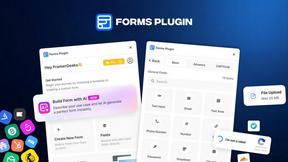
Forms Plugin
The #1 Native Form Builder Plugin for Framer - No Code, No Embeds, No External Platforms.

Product Launch Checklist
A free launch checklist for SaaS, apps, AI tools and more. Every step says why it matters and when you can skip it.

HomeAnswerBook
Practical, independent guides to home repairs, maintenance, costs, troubleshooting, and everyday fixes.
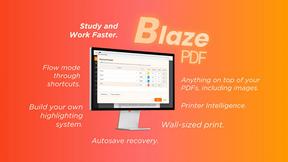
BlazePDF
Highlight faster. Study in flow with custom shortcuts and a workflow built around you. Print smarter, or turn any page into a tiled poster.