
EditTextImage
EditTextInImage lets you replace text in any image online in 30 seconds while keeping the original font, color, and style perfectly intact.
Visit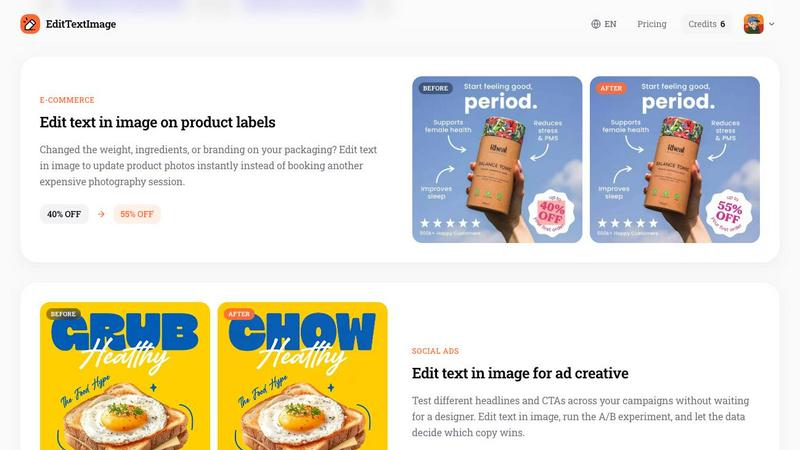
About EditTextImage
EditTextImage is a powerful online AI tool that lets you change the text in any image while keeping the original font, color, and layout pixel-perfect. No Photoshop skills, no font files to install, and no subscription required. If you have ever needed to fix a typo on a finished poster, swap a date on a product photo, or update a headline on a social media ad but lost the original design file, this is the tool for you. Simply upload your image, type the existing text and your replacement, and the AI samples the typeface directly from the pixels. This means paid fonts, hand-lettering, drop shadows, and even perspective all stay intact. The entire process takes about 10 seconds and outputs at 2K resolution. Your first edit is free with no credit card needed, and after that it is a one-time payment of $9.90 for 30 edits. There are no recurring fees, no Canva subscription, and no complicated software to learn. Whether you are a small business owner, a marketer, a content creator, or someone who just needs a quick fix on an image, EditTextImage makes text replacement accessible to everyone. The tool is designed to be beginner-friendly, with a simple three-step process: upload your image, type the text change, and download your result. It supports PNG, JPEG, and WebP files up to 10 MB. EditTextImage is built for honesty and compliance, requiring you to confirm you own or are licensed to edit the image and that the edit is not intended to deceive anyone.
Features of EditTextImage
Pixel-Perfect Text Replacement
The core feature of EditTextImage is its ability to replace text in an image while preserving every detail of the original typography. Unlike traditional image editors that often reset the font, smear the background, or warp the perspective, this AI tool samples the typeface, color, size, drop shadow, and even perspective straight from the pixels. This means paid fonts you do not own, hand-lettering, and custom styles all work perfectly. The result is a seamless edit that looks like it was done in the original design file.
Lightning-Fast Processing
EditTextImage is designed for speed. On average, it takes about 12 seconds to process an edit and deliver a 2K-resolution output. This makes it ideal for quick fixes, urgent updates, and high-volume workflows. You do not need to wait for a designer or struggle with complex software. Just upload, type, and download in under half a minute. This speed is especially valuable for time-sensitive tasks like correcting a typo on a promotional banner or updating a date on an event flyer minutes before printing.
No Subscription, One-Time Payment
Unlike many AI tools that lock you into monthly subscriptions, EditTextImage offers a straightforward and affordable pricing model. Your first edit is completely free with no credit card required. After that, you purchase a one-time pack of 30 credits for $9.90. Credits never expire, so you can use them whenever you need. This is perfect for occasional users who do not want to pay a recurring fee, as well as for businesses that want predictable costs without ongoing commitments.
Commercial Use Included
Every edit you make with EditTextImage comes with full commercial use rights. This means you can use the edited images in your business, marketing materials, product packaging, social media ads, and any other commercial context without additional licensing fees. Whether you are updating a product label for your e-commerce store or creating ad creative for a campaign, you have the freedom to use your edits professionally without worrying about extra costs or restrictions.
Use Cases of EditTextImage
Document Fixes and Corrections
Lost the source file for an important document? Only have a screenshot or a scan? EditTextImage lets you edit text in image files directly to fix typos in contracts, update invoice numbers, correct dates on official documents, or change names on certificates. This is a lifesaver when you need a quick correction but do not have access to the original design software or the person who created the file. The AI preserves the font and layout so the fix looks completely natural.
Posters and Flyers Updates
Event details change all the time. The date moves, a speaker drops out, or the venue changes, but your designer is offline and the poster is already finished. With EditTextImage, you can edit text in image on the finished poster without reopening the design file. Just upload the image, type the old text and the new text, and download the updated version in seconds. This saves you time, money, and the frustration of trying to recreate a design from scratch.
App Screenshot Localization
App Store and Google Play require screenshots in multiple languages for international audiences. Instead of rebuilding every UI mockup for each language, you can use EditTextImage to swap text on existing screenshots. The AI handles the font, color, and layout perfectly, so your localized screenshots look just as polished as the originals. This is a huge time-saver for app developers and marketers who need to localize their app store presence quickly and affordably.
Social Media Ad Creative Testing
Running A/B tests on ad copy is essential for optimizing campaign performance, but waiting for a designer to create each variation can slow you down. EditTextImage lets you edit text in image for ad creative instantly. Test different headlines, calls to action, or promotional offers across your campaigns without any design bottleneck. Upload your base ad image, swap the text, and run your experiments. Let the data decide which copy wins, all without a designer in the loop.
Frequently Asked Questions
What file types and sizes does EditTextImage support?
EditTextImage supports PNG, JPEG, and WebP image files up to a maximum size of 10 MB. These are the most common image formats used for posters, screenshots, product photos, and social media graphics. If your image is larger than 10 MB, you may need to compress it or use a smaller version before uploading. The tool processes images quickly and delivers output at 2K resolution for high-quality results.
Is my first edit really free with no credit card?
Yes, your first edit on EditTextImage is completely free with no credit card required. You simply sign in with your Google account and you receive one free credit to use immediately. This allows you to test the tool and see the quality of the results before making any purchase. There are no hidden fees, no trial period that auto-renews, and no obligation to buy anything after your free edit.
Can I use EditTextImage for commercial projects?
Absolutely. Every edit you create with EditTextImage includes full commercial use rights. You can use the edited images in your business, on your website, in marketing materials, on product packaging, in social media ads, and in any other commercial context. There are no additional licensing fees or restrictions. This makes it a great tool for small business owners, marketers, and content creators who need professional-looking edits for their work.
What happens if I try to edit a document or image I should not?
EditTextImage has strict acceptable use policies to prevent misuse. The tool will not process IDs, passports, visa support letters, official seals, bank statements, or tampered receipts. You must confirm you own or are licensed to edit the image and that the edit is not intended to deceive a third party, including for visa or immigration submissions, fake refund or transaction proofs, or altered email or chat screenshots. Violations result in account termination without refund, and request logs may be shared with law enforcement.
Pricing of EditTextImage
EditTextImage offers a simple and transparent pricing structure. Your first edit is completely free with no credit card required. After using your free credit, you can purchase a one-time pack of 30 credits for $9.90. Credits never expire, so you can use them whenever you need, whether that is over a few days, months, or even years. There are no subscriptions, no recurring fees, and no hidden costs. This one-time payment model is ideal for occasional users and businesses that want predictable, low-cost access to professional text editing in images.
Similar to EditTextImage
Sprite Sheet Maker
A free browser-based toolkit for creating, cutting, converting, and previewing sprite sheet animations.

Vynzo
AI image and video studio. Generate from a prompt, animate stills, swap faces, restyle clips and edit — one credit pool, no subscription.

Try This Skill
One-click AI photo stylization for e-commerce & portraits
Lockimate - AI Live Wallpapers
Turn any photo into a real Apple Live Photo that animates when you wake your iPhone. Restyle it and choose the motion — customizable.
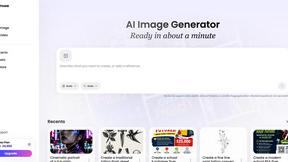
Vismuse
Create polished AI images and videos from prompts or references for social posts, ads, flyers, album covers, and campaigns.
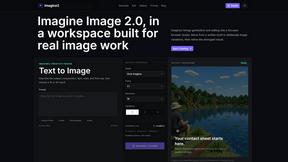
Imagine2
Private browser-based AI image generation and editing with text-to-image, targeted edits, and multi-image references.
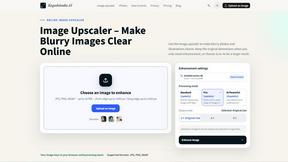
Kogashitsuka AI
An online AI image tool that enhances photos and illustrations at their original size or upscales them by 2x or 4x.