Easymotion - AI Motion Graphic Generator
Turn your static images, data, or ideas into professional motion graphics and map animations in minutes by simply chatting with AI.
Visit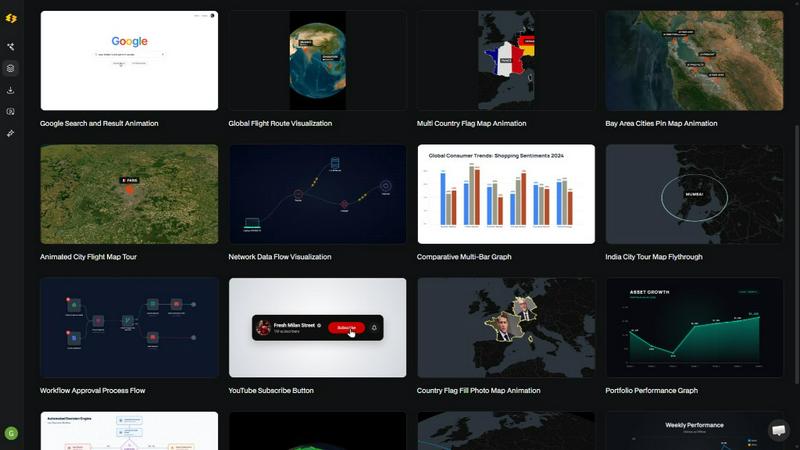
About Easymotion - AI Motion Graphic Generator
Easymotion is an AI-powered motion graphics generator and map animation platform designed for content creators, video editors, marketers, founders, and data storytellers. Its main purpose is to transform your ideas, static images, spreadsheets, and PDFs into polished animated videos without requiring complex timeline editing or years of design experience. Instead of wrestling with software like After Effects, you simply describe your vision in plain English, and the AI handles all the keyframes, animation curves, and visual effects. The platform supports a wide variety of motion graphics, including SaaS product promos, flowcharts, animated charts, UI explainers, quizzes, and other visual storytelling formats. It also excels as a map animation maker for creating flight routes, location pins, flag fill highlights, and geographic narratives. After generating your animation, you can refine every detail by chatting with the AI to adjust colors, pacing, labels, layout, and visual style. Easymotion includes a premium template library so you can start from proven motion graphics layouts and customize them for your brand, campaign, or client content. When your animation is ready, you can export it as MP4 or MOV, including videos with transparent backgrounds for seamless integration into editing workflows, social content, product marketing, presentations, and client deliverables. Easymotion supports multiple aspect ratios including 16:9 for YouTube and landscape content, 9:16 for TikTok and Instagram Reels, 1:1 for square social posts, and 4:5 for feed-friendly vertical formats. It is built for anyone who needs a faster, more intuitive way to create professional motion graphics, map animations, and reusable video assets directly in their browser.
Features of Easymotion - AI Motion Graphic Generator
Static Design into Animation
Upload any static image, such as a logo, infographic, or illustration, and let the AI bring it to life with stunning motion. You do not need to manually set keyframes or create complex animation paths. Simply provide your image, describe the movement you want, and Easymotion generates a smooth, professional animation that adds visual interest and engagement to your content.
Map Animations Made Easy
Create professional map animations effortlessly and faster than ever before. You can generate flight routes, pinpoint locations, highlight countries with flag fills, and build geographic storytelling visuals. This feature is perfect for travel content, data journalism, business presentations, and social media posts that need to show movement across the globe in a clear and visually appealing way.
Boring Sheets into Visuals
Upload a CSV or XLSX file containing your data, and let the AI create beautiful animated visuals. Turn rows of numbers into dynamic bar charts, line graphs, and other data visualizations that stop the scroll. This feature is ideal for data storytellers, analysts, and marketers who want to present insights in a more engaging and memorable format than static charts.
Customize Everything with AI Chat
After generating your initial animation, you can refine every aspect by chatting with the AI. Adjust colors, pacing, labels, layout, and visual style using simple text commands. You can also edit text, logos, and other assets to make every video uniquely yours. This iterative, conversational approach puts you in control without requiring any technical design skills.
Use Cases of Easymotion - AI Motion Graphic Generator
YouTubers and Content Creators
Most creators spend hours in After Effects to produce a single video. With Easymotion, you can create professional motion graphics, map animations, and social media videos in under five minutes. This allows you to produce more content, post more frequently, and grow your channel faster. Creators are already racking up views with engaging map animations and data-driven visuals that captivate their audience.
Video Editors and Motion Designers
Motion graphics can eat up your entire day, and pre-made templates never quite fit your needs. Easymotion lets you create exactly what you need in minutes and move on to your next project. Editors are skipping After Effects and using Easymotion to work three times faster, delivering high-quality results to clients without the late nights and tedious manual work.
Marketers and Campaign Managers
No more waiting on designers or going through endless back-and-forth emails. With Easymotion, you can create and iterate on videos yourself, keeping them on brand and on schedule. Marketing teams are shipping campaigns the same day, producing social media promos, product demos, and explainer videos that drive engagement and conversions without relying on external resources.
Founders and Startups
Freelancers are expensive, and editing software has a steep learning curve. Easymotion empowers you to create professional videos yourself in minutes, helping you build your social presence without hiring freelancers. Startups are growing their brands by producing consistent, high-quality video content for platforms like LinkedIn, Twitter, and Instagram, leading to five times more engagement on their posts.
Frequently Asked Questions
What is Easymotion?
Easymotion is an AI-powered motion graphics generator that lets you create professional videos simply by chatting. You can instantly generate map animations, animate static images, turn spreadsheets into data visualizations, and create social media videos without needing complex software like After Effects. It is designed for creators, marketers, and businesses who need a faster way to produce high-quality motion graphics.
How does AI motion graphics generation work?
It works in three simple steps. First, describe the animation you want in plain English. Second, refine the result using chat commands to adjust colors, timing, map styles, or assets. Finally, export your completed video as an MP4 or with a transparent background. The AI handles all the keyframes and animation curves, so you do not need any technical design skills.
What types of videos can I create?
You can create a wide variety of motion graphics, including SaaS product promos, flowcharts, animated charts, UI explainers, quizzes, and map animations like flight routes and location pins. The platform also supports converting static images, spreadsheets, and PDFs into animation-ready scenes. It is versatile enough for social media content, presentations, and client deliverables.
Can I customize the animations after they are generated?
Yes, absolutely. After generating your initial animation, you can edit by chatting with the AI to adjust colors, pacing, labels, layout, and visual style. You can also change text, logos, and other assets. This conversational editing process makes it easy to fine-tune your video until it perfectly matches your brand or creative vision.
Pricing of Easymotion - AI Motion Graphic Generator
Easymotion offers a free tier that allows you to explore the platform and create videos without any upfront commitment. No credit card is required to get started. For users who need more advanced features, higher export quality, or additional credits, paid plans are available. Specific pricing details for the paid tiers can be found on the Easymotion website. The platform is designed to be accessible for beginners while providing the power and flexibility that professionals need.
Similar to Easymotion - AI Motion Graphic Generator

Nano AI
Create and edit AI images, generate videos, and compare models in one creative workbench.




Gas Station Dance AI Generator
Browser-based AI generator that recreates the viral gas station dance video from 1–3 photos.

Unforgettable Car AI
Unforgettable Car AI generates the 15-second Unforgettable car trend video from a single selfie.

Ozil Goal AI
Ozil Goal AI turns one photo into an AI remake of Mesut Özil's famous 2016 chip-and-dribble goal against Ludogorets.