
DocuExtractor
DocuExtractor instantly transforms your receipts and invoices into clean, structured data without any manual entry.
Visit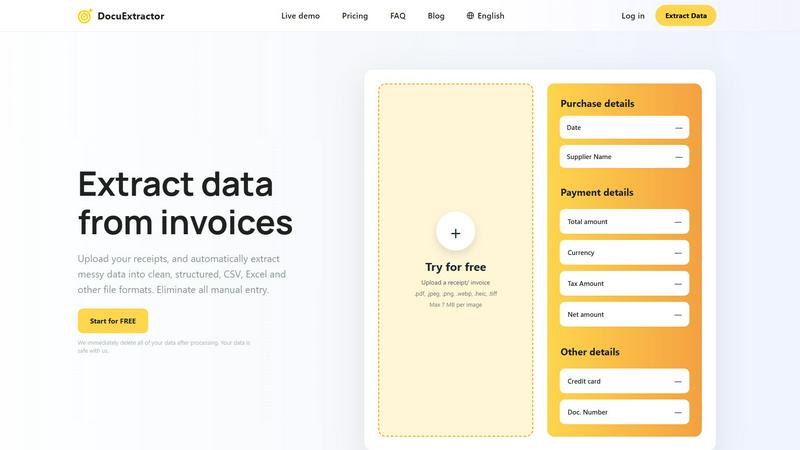
About DocuExtractor
Welcome to DocuExtractor, the ultimate solution for anyone struggling with document chaos! This AI-powered software is designed to help you streamline your data extraction process, making it easier than ever to transform messy, unstructured documents into clean, organized datasets. Whether you are an accountant, bookkeeper, or business professional, DocuExtractor has you covered. It uses advanced Optical Character Recognition (OCR) technology, combined with deep learning and artificial intelligence, to accurately extract key information from receipts, invoices, and bank statements. In just a few seconds, you can upload your documents and download the extracted data in ready-to-use formats like CSV or Excel. Say goodbye to hours spent on tedious manual data entry and hello to a more efficient workflow. With a commitment to data security, DocuExtractor ensures that all files are deleted immediately after processing, providing peace of mind as you tackle your document challenges.
Features of DocuExtractor
Advanced OCR Technology
DocuExtractor utilizes cutting-edge Optical Character Recognition technology to accurately read and extract data from various document types. This means you can trust the software to pull out critical details like dates, supplier names, totals, and more with incredible precision.
Batch Processing
With DocuExtractor, you can upload multiple documents at once, significantly reducing the time it takes to process large volumes of receipts and invoices. This feature is perfect for businesses that handle numerous transactions daily, allowing for efficient and quick data extraction.
Customizable Data Fields
The software allows you to customize the data fields you want to extract, making it adaptable to your specific needs. Whether you require standard fields or unique data, DocuExtractor can cater to your requirements, ensuring that you get the exact information you need.
Multi-language Support
DocuExtractor supports over 45 languages, making it an ideal tool for businesses operating in diverse regions. The automatic language detection feature ensures that you can process documents in various languages without any hassle, expanding your operational capabilities.
Use Cases of DocuExtractor
Accounting and Bookkeeping
Accountants and bookkeepers can greatly benefit from DocuExtractor by automating the data entry process for invoices and receipts. This leads to significant time savings and a reduction in errors, allowing professionals to focus on more critical tasks.
Expense Management
Businesses can use DocuExtractor to streamline their expense management by quickly extracting data from receipts and invoices. This automation facilitates accurate tracking of expenses, simplifying reimbursements and financial analysis.
Financial Audits
During financial audits, accurate data extraction is crucial. DocuExtractor enables auditors to quickly pull necessary details from various financial documents, ensuring that the auditing process is smooth and efficient.
Data Migration
Companies looking to migrate data from physical documents to digital formats can use DocuExtractor to ease the transition. The software automates the extraction process, allowing businesses to convert their paper records into structured digital data effortlessly.
Frequently Asked Questions
How does DocuExtractor ensure data security?
DocuExtractor prioritizes your data's security by automatically deleting all files immediately after processing. This ensures that your sensitive information is never stored or misused.
What types of documents can I upload?
You can upload various document types, including receipts, invoices, and bank statements in formats such as PDF, JPEG, PNG, and more. The software is versatile and designed to handle different file types with ease.
Is there a limit on the size of documents I can upload?
Yes, each document uploaded to DocuExtractor can be a maximum of 7 MB. This size limit ensures that the software remains efficient and responsive during the extraction process.
How fast can I expect results after uploading my documents?
DocuExtractor is designed for speed, providing extracted data within seconds. This rapid processing time allows you to quickly download your results and get back to your important tasks without delay.
Explore more in this category:
Similar to DocuExtractor
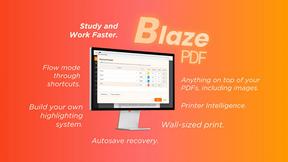
BlazePDF
Highlight faster. Study in flow with custom shortcuts and a workflow built around you. Print smarter, or turn any page into a tiled poster.



IZIPAY
IZIPAY is a virtual and physical crypto card service that lets users top up with digital assets and pay online like with a regular card.

Build Mode for Mac
Build Mode is a Mac app that turns focused sessions into visible progress, so you can see the work adding up before the results arrive.



Efficienco
Efficienco is a free collection of practical online calculators for construction, materials, home improvement, engineering, trades, and business.