
Caesura
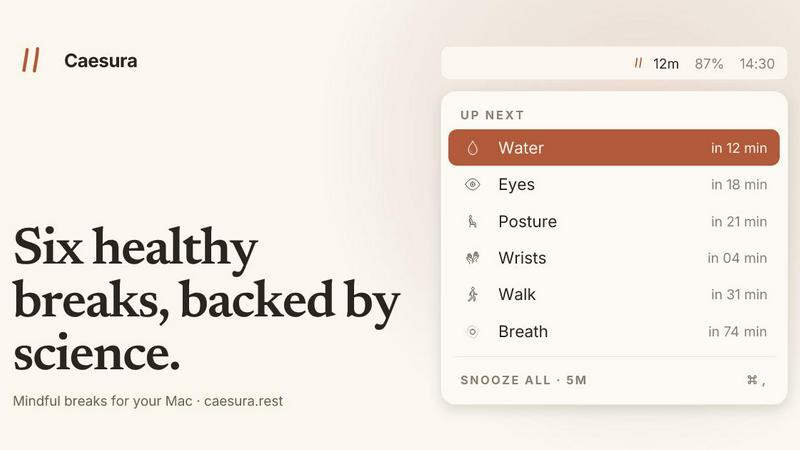
Caesura is a friendly menu-bar app that gently reminds you to drink water, stretch, rest your eyes, and breathe throughout your workday.
VisitPublished on:
June 26, 2026
Pricing:
About Caesura
Caesura is a calm, focused macOS menu-bar break manager designed specifically for people who spend long days at a desk. Unlike noisy, complicated wellness apps that demand accounts, subscriptions, and constant attention, Caesura lives quietly in your menu bar and gently reminds you to take care of six essential habits: drinking water, walking, stretching your wrists, resting your eyes, checking your posture, and breathing. Each reminder runs on its own independent schedule, backed by scientific research rather than arbitrary round numbers. When two reminders fall close together, Caesura intelligently combines them into one gentle break, so you are never interrupted twice in a row. It pauses automatically during video calls, screen sharing, fullscreen apps, and Focus modes, then picks up exactly where it left off. No accounts, no clutter, no telemetry. Just timely nudges that keep you healthy without breaking your flow. Caesura is perfect for remote workers, developers, designers, writers, or anyone who loses track of time while deeply focused. It is a one-time purchase for $15, with a free 14-day trial so you can see how it fits into your routine before committing. Whether you want to drink water every 45 minutes, walk every hour, or breathe deeply every 90 minutes, Caesura adapts to your body's needs and your schedule.
Features of Caesura
Six Science-Backed Breaks
Caesura covers six essential habits: water every 45 minutes, walk every 60 minutes, wrists every 30 minutes, eyes every 20 minutes, posture every 30 minutes, and breathing every 90 minutes. Each interval comes directly from peer-reviewed studies, not guesswork or round numbers. You can turn any break on or off, adjust its interval, or change how it appears on your screen.
Intelligent Break Coalescing
When two reminders fall due within a minute of each other, Caesura merges them into one single prompt. You never get interrupted twice in a row. For example, if your water and posture breaks both come due at the same time, you see one gentle overlay telling you to drink water and shift your position. This keeps your focus intact while still covering all your health needs.
Automatic Pause During Busy Moments
Caesura watches your camera, screen sharing, calendar, and which app is active. When you join a video call, share your screen, enter fullscreen mode, or have a calendar event, every timer freezes. If you had 12 minutes until your water break, you still have 12 minutes after the call ends. It also pauses for Do Not Disturb, FaceTime, and games, so you never get interrupted during important moments.
Three Customizable Prompt Styles
Each break can use one of three prompt styles. Overlay takes over your screen until you press Return, perfect for breaks you might otherwise ignore. Banner slides in from under the menu bar and auto-dismisses after 30 seconds, a gentle nudge. Notification appears as a standard macOS notification, the lightest possible touch. You can assign different styles to different breaks based on your preferences.
Use Cases of Caesura
The Deep Focus Developer
You are a software developer who regularly spends four to six hours in a focused coding session. You forget to drink water, your eyes get strained from staring at the monitor, and your wrists ache from constant typing. Caesura runs quietly in your menu bar, reminding you to drink water every 45 minutes, rest your eyes every 20 minutes, and stretch your wrists every 30 minutes. When you enter a video call, all timers pause automatically. After the call, they resume exactly where they left off, so your routine stays consistent without any manual intervention.
The Busy Remote Worker
You work from home and spend your day jumping between video meetings, document editing, and Slack messages. You rarely remember to stand up or check your posture. Caesura watches your calendar and camera, so it never interrupts you during a meeting. When two breaks fall close together, it combines them into one gentle reminder. After your last meeting, it nudges you to take a two-minute walk and drink some water. You stay healthy without ever feeling nagged or overwhelmed.
The Creative Designer
You are a graphic designer who gets lost in creative flow for hours at a time. You often forget to breathe deeply or shift your posture, leading to back pain and fatigue by the end of the day. Caesura sets a breathing reminder every 90 minutes with a gentle guide bar that paces your inhale and exhale. It also reminds you to check your posture every 30 minutes with a simple shift suggestion. The overlay style ensures you actually take the break, while the banner style for eyes keeps interruptions minimal.
The Health-Conscious Student
You are a student who spends long hours studying on your MacBook. You want to build healthy habits but struggle to remember them. Caesura helps you establish a routine with its six science-backed breaks. You start with just water and eyes, then slowly add walking and posture as the habits stick. The 14-day free trial lets you experiment without commitment. After the trial, a one-time purchase of $15 gives you lifetime access with no subscription or account needed.
Frequently Asked Questions
Is Caesura a subscription or a one-time purchase?
Caesura is a one-time purchase for $15. There are no subscriptions, no recurring fees, and no hidden costs. You buy it once and own it forever. You can also try it free for 14 days before deciding to purchase, and no credit card is required for the trial.
Does Caesura require an account or internet connection?
No account, no sign-up, and no internet connection are required. Caesura runs entirely on your Mac. It does not collect any telemetry, analytics, or personal data. Your privacy is fully respected. The app works offline with no dependencies on external servers.
Will Caesura interrupt me during video calls or presentations?
No. Caesura automatically detects when you are on a video call, sharing your screen, in fullscreen mode, or have a calendar event. It pauses all timers during these activities and resumes them exactly where they left off afterward. You will never be interrupted during an important meeting or presentation.
Can I customize which breaks I receive and how often?
Yes. Each of the six breaks can be turned on or off individually. You can also adjust the interval for each break to suit your personal needs. Additionally, you can choose from three prompt styles per break: overlay, banner, or notification. This allows you to tailor Caesura to your exact preferences and workflow.
Similar to Caesura
How Long How Many Tool
Timers and hourly checks to figure how out long until a certain time or how many days away.


ButterShare
Realtime peer-to-peer file transfer in the browser. Send files directly between devices, no account and no upload to a server.

Emailyy
Free email tools for signatures, subject lines, HTML previews, word counts, and email headers. Browser-based, simple to use, and no signup required.

Uniclip
Clip pages, take full-page screenshots and batch-capture list data to Notion, Feishu, Obsidian, Markdown, CSV or JSON.
TroveKey
Search tabs, Chrome bookmarks and history, run browser commands, and save webpages and social posts locally—no account.
Foreman
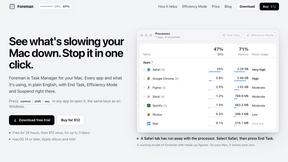
See every app and what it's using in plain English, and end or slow down the one that's hogging your Mac.
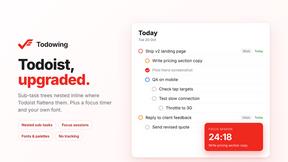
Todowing
Chrome extension for Todoist that shows sub-tasks nested inline in Today, Upcoming, Filter, and Label views instead of a flat list.