Quitlo vs URL to Any
Side-by-side comparison to help you choose the right tool.

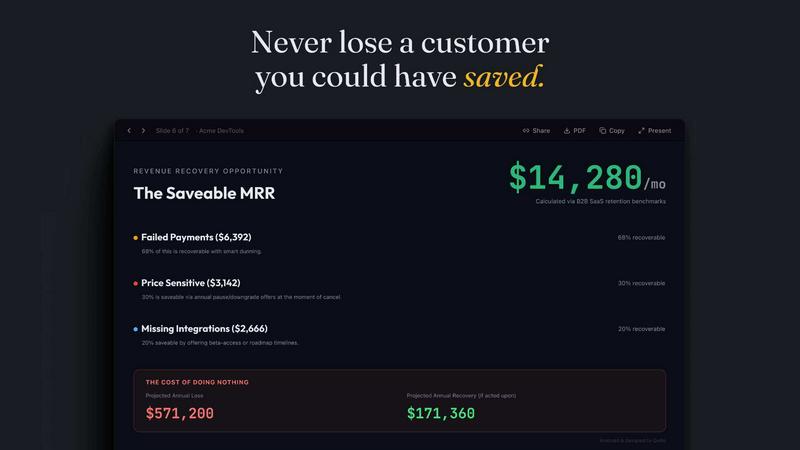
Quitlo uses AI voice calls to reveal why customers leave and delivers insights to your team for effective retention.
Last updated: March 4, 2026

URL to Any
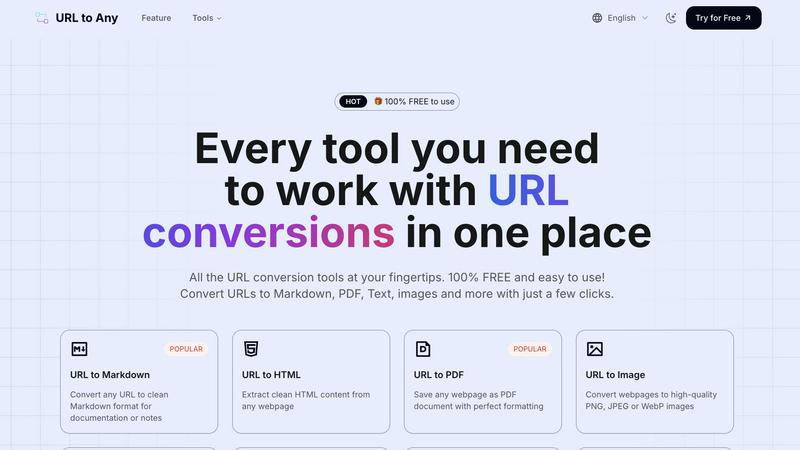
Effortlessly convert any webpage to your desired format with URL to Any's easy-to-use tools, all for free.
Last updated: March 2, 2026
Visual Comparison
Quitlo
URL to Any
Feature Comparison
Quitlo
Adaptive AI Conversations
Quitlo replaces traditional exit surveys with intelligent AI-driven conversations that engage customers in real-time. By initiating a two-minute dialogue, the platform captures detailed insights and context behind the churn signal, transforming the customer experience into a more personal and informative interaction.
Automated Signal Detection
The platform automatically detects critical signals that indicate customer dissatisfaction, such as cancellations, low satisfaction scores, or payment failures. This proactive approach ensures that no opportunity to understand customer churn is missed, allowing teams to address issues promptly.
Actionable Insights Delivery
After engaging with customers, Quitlo provides structured summaries that are delivered instantly to tools like Slack or Jira. These summaries include churn reasons, customer sentiment analysis, competitor insights, and suggested next steps, enabling teams to act quickly and effectively on the information gathered.
Comprehensive Coverage of Churn Moments
Quitlo addresses various customer moments that could lead to churn, including cancellations, low satisfaction scores, failed payments, onboarding milestones, and win-back opportunities. This extensive coverage ensures that every potential risk is monitored and addressed, enhancing overall customer retention strategies.
URL to Any
URL to Markdown
With the URL to Markdown feature, you can convert any webpage into a clean Markdown file that is perfect for documentation or note-taking. This feature simplifies the process of capturing web content, allowing you to focus on what matters most – the content itself.
URL to PDF
The URL to PDF feature lets you save any webpage as a beautifully formatted PDF document. This ensures that you retain the layout and design of the original article, making it ideal for archiving important information or sharing with others.
URL to Image
Transform any webpage into high-quality images with the URL to Image feature. You can choose from PNG, JPEG, or WebP formats, making it easy to use visual content in presentations, reports, or social media posts.
URL to QR Code
The URL to QR Code feature generates unique QR codes for any URL you provide. This is a convenient way to share links quickly and easily, allowing others to access your content with a simple scan using their mobile devices.
Use Cases
Quitlo
Churn Prevention
For B2B SaaS companies, understanding why customers leave is critical. Quitlo's AI conversations can reveal the true reasons behind churn, providing actionable insights that help teams implement strategies to retain at-risk customers.
Customer Sentiment Analysis
Using Quitlo, businesses can gauge customer sentiment directly through conversations. This understanding allows teams to adjust their offerings or communication strategies based on genuine customer feedback, fostering improved relationships.
Competitive Analysis
When customers mention competitors during AI conversations, Quitlo captures this intelligence. Businesses can leverage these insights to enhance their competitive positioning and address gaps in their offerings that could be driving customers away.
Post-Churn Engagement
Quitlo's capabilities extend beyond just understanding churn. It can help teams with win-back strategies by initiating conversations with customers who have left, uncovering reasons for departure, and proposing tailored solutions to entice them back.
URL to Any
Research and Note-taking
Students and researchers can use URL to Any to convert online articles and studies into Markdown or PDF formats, making it easier to compile notes and references for assignments or projects.
Content Creation
Bloggers and content creators can streamline their workflow by converting web articles into clean Markdown files or images for use in their own projects, saving time on formatting and editing.
Sharing Information
Professionals can generate QR codes from important URLs to share resources during presentations or workshops, making it simple for attendees to access additional information on their devices.
Archiving Web Content
Anyone can use URL to Any to save and archive web pages in various formats, whether for personal use or to keep track of industry news and developments without losing the original formatting.
Overview
About Quitlo
Quitlo is an innovative Churn Intelligence Platform specifically designed for B2B SaaS companies. It addresses the significant challenge of understanding customer churn, a problem that traditional exit surveys and cancellation forms often fail to solve. With response rates as low as 8% and vague one-word answers like "pricing," companies are frequently left guessing the true reasons behind customer departures. Quitlo transforms this process by replacing static forms with engaging, adaptive AI conversations—available through both voice and text. This platform actively detects critical signals such as cancellations, low NPS scores, or failed payments, initiating a meaningful two-minute dialogue with customers at pivotal moments in their lifecycle. Within minutes, teams receive structured summaries delivered directly to tools like Slack or Jira, detailing churn reasons, customer sentiment, competitor mentions, and clear opportunities for retention. Quitlo not only helps businesses save valuable revenue but also provides deep insights into the factors driving customer decisions, turning uncertainty into actionable strategies.
About URL to Any
URL to Any is your go-to tool for transforming web content into formats that suit your needs. Whether you stumble upon an insightful article, a captivating blog post, or essential research, URL to Any enables you to convert these webpages effortlessly into various formats like Markdown, PDF, text, and images. This tool is designed for a wide audience, including students, content creators, developers, and anyone who values organization and efficiency in managing online information. The main value proposition of URL to Any lies in its simplicity and accessibility; it is completely free, requires no sign-up, and is incredibly user-friendly. With just a few clicks, you can turn any URL into a well-formatted file that you can save, share, or reference later, eliminating the hassle of manual copying and reformatting. Say goodbye to the tedious tasks of converting web content; URL to Any is here to streamline your digital life.
Frequently Asked Questions
Quitlo FAQ
How does Quitlo improve customer retention?
Quitlo improves retention by facilitating meaningful conversations with customers at critical churn moments, allowing businesses to understand the underlying reasons for cancellation and implement targeted retention strategies.
Is Quitlo suitable for all types of SaaS companies?
Yes, Quitlo is designed specifically for B2B SaaS companies but can be adapted to fit various business models that require insights into customer churn and retention strategies.
What tools can I integrate Quitlo with?
Quitlo seamlessly integrates with popular collaboration tools like Slack and project management platforms like Jira, ensuring that insights and action items are easily accessible to your team.
How quickly can I expect results from using Quitlo?
Many users report receiving structured summaries and actionable insights within minutes of customer interactions, allowing teams to respond swiftly to potential churn issues.
URL to Any FAQ
How do I convert a URL using URL to Any?
To convert a URL, simply paste the web address into the designated field, select your preferred format (such as Markdown or PDF), and click the convert button. Your content will be ready almost instantly.
Is there a cost associated with using URL to Any?
No, URL to Any is completely free to use. There are no hidden fees, and you do not need to create an account or provide any personal information.
Can I convert multiple URLs at once?
Yes, URL to Any offers a URL Opener feature that allows you to open multiple URLs simultaneously, making it easier to convert several pages in one go.
What formats can I convert URLs into?
URL to Any supports various formats including Markdown, PDF, images (PNG, JPEG, WebP), text, JSON, and XML, among others, providing you with flexibility for different needs.
Alternatives
Quitlo Alternatives
Quitlo is an innovative Churn Intelligence Platform designed specifically for B2B SaaS companies. By utilizing AI voice calls, it addresses the common issue of understanding customer churn, which traditional surveys often fail to resolve. Quitlo's empathetic conversations replace static feedback forms, allowing for deeper insights into why customers choose to leave, and its adaptive dialogue helps teams gather actionable data to improve retention strategies. Users often seek alternatives to Quitlo for various reasons, including pricing concerns, feature requirements, or platform compatibility. It's essential to consider what specific needs your organization has when exploring alternatives. Look for options that offer similar capabilities in customer engagement, data analysis, and integration with your existing tools, ensuring they can effectively address your churn challenges while fitting within your budget and operational framework.
URL to Any Alternatives
URL to Any is a versatile web content conversion tool that allows users to transform any webpage into their desired format with just a few clicks. It falls under the category of AI assistants, designed to simplify the process of saving, editing, and sharing online content. Users often seek alternatives to URL to Any due to various factors, such as pricing structures, feature sets, or compatibility with different platforms. When exploring alternatives, it's essential to consider the ease of use, the range of supported formats, and whether the tool is truly free or comes with hidden fees. A good alternative should also prioritize user accessibility, allowing seamless conversions without requiring extensive technical knowledge or lengthy sign-ups.