URL to Any
Effortlessly convert any webpage to your desired format with URL to Any's easy-to-use tools, all for free.
Visit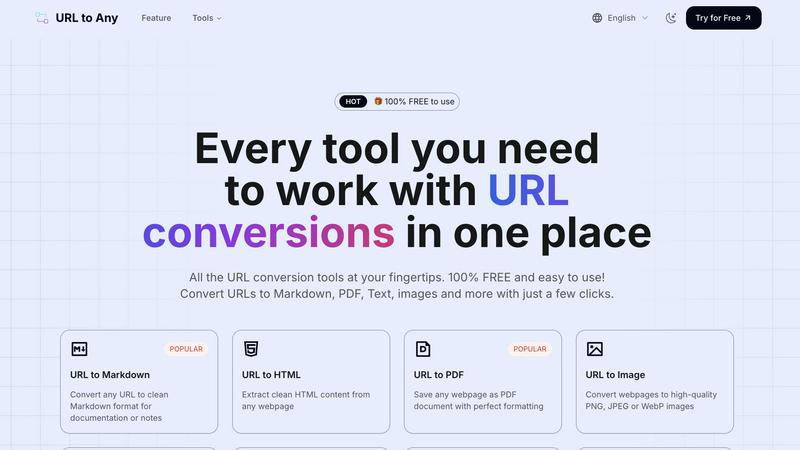
About URL to Any
URL to Any is your go-to tool for transforming web content into formats that suit your needs. Whether you stumble upon an insightful article, a captivating blog post, or essential research, URL to Any enables you to convert these webpages effortlessly into various formats like Markdown, PDF, text, and images. This tool is designed for a wide audience, including students, content creators, developers, and anyone who values organization and efficiency in managing online information. The main value proposition of URL to Any lies in its simplicity and accessibility; it is completely free, requires no sign-up, and is incredibly user-friendly. With just a few clicks, you can turn any URL into a well-formatted file that you can save, share, or reference later, eliminating the hassle of manual copying and reformatting. Say goodbye to the tedious tasks of converting web content; URL to Any is here to streamline your digital life.
Features of URL to Any
URL to Markdown
With the URL to Markdown feature, you can convert any webpage into a clean Markdown file that is perfect for documentation or note-taking. This feature simplifies the process of capturing web content, allowing you to focus on what matters most – the content itself.
URL to PDF
The URL to PDF feature lets you save any webpage as a beautifully formatted PDF document. This ensures that you retain the layout and design of the original article, making it ideal for archiving important information or sharing with others.
URL to Image
Transform any webpage into high-quality images with the URL to Image feature. You can choose from PNG, JPEG, or WebP formats, making it easy to use visual content in presentations, reports, or social media posts.
URL to QR Code
The URL to QR Code feature generates unique QR codes for any URL you provide. This is a convenient way to share links quickly and easily, allowing others to access your content with a simple scan using their mobile devices.
Use Cases of URL to Any
Research and Note-taking
Students and researchers can use URL to Any to convert online articles and studies into Markdown or PDF formats, making it easier to compile notes and references for assignments or projects.
Content Creation
Bloggers and content creators can streamline their workflow by converting web articles into clean Markdown files or images for use in their own projects, saving time on formatting and editing.
Sharing Information
Professionals can generate QR codes from important URLs to share resources during presentations or workshops, making it simple for attendees to access additional information on their devices.
Archiving Web Content
Anyone can use URL to Any to save and archive web pages in various formats, whether for personal use or to keep track of industry news and developments without losing the original formatting.
Frequently Asked Questions
How do I convert a URL using URL to Any?
To convert a URL, simply paste the web address into the designated field, select your preferred format (such as Markdown or PDF), and click the convert button. Your content will be ready almost instantly.
Is there a cost associated with using URL to Any?
No, URL to Any is completely free to use. There are no hidden fees, and you do not need to create an account or provide any personal information.
Can I convert multiple URLs at once?
Yes, URL to Any offers a URL Opener feature that allows you to open multiple URLs simultaneously, making it easier to convert several pages in one go.
What formats can I convert URLs into?
URL to Any supports various formats including Markdown, PDF, images (PNG, JPEG, WebP), text, JSON, and XML, among others, providing you with flexibility for different needs.
Similar to URL to Any


amaze.directory
Every AI tool here was opened and used on a real task before it went in. Free to submit.
Speechyou
AI transcription for voice notes, meetings, and audio files in 1,700 languages, with AI summaries and subtitle export and unlimited chat ai usage.
ProspectHalo
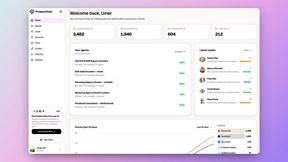
AI sales agent that finds qualified leads, runs outreach, follows up automatically, creates content, and helps book more meetings.
benchmark.directory
Independent AI tool listings: the cheapest usable plan, the real free-tier limit, tested integrations, and who trains on your work.

saasgrow.ai
The shortcut to the right SaaS. Screened growth tools, organised by category, with nothing sponsored and nothing bought.

Tools Network
Tools Network is a curated directory of the best AI tools across 25+ categories. Compare ratings, pricing, and features to find the right one, fast.