Fusedash vs Threat Watch
Side-by-side comparison to help you choose the right tool.

Fusedash transforms raw data into intuitive dashboards and charts for instant insights and informed decision-making.
Last updated: March 4, 2026

Threat Watch
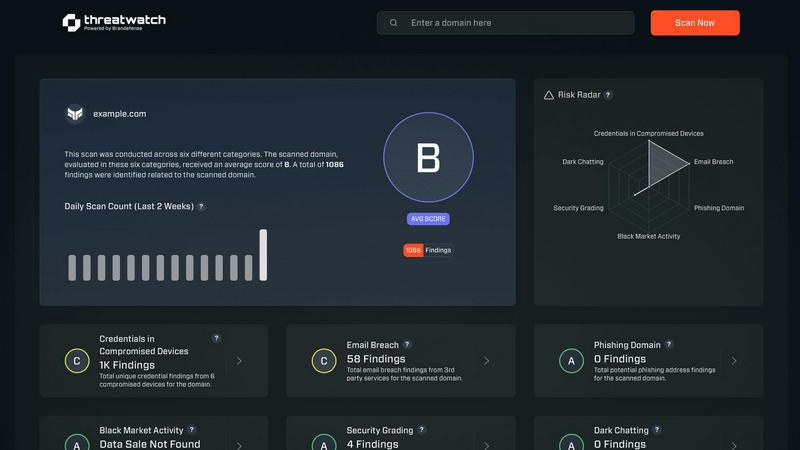
Quickly assess your cybersecurity health and get easy steps to enhance your protection against online threats.
Last updated: March 1, 2026
Visual Comparison
Fusedash

Threat Watch
Feature Comparison
Fusedash
Flexible Views
Fusedash offers flexible views tailored for different audiences. You can easily convert the same dataset into dashboards, charts, maps, or report-style presentations, ensuring that each stakeholder sees the information that matters most to them without unnecessary back-and-forth communication.
AI Chart Generator
The AI Chart Generator in Fusedash allows users to create stunning visuals from CSVs or APIs in mere minutes. This feature helps you select the most suitable chart types, apply comparisons, and refine labels to accurately convey your data story, which can then be incorporated into dashboards or used as standalone visuals.
Dashboard Software
Fusedash combines dashboard monitoring with comprehensive reporting capabilities. This unique integration allows teams to share consistent views with stakeholders while adding context through storytelling sections, clarifying what has changed, why it is important, and what actions should be taken next.
Data Integrations
With Fusedash, you can seamlessly combine data from CSVs, APIs, and public datasets all within one platform. This feature simplifies data organization and ensures that various datasets can be reused across multiple charts, dashboards, and reports, reducing redundancy and enhancing efficiency.
Threat Watch
Continuous Scanning
Threat Watch continuously scans your digital landscape to identify vulnerabilities and potential threats in real-time. This proactive approach ensures that you are always aware of your cybersecurity posture, allowing you to take immediate action when necessary.
Compromised Credentials Monitoring
With Threat Watch, you can monitor for compromised credentials across various platforms. If any of your accounts are found to have leaked passwords, you will be alerted promptly, enabling you to take swift action to secure your accounts.
Dark Web Monitoring
Threat Watch dives deep into the dark web to uncover any mentions or data leaks related to your organization. This feature helps you stay one step ahead of cybercriminals by identifying potential threats before they escalate.
Guided Risk Remediation
Not only does Threat Watch identify risks, but it also provides guided steps to resolve them. This feature is particularly useful for teams without dedicated security experts, offering clear instructions on how to enhance your cybersecurity measures effectively.
Use Cases
Fusedash
Marketing Performance Monitoring
Marketing teams can utilize Fusedash to monitor campaign performance by creating dashboards that visualize key metrics such as conversion rates, customer engagement, and ROI. This allows for timely adjustments based on real-time data insights.
Financial Reporting
Finance departments can leverage Fusedash for generating detailed financial reports. By integrating various data sources, teams can create comprehensive visualizations that provide insights into budget performance, spending patterns, and revenue forecasts.
Sales Analysis
Sales teams can benefit from Fusedash by building interactive dashboards that track sales performance across different regions and product lines. This enables quick identification of trends and areas for improvement, fostering data-driven decision-making.
Operational Efficiency Tracking
Operations teams can use Fusedash to monitor key operational metrics and performance indicators. With real-time visualizations, teams can identify bottlenecks and optimize processes, ultimately improving efficiency and productivity.
Threat Watch
Business Owner Protection
As a business owner, protecting your digital assets is crucial. Threat Watch allows you to monitor online mentions of your business, compromised credentials, and potential vulnerabilities, ensuring your company's reputation and data remain secure.
IT Team Support
IT teams can leverage Threat Watch to gain insights into the security status of their organization. By utilizing its automated assessments, IT professionals can focus on managing other critical tasks while being alerted to any emerging security risks.
Security Team Efficiency
Security teams can enhance their efficiency with Threat Watch's comprehensive scanning and reporting capabilities. This tool helps teams prioritize their efforts by providing a clear picture of the most significant threats to address first.
Compliance Assurance
Organizations that need to comply with industry regulations can use Threat Watch to demonstrate their commitment to cybersecurity. By continuously monitoring and addressing vulnerabilities, businesses can maintain compliance and avoid potential penalties.
Overview
About Fusedash
Fusedash is an advanced AI-powered data visualization platform that simplifies the process of transforming connected data into actionable insights. It is designed for teams and organizations seeking to enhance their data reporting and analysis capabilities without the hassle of dealing with multiple disconnected tools. With Fusedash, you can create dynamic dashboards, interactive charts, detailed maps, and comprehensive narrative reports all within a unified workspace. The platform's main value proposition lies in its ability to ensure consistency and efficiency; by defining key metrics and KPIs once, you can easily reuse these definitions across various views and reports. This feature guarantees that all team members, from leadership to operations, are aligned and referencing the same trusted data. Fusedash is particularly beneficial for teams weary of tedious manual reporting cycles and discrepancies in data interpretations. It empowers users to monitor real-time data while also enabling deeper analysis by drilling down into specific segments, regions, or time periods. With integrated AI functionalities like natural language data chat and smart visualization assistance, Fusedash streamlines data exploration and reporting, making it accessible to all users and transforming raw data into a collaborative source of truth that drives informed decision-making.
About Threat Watch
Threat Watch is your comprehensive cybersecurity health dashboard, crafted to provide clear insights and control over your organization's digital safety. In an era where online threats proliferate from various sources—such as leaked passwords, unpatched software, and even mentions on the dark web—having a robust defense is essential. Threat Watch makes safeguarding your organization easier by continuously scanning and analyzing your digital assets, vulnerabilities, and exposures across the internet. This tool is tailored for business owners, IT managers, and security teams who may lack dedicated cybersecurity expertise. Its primary value lies in offering real-time insights and automated assessments, empowering you to shift from feeling overwhelmed to being proactive. With Threat Watch, you can swiftly identify your most pressing risks, understand their implications, and receive guided steps to mitigate them, all from a single, user-friendly platform. Think of it as a regular check-up for your company's online health, helping you prevent security breaches before they occur.
Frequently Asked Questions
Fusedash FAQ
What types of data can I connect to Fusedash?
You can connect various data sources to Fusedash, including CSV files, APIs, and public datasets. This flexibility allows you to consolidate your data into a single platform for comprehensive analysis and reporting.
How does Fusedash ensure data consistency across reports?
Fusedash enables users to define key metrics and KPIs once, which can then be reused across all views and reports. This standardization ensures that everyone in the organization is referencing the same trusted data, eliminating discrepancies.
Can I customize the dashboards and reports in Fusedash?
Absolutely! Fusedash provides customizable layouts, filters, and time ranges, allowing you to tailor dashboards and reports to meet the specific needs of different audiences or stakeholders.
Is there support for real-time data monitoring in Fusedash?
Yes, Fusedash offers a real-time interface that allows users to monitor data as it is updated. This feature ensures that teams have access to the most current information for informed decision-making.
Threat Watch FAQ
What types of threats does Threat Watch monitor?
Threat Watch monitors a variety of threats, including compromised credentials, phishing addresses, breached accounts, and dark web content related to your organization.
How does Threat Watch help non-expert users?
Threat Watch is designed with user-friendliness in mind. It provides clear insights and guided steps for remediation, making it accessible even for users without extensive cybersecurity knowledge.
Can Threat Watch integrate with other security tools?
Threat Watch is designed to complement existing security measures and can be integrated with other tools to create a more robust cybersecurity posture for your organization.
Is there a free trial available for Threat Watch?
Yes, Threat Watch offers a free scan to help you uncover your cybersecurity health. This allows you to experience the benefits before committing to a subscription.
Alternatives
Fusedash Alternatives
Fusedash is an AI-driven data visualization platform that helps teams transform raw data into clear dashboards and charts, enabling them to make immediate, informed decisions. It fits into the Analytics & Data and Business Intelligence categories, providing a unified workspace where users can create decision-ready reports without the hassles of managing multiple disconnected tools. Users often seek alternatives to Fusedash due to various reasons such as pricing, specific feature requirements, or compatibility with existing platforms. When searching for an alternative, it's essential to consider factors such as ease of use, the ability to customize data visualizations, integration capabilities, and overall value for money to ensure you select a tool that meets your organization's unique needs.
Threat Watch Alternatives
Threat Watch is a comprehensive cybersecurity health dashboard that helps organizations monitor and improve their digital safety. As a tool designed for business owners, IT managers, and security teams, it simplifies the complex landscape of cybersecurity by providing real-time insights and automated assessments of an organization's security posture. Users often seek alternatives to Threat Watch for reasons such as pricing, specific feature sets, or compatibility with existing platforms. When considering alternatives, look for tools that offer a clear overview of your cybersecurity health, real-time monitoring capabilities, and easy-to-understand metrics. Additionally, ensure that the alternative you choose aligns with your organization's specific needs, whether that's budget constraints or specific security focus areas. Finding the right fit can help you maintain control over your cybersecurity without feeling overwhelmed.