

Alternatives to Browser Notes
Browser Notes saves your notes, sticky notes, and mind maps locally in your browser with no signup or cloud needed.
Explore 20 alternatives to Browser Notes. Compare features, pricing, and find the best fit for your needs.

Panzoe
Panzoe is an all-in-one AI platform for personal productivity, business automation, AI assistants, content creation, and custom AI solutions.
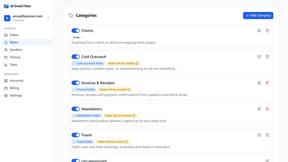
AI Email Filter
AI Email Filter sorts incoming mail into folders using plain-language prompts you write. Works with any IMAP mailbox; bring your own LLM if you want.

Egmatic
No-code 2D game editor: visual node logic, drag-and-drop scenes, live preview. Exports to Windows, macOS, Linux, Android, iOS, Web.

Kody Tools
Free collection of online developer utilities, code formatters, and digital converters designed to streamline your daily workflow.
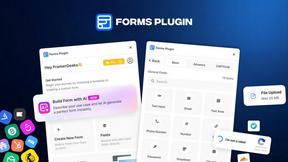
Forms Plugin
The #1 Native Form Builder Plugin for Framer - No Code, No Embeds, No External Platforms.

Product Launch Checklist
A free launch checklist for SaaS, apps, AI tools and more. Every step says why it matters and when you can skip it.

HomeAnswerBook
Practical, independent guides to home repairs, maintenance, costs, troubleshooting, and everyday fixes.
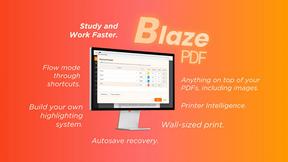
BlazePDF
Highlight faster. Study in flow with custom shortcuts and a workflow built around you. Print smarter, or turn any page into a tiled poster.


Build Mode for Mac
Build Mode is a Mac app that turns focused sessions into visible progress, so you can see the work adding up before the results arrive.



Efficienco
Efficienco is a free collection of practical online calculators for construction, materials, home improvement, engineering, trades, and business.

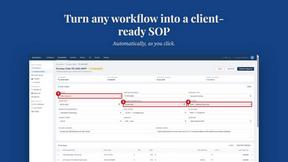
MySOP.guru
Capture any workflow in your browser and export a branded, step-by-step SOP with screenshots. €5 per document, no subscription.

PerPageFax
PerPageFax lets you send a fax online from any browser for a flat $0.50 per page — no account, no subscription, no fax machine.

Construction Calculator
Free construction calculators with transparent formulas, steps, assumptions, and metric or imperial units.


About Browser Notes Alternatives
Browser Notes is a local-first productivity tool that combines notes, sticky notes, and mind maps into a single workspace, all without requiring any signup or cloud storage. It falls under the Productivity & Management category, making it a great fit for anyone who wants to keep their ideas organized without relying on external servers. Users often look for alternatives to Browser Notes for a few common reasons, such as needing more advanced collaboration features for team projects, wanting cross-device syncing that works across different browsers or operating systems, or simply seeking a tool with a different pricing model or additional integrations. When choosing an alternative, it is helpful to consider what matters most to you, such as whether the tool works offline, how it handles data privacy, and if it offers the specific formats like mind maps or boards that match your workflow. Starting with a clear idea of your must-have features will make your search much easier and more rewarding. As you explore your options, remember that the best alternative is one that feels natural to your daily routine and respects your need for simplicity. Look for tools that offer a clear backup process, since local-first tools rely on you to save your work, and check if they provide an easy way to export your data if you decide to switch later. Some users also prioritize tools with a gentle learning curve, especially if they are new to organizing notes and ideas digitally. By focusing on your personal needs around privacy, ease of use, and specific features like sticky boards or mind mapping, you can find a solution that helps you stay productive without feeling overwhelmed. Take your time to test a few options, and remember that the goal is to find a tool that supports your thinking process rather than complicating it.
FAQs about Browser Notes Alternatives
What is Browser Notes?
Browser Notes is a local-first productivity tool that combines notes, sticky notes, and mind maps into a single workspace. It works entirely within your browser, meaning no signup, no cloud storage, and no tracking are required. All your data is stored locally on your device, and you can back it up anytime you want. This makes it a private and offline-friendly option for organizing your ideas.
Who is Browser Notes for?
Browser Notes is designed for anyone who wants to keep their notes, sticky notes, and mind maps in one private space without relying on online accounts. It is especially helpful for students, freelancers, and professionals who value data privacy and want to work offline. If you prefer a straightforward tool that does not force you to sync or share your ideas, Browser Notes is a great fit. It also works well for those who are new to digital organizing and want a simple, no-commitment starting point.
Is Browser Notes free?
Yes, Browser Notes is completely free to use with no signup or subscription required. You can start using it immediately in your browser without any payment or account creation. There are no hidden fees or premium tiers, so you get full access to all its features from the start. This makes it an accessible option for anyone looking to organize their thoughts without financial commitment.
What are the main features of Browser Notes?
Browser Notes offers three main features: note-taking, sticky notes, and mind mapping, all in one local-first workspace. It works offline, stores everything directly in your browser, and does not track your activity or force any cloud sync. You can also back up your data manually at any time, giving you full control over your information. These features make it a versatile and private tool for managing your ideas and tasks.