
TDEE Calculator
Find your precise daily calorie target with this easy-to-use TDEE calculator, guiding you step-by-step toward your fitness goals.
Visit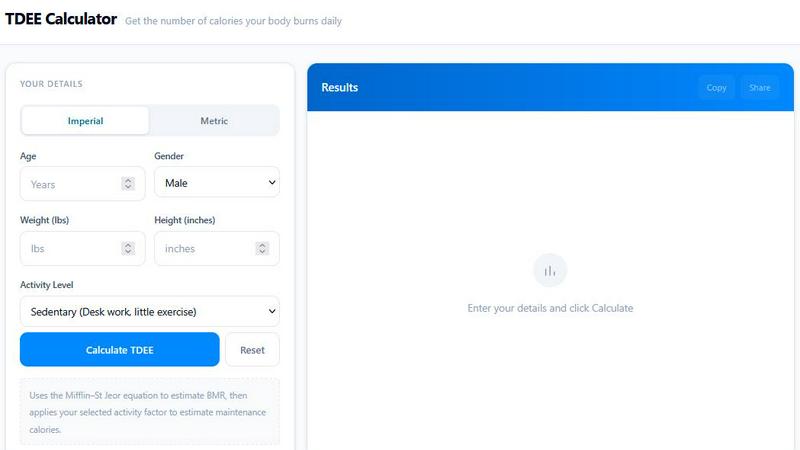
About TDEE Calculator
TDEE Calculator is a fast, accurate, and completely free online tool designed to help you estimate your Total Daily Energy Expenditure (TDEE) and plan your daily calorie intake with confidence. Whether you are just starting your fitness journey or you are an experienced athlete looking to fine-tune your nutrition, this calculator gives you a reliable, science-backed starting point. By entering simple details like your age, sex, height, weight, and activity level, you instantly receive your maintenance calories, which is the number of calories your body burns each day. From there, the tool provides practical targets for fat loss, muscle gain, or weight maintenance. The calculator uses the proven Mifflin-St Jeor equation, which research has shown to be one of the most accurate ways to estimate resting metabolic rate in healthy adults. This means you are getting estimates based on real physiology, not guesswork. Beyond just a number, TDEE Calculator offers helpful insights including calorie deficit and surplus recommendations, macro guidance, and activity-based adjustments. This makes it easy for you to create a personalized nutrition plan that fits your lifestyle and goals. The tool is designed for speed, clarity, and practical use, so you can get your results in seconds and start applying them right away. It is perfect for anyone trying to lose weight, build muscle, or simply maintain their current physique. The interface is beginner-friendly, with clear instructions and helpful explanations for every concept, including what TDEE means, how it differs from BMR, and how to use your results effectively. You can also easily copy or share your results with friends, trainers, or nutrition coaches. With its straightforward design and educational approach, TDEE Calculator empowers you to take control of your nutrition and make informed decisions about your health.
Features of TDEE Calculator
Instant and Accurate Calculations
Get your TDEE and maintenance calories in seconds. Simply enter your age, sex, height, weight, and activity level, and the calculator instantly processes your data using the scientifically validated Mifflin-St Jeor equation. This feature removes all the guesswork from figuring out how many calories your body needs, giving you a reliable estimate you can trust. You do not need to be a math expert or a nutrition scientist to get started. The tool does all the complex calculations for you, so you can focus on applying the results to your daily life. Whether you are at home, at the gym, or on the go, you can access this fast and accurate tool anytime.
Activity Level Adjustments
The calculator includes five clearly defined activity levels ranging from Sedentary to Athlete. Each level comes with a simple description to help you choose the one that best matches your lifestyle. For example, if you have a desk job and rarely exercise, you would select Sedentary. If you train hard six days a week, you would choose Heavy Exercise. The tool then multiplies your Basal Metabolic Rate (BMR) by the corresponding activity factor, which ranges from 1.2 to 1.9. This ensures your calorie estimate is personalized to your actual daily movement, making it much more useful than a one-size-fits-all number.
Practical Deficit and Surplus Recommendations
Once your TDEE is calculated, the tool provides clear, actionable recommendations for fat loss and muscle gain. For fat loss, it suggests a daily calorie deficit of roughly 250 to 500 calories, which is a safe and sustainable range for most people. For muscle gain, it recommends a daily surplus of about 200 to 350 calories. These recommendations are designed to help you make consistent progress without extreme dieting or excessive fat gain. This feature turns a simple number into a practical plan you can follow day by day.
Copy and Share Results
After your calculation is complete, you can easily copy your results to your clipboard or share them with others. This is incredibly useful if you work with a personal trainer, a nutrition coach, or a healthcare provider who needs to see your baseline numbers. You can also save your results for later reference or compare them after you have made changes to your weight or activity level. This feature makes the tool collaborative and convenient, ensuring your data is always accessible when you need it.
Use Cases of TDEE Calculator
Starting a Weight Loss Journey
If you are looking to lose weight, knowing your TDEE is your first and most important step. By understanding how many calories your body burns each day, you can create a safe and effective calorie deficit. The calculator provides a recommended deficit of 250 to 500 calories, which typically leads to a steady fat loss of about 0.5 to 1 pound per week. You can then use this target to plan your meals, track your food intake, and monitor your progress. This approach replaces guesswork with a clear, data-driven strategy, making your weight loss journey more manageable and less stressful.
Planning a Muscle Building Phase
For those focused on building muscle, a calorie surplus is necessary to support new tissue growth. The TDEE Calculator gives you a precise maintenance number, and then suggests a surplus of 200 to 350 calories per day. This moderate surplus helps you gain muscle without accumulating excessive body fat. You can then use this calorie target to structure your meals around protein, carbohydrates, and fats, ensuring your body has the energy and building blocks it needs for recovery and growth. This is a foundational tool for anyone serious about body recomposition or strength training.
Maintaining Your Current Weight
If your goal is to maintain your current weight and body composition, the TDEE Calculator gives you your exact maintenance calories. By eating around this number each day, you can keep your weight stable while still having the energy to perform well in your workouts and daily activities. This is especially useful for athletes during their off-season or for anyone who has reached their goal weight and wants to avoid regaining fat. The tool helps you understand how your activity level affects your energy needs, so you can adjust your intake on rest days versus training days.
Adjusting Nutrition After Weight Changes
As you lose or gain weight, your calorie needs change. A smaller body requires fewer calories to maintain itself, so your original TDEE estimate will no longer be accurate. The TDEE Calculator makes it easy to recalculate your numbers after you have lost 5 to 10 pounds or gained significant muscle mass. This ensures your nutrition plan stays aligned with your current body and goals, preventing plateaus and keeping your progress on track. It is a simple habit to recalculate every few weeks to stay accurate.
Frequently Asked Questions
What does TDEE mean?
TDEE stands for Total Daily Energy Expenditure. It is the total number of calories your body burns in a single day. This includes the energy your body uses to keep you alive at rest (your Basal Metabolic Rate), the energy required to digest and process food, and the calories burned through all physical movement and exercise. Knowing your TDEE is essential for managing your weight, because it tells you exactly how many calories you need to eat to maintain your current weight.
How is TDEE different from BMR?
BMR, or Basal Metabolic Rate, is the number of calories your body needs to perform basic life-sustaining functions like breathing, circulating blood, and maintaining body temperature while at complete rest. TDEE is a larger number because it includes your BMR plus all the calories you burn through daily activities, movement, and exercise. Think of BMR as the baseline and TDEE as the total. The TDEE Calculator first estimates your BMR using the Mifflin-St Jeor equation, then multiplies it by an activity factor to give you your TDEE.
How accurate is this calculator?
The TDEE Calculator uses the Mifflin-St Jeor equation, which is considered one of the most accurate formulas for estimating resting metabolic rate in healthy adults. However, it is still an estimate. Individual factors like muscle mass, genetics, hormone levels, and specific medical conditions can cause your actual TDEE to vary. For best results, treat the number as a starting point. Use it consistently for two to three weeks while monitoring your body weight. If your weight stays stable, the estimate is likely close. If you are losing or gaining weight, adjust your intake by about 100 to 200 calories and reassess.
Should I recalculate after losing weight?
Yes, absolutely. As you lose weight, your body requires fewer calories to maintain itself. Your original TDEE estimate will become less accurate over time. It is a good practice to recalculate your TDEE after every 5 to 10 pounds of weight loss, or after you have made significant changes to your activity level. This ensures your calorie targets remain appropriate for your new body weight and helps you avoid hitting a plateau. The same applies if you gain significant muscle mass, as muscle tissue burns more calories than fat.
Similar to TDEE Calculator



Body Shape Calculator
Free body shape calculator for women and men. Enter bust, waist and hips — or upload a photo — for an instant body type result. 100% private.


Expirel
Expirel is an AI-powered expiry date and habit tracker that helps you manage food, medicines, cosmetics, subscriptions, documents, and daily habits.


Caesura
Caesura is a friendly menu-bar app that gently reminds you to drink water, stretch, rest your eyes, and breathe throughout your workday.

PrettyScale
PrettyScale offers free, private AI tools to analyze your face, find your celebrity look-alike, and discover your body shape instantly with no signup.