
SlabCalc
SlabCalc is a free suite of 34 concrete calculators plus AI tools that instantly gives you volume, bag counts, costs, and expert quote analysis for.
Visit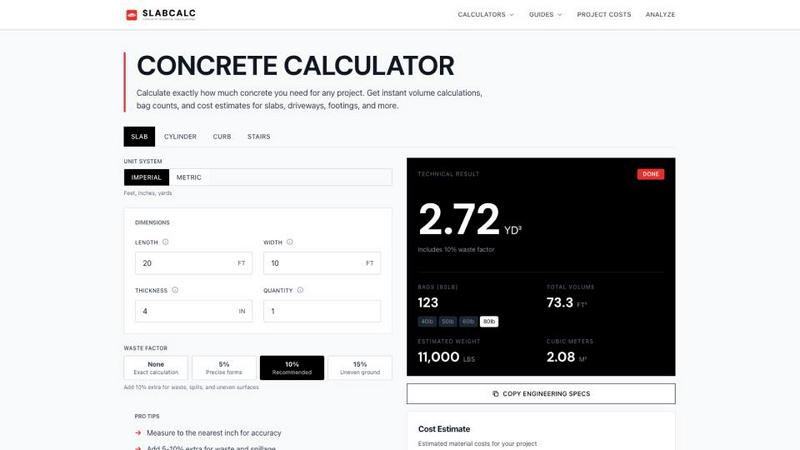
About SlabCalc
SlabCalc is a free, no-signup suite of concrete tools built for contractors, builders, and DIYers. It is a one-stop platform for concrete planning that simplifies every step of your project. At its core are 34 specialized calculators covering slabs, driveways, patios, footings, foundations, walls, CMU block, columns, curbs, stairs, sonotubes, rebar, gravel, garage and basement floors, and more. Each calculator returns volume in cubic yards and cubic meters, pre-mix bag counts for 40, 50, 60, and 80-pound bags, total weight, and a detailed cost estimate. You can adjust the waste factor and toggle between imperial and metric units. Beyond estimating, SlabCalc adds powerful AI tools. The Concrete Crack Analyzer diagnoses damage from a photo, identifying failure mode, severity on a scale of 1 to 5, and providing DIY-or-engineer advice. The Quote Analyzer breaks down a contractor's bid into labor, materials, and site prep, and flags any red flags. Rounding out the platform are cost-by-city pricing pages, expert guides, a concrete glossary, a Chrome extension, and embeddable widgets. Whether you are pouring a small patio or a large foundation, SlabCalc gives you the confidence to plan accurately, save money, and avoid costly mistakes.
Features of SlabCalc
34 Specialized Calculators
SlabCalc provides 34 dedicated calculators for every concrete project imaginable. These cover slabs, driveways, patios, footings, foundations, walls, CMU block, columns, curbs, stairs, sonotubes, rebar, gravel, garage and basement floors, and more. Each calculator instantly returns volume in cubic yards and cubic meters, bag counts for 40, 50, 60, and 80-pound bags, total material weight, and a cost estimate. You can also adjust the waste factor from none to 15% and toggle between imperial and metric units for complete flexibility.
AI-Powered Concrete Crack Analyzer
This innovative tool lets you diagnose concrete damage simply by uploading a photo. The AI analyzes the image to identify the failure mode, such as shrinkage cracking or settlement. It then assigns a severity rating from 1 to 5 and provides clear advice on whether the issue is a DIY fix or requires a structural engineer. This feature helps you understand the urgency and appropriate response for any crack, saving time and money on unnecessary professional consultations.
AI-Powered Quote Analyzer
Take the guesswork out of reviewing contractor bids. The Quote Analyzer breaks down a contractor's estimate into key categories: labor, materials, and site preparation. It then analyzes the numbers to flag potential red flags, such as inflated material costs or missing line items. This gives you a clear picture of where your money is going and helps you negotiate a fair price. It is an essential tool for homeowners and contractors alike to ensure transparency and avoid hidden costs.
Cost-by-City Pricing and Expert Guides
SlabCalc goes beyond simple calculations by providing localized cost estimates. The cost-by-city pricing pages give you accurate material and labor rates based on your specific location. This helps you create realistic budgets. Additionally, the platform includes a library of expert guides that cover everything from how to calculate concrete volume to understanding standard slab thicknesses. A comprehensive concrete glossary is also included, making it easy for beginners to learn industry terms.
Use Cases of SlabCalc
Planning a Residential Patio or Sidewalk
A homeowner planning a new 10x10 foot patio can use SlabCalc to determine exactly how much concrete is needed. By entering the dimensions and selecting a 4-inch thickness with a 10% waste factor, the calculator instantly shows the volume in cubic yards, the number of 80-pound bags required, and the total estimated weight. The user can then compare the cost of bagged concrete versus ready-mix and get a professional cost estimate for installation, all without creating an account.
Reviewing a Contractor's Bid for a Driveway
After receiving a quote for a new driveway, a homeowner can use the Quote Analyzer feature. They paste the contractor's bid into the tool, and the AI breaks it down into labor, materials, and site prep costs. The tool flags any red flags, such as unusually high material costs or missing line items for permits. This allows the homeowner to have an informed conversation with the contractor, ask specific questions, and potentially negotiate a better price.
Diagnosing a Crack in a Basement Floor
A homeowner notices a new crack in their basement floor and is unsure how serious it is. They take a photo and upload it to the Concrete Crack Analyzer. The AI identifies the crack as a shrinkage crack with a severity of 2 out of 5. The tool recommends a simple DIY repair using a concrete crack filler and provides step-by-step instructions. This saves the homeowner from the expense and worry of calling a structural engineer for a minor issue.
Estimating Materials for a CMU Block Wall
A contractor needs to build a retaining wall using concrete blocks. Using the CMU Wall Calculator, they enter the wall length, height, and block size. The calculator instantly provides the number of blocks needed, the amount of mortar and grout, and the required rebar. It also estimates the total cost. This allows the contractor to order the exact materials needed for the job, reducing waste and preventing costly trips back to the supply yard.
Frequently Asked Questions
How do I calculate how much concrete I need for a rectangular slab?
To calculate concrete volume for a rectangular slab, use this formula: Length (feet) x Width (feet) x Thickness (feet) divided by 27 equals Cubic Yards. First, convert your thickness from inches to feet by dividing by 12. For example, a 4-inch thick slab is 4 divided by 12, which equals 0.333 feet. Then multiply the length, width, and thickness in feet, and divide by 27. Always add 5 to 10% for waste and spillage.
When should I use bagged concrete instead of ready-mix?
For projects under 1 cubic yard, bagged concrete is the practical choice. It is available at any hardware store and requires no truck coordination. Once your project crosses the 1-yard mark, ordering ready-mix from a concrete plant is faster, cheaper per unit, and results in a more consistent mix. SlabCalc helps you compare the costs of both options automatically, so you can make the best decision for your specific project size.
What is the standard thickness for a concrete slab?
Standard thickness depends on the project type. Residential patios and sidewalks are typically poured at 4 inches thick. Driveways that carry vehicle weight should be 5 to 6 inches thick. Structural slabs, garage floors, and any slab with heavy load requirements may call for 6 inches or more with rebar reinforcement. Always check local building codes for specific requirements in your area.
Do I need to sign up or pay to use SlabCalc?
No, SlabCalc is completely free and requires no signup or account creation. You can calculate unlimited projects with full access to all 34 calculators, the AI Crack Analyzer, the Quote Analyzer, and all guides and pricing pages. There are no hidden fees, no trials, and no credit card required. It is designed to be a completely open and accessible tool for everyone.
Explore more in this category:
Similar to SlabCalc

nanobanana 21
Fast, simple image studio powered by Nano Banana 2.1. Create and edit high-quality AI images with accurate details and readable text.

GetYouTubeTranscript
Free YouTube transcripts on the web, a Chrome extension, and an API + MCP server so AI assistants can read YouTube.

metalfontgenerator
A sleek online tool for creating bold 3D metal lettering with customizable finishes, depth, perspective, lighting, and spacing.

Seedance 2.5 Free
Create polished AI videos from text or images online with Seedance 2.5 Free.

Presentation Intelligence
AI-native presentation and visual content platform that turns prompts, documents, images, videos, and data into polished, shareable decks.

Try This Skill
One-click AI photo stylization for e-commerce & portraits


Lockimate - AI Live Wallpapers
Turn any photo into a real Apple Live Photo that animates when you wake your iPhone. Restyle it and choose the motion — customizable.