
QuickTextTools
QuickTextTools provides 76 free online utilities to help writers and creators optimize text and boost productivity effortlessly.
Visit
About QuickTextTools
QuickTextTools is an innovative, free online platform specifically designed to enhance productivity for writers, marketers, developers, students, SEO professionals, and content creators. With over 76 browser-based tools at your fingertips, QuickTextTools simplifies a range of tasks, making it easier for users to focus on their primary objectives without the hassle of complicated setups or software downloads. The platform features utilities for text formatting, SEO analysis, writing assistance, keyword management, and development tasks. By operating directly in your browser, QuickTextTools prioritizes user privacy and security, ensuring that all operations are conducted seamlessly and without data compromise. Whether you are cleaning up a keyword list, analyzing SEO meta tags, or enhancing the clarity of your writing, QuickTextTools provides practical, time-saving solutions that allow you to work smarter and more efficiently.
Features of QuickTextTools
Text Formatter
The Text Formatter tool is designed to clean and format messy text quickly. It removes unwanted spaces, special characters, and provides options for text alignment, making your content presentation-ready in just a few clicks.
Keyword Density Checker
The Keyword Density Checker allows you to analyze the frequency and distribution of keywords within your text. This feature is crucial for optimizing content for search engines and improving your SEO strategy, ensuring that your writing is effective.
Meta Tag Analyzer
With the Meta Tag Analyzer, users can preview how their content will appear in search engine snippets. This tool helps optimize meta tags for better visibility and click-through rates, providing insights into improving your site's SEO performance.
Case Converter
The Case Converter tool lets you effortlessly change the capitalization of your text. Whether you need uppercase, lowercase, or title case, this feature is perfect for adjusting text formatting to meet specific requirements for various platforms.
Use Cases of QuickTextTools
Streamlining Content Creation
Writers can use QuickTextTools to streamline their content creation process. From formatting text to analyzing keyword density, these tools help ensure that every piece of writing is polished and optimized before publication.
SEO Optimization for Marketers
Marketers can leverage the various SEO tools available on QuickTextTools to enhance their content's visibility. The Meta Tag Analyzer and Keyword Density Checker are particularly useful for ensuring that all content meets SEO best practices.
Academic Writing Assistance
Students can benefit from QuickTextTools by using features like the Word Counter and Character Counter. These tools assist in meeting specific text length requirements for essays, reports, and other academic papers.
Development Utilities for Developers
Developers can take advantage of QuickTextTools' developer utilities, such as JSON Formatter and URL Encoder. These tools facilitate coding tasks and help manage data more effectively, making development projects smoother.
Frequently Asked Questions
Is QuickTextTools really free to use?
Yes, QuickTextTools is completely free to use with no hidden fees or charges. You can access all 76+ tools without creating an account or signing up.
Do I need to download anything to use QuickTextTools?
No, all tools on QuickTextTools operate directly in your browser. There is no need for downloads or complicated setups, allowing for immediate access.
Can I use QuickTextTools for SEO analysis?
Absolutely! QuickTextTools includes several SEO-focused utilities, such as the Keyword Density Checker and Meta Tag Analyzer, which are essential for optimizing your content for search engines.
How secure is my data when using QuickTextTools?
QuickTextTools prioritizes user privacy and security. All processing occurs in your browser, meaning your data is not stored or shared, ensuring a secure and hassle-free experience.
Explore more in this category:
Similar to QuickTextTools
Novastart
Apps and files on an infinite canvas where people and AI agents work together.

Panzoe
Panzoe is an all-in-one AI platform for personal productivity, business automation, AI assistants, content creation, and custom AI solutions.
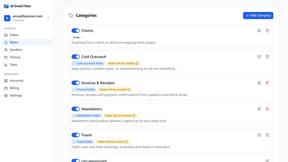
AI Email Filter
AI Email Filter sorts incoming mail into folders using plain-language prompts you write. Works with any IMAP mailbox; bring your own LLM if you want.

Egmatic
No-code 2D game editor: visual node logic, drag-and-drop scenes, live preview. Exports to Windows, macOS, Linux, Android, iOS, Web.

Kody Tools
Free collection of online developer utilities, code formatters, and digital converters designed to streamline your daily workflow.

Forms Plugin
The #1 Native Form Builder Plugin for Framer - No Code, No Embeds, No External Platforms.

Product Launch Checklist
A free launch checklist for SaaS, apps, AI tools and more. Every step says why it matters and when you can skip it.

HomeAnswerBook
Practical, independent guides to home repairs, maintenance, costs, troubleshooting, and everyday fixes.