ProspectBuddy
ProspectBuddy safely saves LinkedIn leads to your CRM in one click, keeping your manual prospecting fast and compliant.
Visit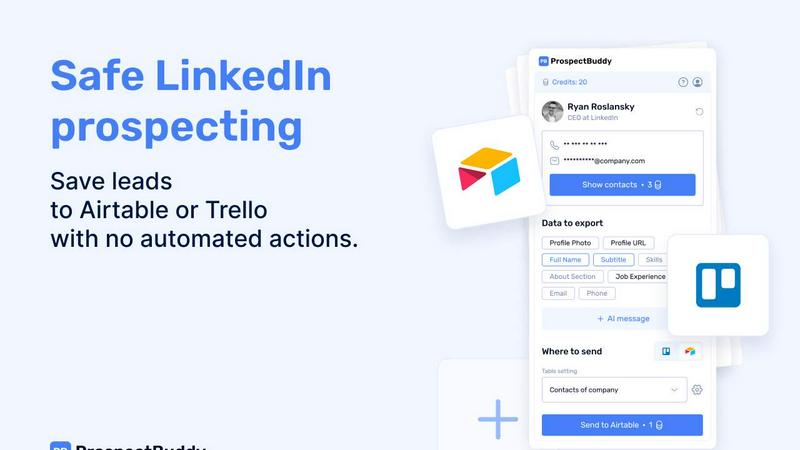
About ProspectBuddy
ProspectBuddy is your friendly, one-click solution for turning LinkedIn prospecting from a chore into a superpower. It's a simple Chrome extension built for sales professionals, recruiters, founders, and anyone who finds valuable leads on LinkedIn but dreads the manual work of saving them. If you've ever wasted time copying and pasting details from a LinkedIn profile into your Airtable base or Trello board, only to end up with messy, inconsistent data, ProspectBuddy is for you. Its core mission is to bring order and efficiency to your manual prospecting. With a single click, it transforms any LinkedIn profile into a clean, structured record in your chosen tool, capturing exactly the information you need. Unlike risky automation bots, ProspectBuddy keeps you in the driver's seat, ensuring your LinkedIn activity remains safe and fully compliant. It also supercharges your outreach by finding verified contact details and using AI to craft personalized messages in seconds. Think of it as your digital assistant for LinkedIn, designed to save you hours, eliminate errors, and make your prospecting workflow organized and effective from the very first profile you save.
Features of ProspectBuddy
One-Click Save to Airtable or Trello
This is the heart of ProspectBuddy. With the extension installed, simply visit a LinkedIn profile and click the ProspectBuddy button. It instantly parses the profile and lets you send the person's details directly to your connected Airtable base or Trello board. This eliminates the tedious, error-prone process of switching tabs and manually copying data like name, job title, and company, ensuring your CRM data is always clean and structured correctly from the very beginning.
Manual & LinkedIn-Safe Prospecting
ProspectBuddy is designed with safety and compliance in mind. It does not automate actions or scrape data in the background. You control every step, working directly from the LinkedIn profile you are viewing. This manual approach means you stay within LinkedIn's terms of service, making it a much safer and more sustainable choice compared to bulk scraping tools or automation bots that can risk your account.
Verified Email and Phone Discovery
Stop guessing contact information. ProspectBuddy can find verified business email addresses and direct phone numbers for the profiles you save. This feature uses credits (email searches cost 10 credits) and only charges you if a valid email is successfully found. It seamlessly adds this crucial contact data to the record sent to your Airtable or Trello, giving you everything you need to start your outreach.
AI-Personalized Outreach Messages
Kickstart your conversations with tailored messages written in seconds. ProspectBuddy's AI uses the data from the LinkedIn profile you just saved-like their job experience, skills, and "About" section-to generate a unique, context-aware draft for your email or LinkedIn InMail. This helps you break the ice with personalized relevance without spending time crafting each message from scratch.
Use Cases of ProspectBuddy
Sales Teams Building Lead Lists
Sales development representatives and account executives can efficiently build targeted lead lists. As they research prospects on LinkedIn, they can save each qualified lead directly to their team's Airtable or sales Trello pipeline with one click, complete with verified contact info. This keeps the sales funnel organized and ensures no promising lead is lost in a messy spreadsheet.
Recruiters Managing Candidate Pipelines
Recruiters sourcing talent on LinkedIn can streamline their workflow. Instead of manually entering candidate details into their ATS or tracking board, they can instantly add a candidate as a structured card in Trello or a row in Airtable. This captures their profile, experience, and skills cleanly, making it easy to review, share with hiring managers, and track candidates through the hiring stages.
Founders and Solopreneurs Networking
Founders, consultants, and solopreneurs who wear many hats can use ProspectBuddy to manage their networking and outreach without a complex setup. They can easily save potential partners, clients, or mentors to a simple Airtable base or Trello board they already use, keeping all their valuable connections organized in one place with minimal effort.
Operators Streamlining Business Development
Business operators and marketing professionals engaged in partnership outreach or PR can save significant time. When identifying potential partners or media contacts on LinkedIn, they can capture key details and contact information directly into their operational workflows on Airtable or Trello, ensuring follow-ups are timely and based on accurate, up-to-date information.
Frequently Asked Questions
How do I connect ProspectBuddy to Airtable?
Connecting is quick and easy! First, click on the ProspectBuddy extension icon. On the "Connect" screen or in your Profile settings, select "Airtable." You'll be prompted to select which Airtable bases or workspaces you want to grant access to. Simply click "Grant access," and you're all set. The connection status will be visible on your Profile page, and you can disconnect at any time.
Is ProspectBuddy safe to use with LinkedIn?
Absolutely yes. ProspectBuddy is built specifically for safe, manual prospecting. It does not perform any automated actions, scraping, or messaging on your behalf. You are in full control, clicking the button yourself while actively viewing a profile. This makes it a much safer and more compliant alternative to tools that use automation bots, which can violate LinkedIn's terms of service.
How do credits work in ProspectBuddy?
Credits are your internal balance used for specific actions within the extension, like searching for verified emails. You can purchase credits securely via Stripe, and your balance updates automatically after payment. For example, searching for an email costs 10 credits, but you are only charged if a valid email is successfully found. This ensures you only pay for valuable information.
Why can't I see some of my Airtable fields when mapping data?
ProspectBuddy supports specific Airtable field types to ensure data is transferred correctly. Supported types include: Attachment (for photos), URL, Text, Email, and Phone. If you have a field in Airtable with an unsupported type (like a checkbox, rating, or formula field), it will not appear in the dropdown menu when you are mapping your LinkedIn data fields during the setup process.
Pricing of ProspectBuddy
ProspectBuddy offers simple, transparent pricing plans to suit different needs. You can start for free and upgrade as your prospecting volume grows.
Starter Plan - $10 per month
This plan is perfect for solo professionals and small teams beginning their LinkedIn prospecting journey. For $10, you receive 500 credits per month. It includes all core features: finding verified business emails, revealing direct phone numbers (for B2B users), generating AI-powered outreach messages, sending leads to Airtable or Trello, and capturing structured LinkedIn profile data.
Growth Plan - $20 per month
Designed for active prospecting teams that need more capacity, the Growth plan provides 1000 credits per month. It includes everything in the Starter plan but with higher enrichment capacity and more credits for consistent, high-volume prospecting and CRM syncing.
Custom Plan - Custom Pricing
For high-volume teams with specific needs, a Custom plan is available. This includes custom credit packages, a white-label option, potential custom feature development, dedicated support, custom CRM integrations, and team-based setup. You can contact the ProspectBuddy team directly to discuss your requirements.
Similar to ProspectBuddy
CleanSmart
CleanSmart removes duplicates, fixes formatting, fills gaps, and flags anomalies in one automated pass. No code. No data engineers.

Forms Plugin
The #1 Native Form Builder Plugin for Framer - No Code, No Embeds, No External Platforms.

ContextBolt SEO
Research keywords, competitors, backlinks and AI visibility inside Claude or Codex, with findings saved to your SEO dashboard.

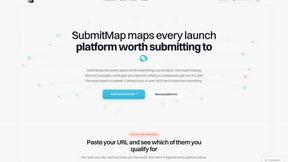
SubmitMap
A directory of launch platforms: who each accepts, what disqualifies you, and how to submit. Free to read, and your agent can do the submitting.