
Picture Enhancer
Picture Enhancer lets you deblur, upscale, and restore photos free in your browser with no software install needed.
Visit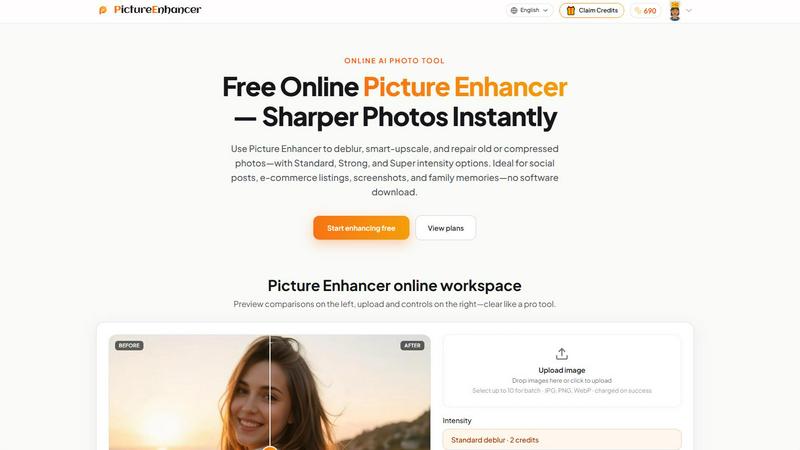
About Picture Enhancer
Picture Enhancer is a free online AI photo enhancement tool designed for creators, sellers, and everyday users who need sharper, clearer images quickly and without hassle. This powerful yet beginner-friendly tool lets you upload a JPG, PNG, or WebP photo and choose from three core enhancement modes: Deblur, Upscale, or Restore. Each mode offers three intensity levels — Standard, Strong, and Super — so you can dial in exactly the amount of improvement your photo needs. Before you download, you can preview the result side by side with the original using a simple slider, ensuring you are happy with the outcome. All downloads are completely watermark-free, so your enhanced images are ready to use immediately for social media, e-commerce listings, personal projects, or printing. Picture Enhancer is built for everyone, from professional content creators and online sellers to families wanting to restore old photographs. The best part? You can try it right now with zero commitment. Guests receive three free lifetime tries per IP address with no signup required. If you want to do more, simply sign in to use credits. New accounts receive starter credits to begin enhancing right away. Credits are only charged when your enhancement job succeeds, so you never pay for failed attempts. Standard enhancements cost 2 credits, Strong costs 4 credits, and Super costs 6 credits. For power users, paid subscriptions unlock the Super intensity tiers and batch processing of up to 10 images at once. Monthly plans grant fresh credits each billing cycle, while permanent credit packs never expire, giving you total flexibility. Picture Enhancer processes your images securely and privately, using your uploads only to complete your enhancement request. Results come back in seconds, making it one of the fastest and most accessible AI photo tools available today.
Features of Picture Enhancer
AI Deblur
This feature rebuilds lost edges and texture caused by camera shake, soft focus, or mild motion blur. Whether your photo is slightly out of focus or has that typical handheld smartphone softness, AI Deblur intelligently sharpens faces, text, and important details. You can choose Standard, Strong, or Super deblur intensity to match the level of blur in your image. This is perfect for making portraits look crisp again or ensuring text in screenshots is readable.
Smart Upscale
Smart Upscale lets you enlarge your photos by 2x or 4x while adding realistic detail rather than just stretching pixels. Starting from a small file, the AI fills in missing information to create a larger, sharper image suitable for social media cover photos, product hero shots, or even print previews. This feature is ideal when you have a low-resolution image but need a high-quality version for a larger display or publication.
Old Photo and Damage Restore
This mode reduces scratches, fading, and compression artifacts from older or damaged photographs. Strong and Super restore intensities are designed to handle heavier damage commonly found on scanned family prints, such as creases, dust spots, and discoloration. The AI works to bring back the original clarity and color balance, making old memories look fresh and ready to share or print again.
Batch Enhance for Subscribers
Paid users gain access to batch processing, allowing them to upload and enhance up to 10 images in a single session. This is a massive time-saver for e-commerce sellers, social media managers, or anyone who needs to process multiple photos quickly. Combined with the Super intensity tiers, batch enhance ensures professional-grade results without repetitive manual work. Credits are still charged only on successful enhancements, keeping costs predictable.
Use Cases of Picture Enhancer
Portraits and Everyday Photos
Reduce mild blur in portraits so faces, clothing, and backgrounds look cleaner and more professional for social media feeds, personal portfolios, or family albums. Whether you snapped a quick photo at a gathering or need to polish a selfie for your profile, Picture Enhancer helps you achieve a crisp, natural look without complicated software.
E-commerce and Product Shots
Upscale product detail and tame compression noise so your listings stand out in crowded marketplaces. Sharp, clear images build trust with buyers and can lead to higher conversion rates. Use Smart Upscale to enlarge small product photos for hero images, or apply Deblur to fix slightly out-of-focus shots taken with a phone camera.
Screenshots and UI Captures
Sharpen text edges in screenshots for tutorials, support threads, documentation archives, or social media posts. Blurry text can confuse readers and reduce the professionalism of your content. Picture Enhancer's Deblur mode makes sure every character is crisp and legible, even if the original capture was compressed or low resolution.
Old Photo Memories
Repair fading, scratches, and damage in scanned family prints so they are ready to share digitally or print for framing. Whether you have a box of old photos from your grandparents or a single treasured image, Restore mode can breathe new life into them. The Strong and Super intensities handle significant wear, making it possible to preserve memories that might otherwise be lost.
Frequently Asked Questions
What is Picture Enhancer?
Picture Enhancer is a free online AI tool that improves the quality of your photos. You can deblur, upscale, or restore images with just a few clicks. It works entirely in your browser, so no software download is needed. The tool is designed for both beginners and experienced users who want sharper, clearer images for social media, e-commerce, or personal use.
Can I try Picture Enhancer without signing in?
Yes, absolutely. Guests receive three free lifetime tries per IP address with no signup required. You can upload a photo, choose a mode and intensity, preview the result, and download a watermark-free image. If you want to enhance more photos, simply sign in to receive starter credits and continue using the service.
How does billing work after sign-in?
After signing in, you use credits to enhance photos. New accounts receive starter credits to begin. Credits are only charged when your enhancement job succeeds, so you never pay for failed attempts. Standard enhancements cost 2 credits, Strong costs 4 credits, and Super costs 6 credits. You can purchase monthly subscriptions that grant credits each cycle, or buy permanent credit packs that never expire.
Which modes does Picture Enhancer support?
Picture Enhancer supports three main modes: Deblur, which sharpens edges and reduces blur; Upscale, which enlarges images by 2x or 4x with added detail; and Restore, which repairs scratches, fading, and compression artifacts. Each mode has three intensity levels — Standard, Strong, and Super — so you can choose the right amount of enhancement for your photo.
Will downloads include a watermark?
No, all downloads from Picture Enhancer are completely watermark-free. You get the fully enhanced image without any branding or logos, ready to use immediately for your projects, listings, or social media posts.
What is the difference between subscription and permanent credit packs?
A monthly subscription grants you a set number of credits each billing cycle, which is great if you enhance photos regularly. Permanent credit packs are a one-time purchase that never expire, so you can use them whenever you need, even months or years later. Both options unlock Super intensity tiers and batch processing of up to 10 images.
Are my photos safe?
Yes, your privacy is a priority. Picture Enhancer uses your uploaded images only to complete your enhancement request. Processing is private and secure, and your photos are not used for any other purpose. You can enhance with confidence.
Where do I check balance and history?
Signed-in users can check their credit balance and view their enhancement history in the My Assets section of the website. This makes it easy to track your usage, revisit past results, and manage your credits.
Pricing of Picture Enhancer
Picture Enhancer offers a flexible pricing structure to suit different needs. Guests get three free lifetime tries per IP address with no signup required. After signing in, new accounts receive starter credits. Credits are charged only on successful enhancements: Standard mode costs 2 credits, Strong costs 4 credits, and Super costs 6 credits. For users who need more, paid monthly subscriptions grant fresh credits each billing cycle. Permanent credit packs are also available as a one-time purchase that never expires. Paid subscribers unlock the Super intensity tiers and batch processing of up to 10 images at once. Visit the Pricing page on the website to see current plan options and credit pack prices.
Similar to Picture Enhancer

ColorBestie
AI color previews and marker color suggestions for coloring pages.
AIPetGen
AIPetGen turns a photo of your dog, cat, or other pet, or a written description, into a new picture or a short animation.

ZombieTrend AI
Turn two photos into a cinematic zombie love story video. One becomes a zombie, the other chooses love, ending in a warm memory.

Genjutsu AI
Genjutsu AI turns your ideas into cinematic videos, product ads, social media shorts, and high-quality images in minutes.

ImageGPT
ImageGPT is an all-in-one AI creative platform for generating, editing and transforming images and videos using AI.

Qwen Image 2.1
AI image creation and editing with transparent assets, multi-image references and detailed prompts.

AI Album Cover Maker
Create release-ready album covers from a prompt or photo. Generate, refine, and export art for singles, EPs, mixtapes, and playlists.

EditTextPhoto
AI-powered image text editor to edit, replace, fix, or translate text in images while preserving the original font, color, size, and style.