
Open User Map
Open User Map lets you easily create a WordPress map where visitors can add and edit locations without any coding.
Visit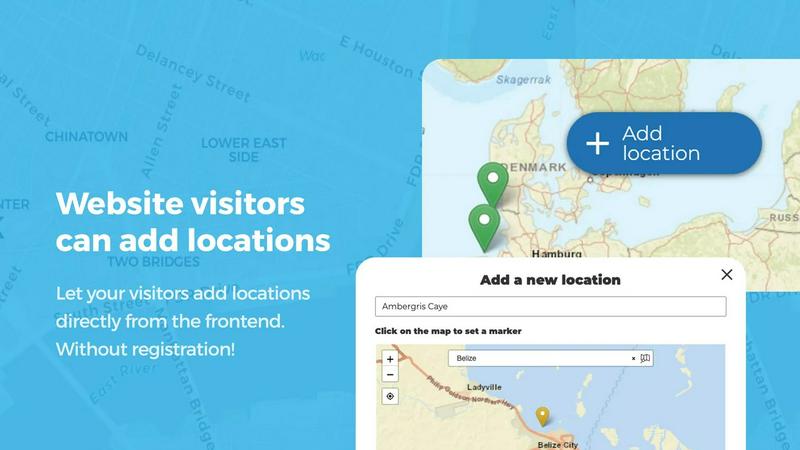
About Open User Map
Open User Map is a powerful and user-friendly WordPress plugin that lets you create interactive maps where your website visitors can contribute their own locations. If you have ever wanted to build a community-driven map for your website but felt overwhelmed by technical requirements, this tool is designed specifically for you. It allows you to set up a map without writing any code, without needing a Google Maps API key, and without any complex setup processes. The plugin is perfect for beginners and experienced website owners alike, offering a straightforward way to gather location-based information from your audience.
At its core, Open User Map enables frontend submissions, meaning your visitors can add markers, provide details, and upload information directly from your website. You maintain full control through an approval workflow, so every submission is reviewed before it becomes visible to others. The plugin also offers powerful customization options, including custom fields, categories, filters, and even the ability to use custom images as maps. With over 15,000 active installs and a perfect 5-star rating, it is one of the most trusted map plugins available on WordPress. Whether you run a tourism site, a local business directory, a community project, or an event planning website, Open User Map gives you the tools to create an engaging, collaborative map experience for your users.
Features of Open User Map
Allow Website Visitors to Add and Edit Locations Easily
This feature empowers your users to become active contributors to your map. When a visitor clicks the Add location button, they can place a marker on the map and submit details such as a title, description, and any custom fields you have configured. The submission then goes into a moderation queue where you can approve or reject it before it appears publicly. Additionally, users can edit their own existing locations, which means your map always stays current and accurate. This collaborative approach reduces your workload while keeping your map fresh and relevant.
Effortlessly Categorize and Filter Location Markers
Organizing your map has never been simpler. You can create marker categories, each with its own unique icon, to group similar locations together. For example, you might have categories for restaurants, parks, museums, and hotels. Each location can belong to multiple categories, so a place that is both a restaurant and a historical landmark can be tagged appropriately. Your visitors can then use filters to view only the types of locations they are interested in, making the map more useful and less cluttered. This feature helps everyone find what they need quickly.
Custom Image as Map
This innovative feature lets you upload any image and turn it into a fully interactive map. Instead of using a traditional geographic map, you can use a floor plan, event layout, campus guide, seating chart, product diagram, or even a game map. Visitors can place markers directly on the image, and all the same powerful functionality applies, including custom fields, filtering, and user submissions. This opens up endless possibilities for creative map projects that go beyond standard street maps.
Advanced Filter Interface
The Advanced Filter Interface adds a sidebar next to your map where visitors can filter locations by any custom field you have created. For instance, if you have a custom field for price range or opening hours, users can select their preferences and see only matching locations. You can also add custom HTML content to the sidebar for additional information or branding. This feature makes your map more intuitive and helps users explore your data in a way that makes sense to them.
Use Cases of Open User Map
Local Business Directory
Create a community-driven directory where residents and visitors can add their favorite local businesses, from coffee shops to hardware stores. Each entry can include custom fields for contact information, hours of operation, and categories. You can approve submissions to ensure quality, and users can upvote or rate businesses to highlight the best ones. This creates a valuable resource that grows organically with community participation.
Tourism and Travel Guide
Build an interactive travel guide where tourists can share hidden gems, scenic viewpoints, and recommended restaurants. Use categories to separate attractions, accommodations, and dining options. The Lines and Areas feature can highlight walking trails or neighborhood boundaries. With the Custom Image as Map feature, you could even overlay points of interest on a park map or museum floor plan, giving visitors a rich, visual experience.
Event and Festival Mapping
For conferences, festivals, or community events, use Open User Map to create a live map of vendors, stages, restrooms, and information booths. Attendees can add their own pins for meetup spots or lost and found items. The approval workflow ensures only relevant information is displayed. The star rating and upvote features allow attendees to recommend their favorite food trucks or performances, enhancing the overall event experience.
Real Estate and Property Listings
Real estate agents can use Open User Map to let property owners add their own listings to a community map. Each listing can include custom fields for price, square footage, and number of bedrooms. Categories can separate homes for sale, rentals, and commercial properties. The filtering interface helps potential buyers narrow down their search by specific criteria, making property hunting more efficient and collaborative.
Frequently Asked Questions
Do I need any coding skills to use Open User Map?
No, you do not need any coding skills at all. Open User Map is designed to be beginner-friendly and works right out of the box. You can install it like any other WordPress plugin and configure it through a simple settings panel. All features, including adding markers, setting up categories, and creating custom fields, are managed through visual interfaces and dropdown menus. There is no need to write a single line of code.
Do I need a Google Maps API key?
No, you do not need a Google Maps API key. Open User Map uses its own mapping technology, so you can start building your map immediately without any additional setup or fees. This removes a common barrier that many other map plugins have, making the process much simpler and more accessible for everyone.
Can I moderate user submissions before they appear on the map?
Yes, absolutely. Open User Map includes a built-in approval workflow. When a visitor submits a new location, it goes into a moderation queue where you can review the details. You can approve, reject, or edit the submission before it becomes visible to the public. This gives you full control over the content on your map and ensures that only accurate and appropriate information is displayed.
What kind of maps can I create besides standard geographic maps?
You can create many types of maps beyond traditional geographic ones. The Custom Image as Map feature allows you to upload any image, such as a floor plan, event layout, campus guide, seating chart, product diagram, or game map. Visitors can place markers on these images just like on a regular map. This makes Open User Map incredibly versatile for creative projects, educational tools, and unique interactive experiences.
Similar to Open User Map

Kovnerov
Personal site of Vlad Kovnerov: analytics dashboards, web development, Telegram bots and browser tools for sellers and subscription tracking.
Unifyca
Unifyca helps you organize, maintain, and back up every client WordPress site from one simple dashboard.

Shadcn Examples
Discover ready-to-use Shadcn UI blocks and examples to quickly build beautiful React and Tailwind web apps.
Webleadr
Webleadr instantly finds businesses without websites so you can contact them and get new web design clients in just a few clicks.
SiteMd
SiteMD scans your website in 60 seconds, providing instant insights on SEO, performance, and security to fix issues quickly and easily.

Idearium
Idearium crafts memorable websites that drive growth and engage users, helping your business thrive online.
FilexHost
Easily host and share any file in seconds with drag-and-drop simplicity and a secure, shareable link.

Crawlkit
Turn any website into structured data with a single, simple API call.