
MacBrightness
MacBrightness lets you use your brightness keys to boost your Mac screen past its limit for clear viewing even in direct sunlight.
Visit
About MacBrightness
MacBrightness is a simple, one time purchase app designed for MacBook Pro users who need their screen to be brighter than what macOS normally allows. If you have a MacBook Pro 14 inch or 16 inch with an M series Pro or Max chip, or a Pro Display XDR, your display is capable of reaching around 1,600 nits of sustained brightness. However, macOS caps this brightness for everyday use, reserving the full range only for HDR video content. MacBrightness unlocks that hidden brightness range and makes it available system wide, in every app, using the same brightness keys you already have on your keyboard. This means you do not need to learn new shortcuts or hunt through menus. You simply press the brightness up key a few more times past the old limit, and your whole screen gets brighter. The app is built for people who work outside, near windows, or in any bright environment where a standard screen becomes unreadable. It has no noticeable CPU overhead and uses no low level hacks. It simply opens the HDR brightness range your display already supports. The free trial gives you a split screen view so you can see the difference side by side before you buy. The full version is a one time purchase with no subscription. It works on macOS 13 and later, and no account is needed to download or try it.
Features of MacBrightness
System Wide Brightness Boost
MacBrightness makes your entire screen up to twice as bright in every application, not just in HDR video. Normally, macOS limits the full brightness range to video content that triggers the HDR mode. With MacBrightness, that full 1,600 nit range is available for your web browser, email, code editor, design software, or any other app you use. This means you can work on a spreadsheet, read a PDF, or browse the web in direct sunlight without squinting. The brightness increase is applied uniformly across the whole display, so there are no uneven patches or dim areas. You get the same high brightness experience whether you are editing photos, watching a presentation, or simply reading text.
Works With Your Existing Brightness Keys
You do not need to learn any new keyboard shortcuts or install additional hardware. MacBrightness works with the brightness keys that are already on your MacBook Pro keyboard. When the app is active, pressing the brightness up key simply extends the range further than before. You press it a few more times, and the screen keeps getting brighter. This makes the transition feel natural and intuitive. There is no menu bar icon to click, no slider to drag, and no confusing control panel. It is the same muscle memory you already have, just with a longer range. This feature is especially helpful for people who switch between multiple computers or work on the go and do not want to learn a new workflow.
No Performance Impact or System Modifications
MacBrightness is designed to be lightweight and safe. It uses no noticeable CPU overhead, so it will not slow down your computer or drain your battery faster than normal. It also does not rely on any low level hacks or system modifications that could cause instability or void your warranty. Instead, it uses the HDR brightness range that your display already supports and keeps in reserve. This means your display is operating within its designed specifications. You are not overdriving the screen or pushing it beyond its limits. The app simply tells macOS to allow the full brightness range for all content, not just HDR video. This makes it a reliable tool that you can run in the background without worrying about crashes or compatibility issues.
Free Split Screen Trial Mode
Before you buy, MacBrightness offers a free trial that lets you see the difference for yourself. When you first open the app, it activates in Splitscreen Mode. One half of your screen jumps to full brightness, while the other half stays at the brightness level set by macOS. This side by side comparison makes the difference immediately obvious. You can see how much brighter your screen can get and how much more readable it becomes in bright environments. The Splitscreen Mode is free to use for as long as you like, with no time limit. When you are ready, you can purchase a one time license to unlock full brightness across the entire screen. This approach lets you test the app in your own workspace before spending any money.
Use Cases of MacBrightness
Working on a Sunny Patio or Balcony
If you enjoy working outside on a sunny day, you know how frustrating it is when your screen becomes a mirror. Even at maximum brightness, standard macOS often leaves your display too dim to read. MacBrightness solves this by doubling the brightness range. You can set up your laptop on a patio table, a balcony railing, or a park bench and still see your work clearly. The screen stays sharp and readable, even with direct sunlight hitting the display. This is ideal for remote workers, freelancers, or anyone who wants to enjoy fresh air while staying productive. You no longer have to hunt for shade or hunch over your keyboard to see what you are typing.
Reading and Editing at a Bright Window
Many people prefer to work near a window for natural light, but the glare from the window can wash out your screen. Whether you are in a home office, a coworking space, or a coffee shop, sitting next to a bright window can make your display hard to read. MacBrightness gives you the extra brightness you need to overcome that glare. You can keep your spot by the window without sacrificing visibility. This is especially useful for designers, writers, and video editors who rely on accurate screen visibility throughout the day. You can maintain your preferred seating arrangement without constantly adjusting your screen angle or closing the blinds.
Traveling and Working on a Plane
Airplanes are often very bright environments, especially if you are sitting in a window seat with sunlight streaming in. The cabin lights can also create reflections that make reading difficult. MacBrightness helps you see your screen clearly in these conditions. The extra brightness range cuts through the glare and ambient light, so you can work on documents, watch presentations, or browse the web comfortably during your flight. This is a game changer for frequent travelers who need to stay productive on the go. You can use your laptop in any seat without struggling to see the display, making your travel time more efficient and less frustrating.
Outdoor Presentations and Demos
If you need to show something on your screen to a client or colleague outdoors, a dim display can make you look unprofessional. MacBrightness ensures your screen is bright enough to be seen by everyone, even in direct sunlight. This is useful for architects showing blueprints on a job site, salespeople demonstrating a product at an outdoor event, or teachers conducting a class outside. The full screen brightness means your content is visible from multiple angles and distances. You can confidently present your work without worrying about the sun washing out your screen. This feature also helps when taking photos or videos of your screen for documentation, as the brighter display captures better in camera.
Frequently Asked Questions
Which Mac models are compatible with MacBrightness?
MacBrightness works with MacBook Pro 14 inch and 16 inch models that have M series Pro or Max chips. It also works with the Pro Display XDR. These displays use mini LED panels that can sustain around 1,600 nits of brightness. Other Mac models, including those with standard LED displays or older Intel based MacBook Pros, do not have the same hardware capability and are not supported. You can check your Mac model by clicking the Apple logo in the top left corner of your screen and selecting About This Mac. If you have a compatible model, the app will work immediately after download.
How do I use the free trial?
The free trial activates automatically when you first open MacBrightness. It opens in Splitscreen Mode, where one half of your screen becomes fully bright and the other half stays at the brightness level set by macOS. This lets you see the difference side by side. You can use Splitscreen Mode for free for as long as you like. There is no time limit or account required. When you decide you want the full brightness across your entire screen, you can purchase a one time license from within the app. The purchase unlocks the full screen mode immediately.
Will MacBrightness drain my battery faster?
MacBrightness itself uses no noticeable CPU overhead, so it does not directly drain your battery. However, setting your screen to a higher brightness level will use more power than a dimmer setting, just as it would if you manually increased brightness through macOS. This is a normal characteristic of any display. The app does not force your screen to stay at maximum brightness. You can adjust the brightness up or down using your keyboard keys as needed. For most users, the increased visibility and productivity outdoors outweighs the small impact on battery life.
Is MacBrightness safe for my display?
Yes, MacBrightness is completely safe. It only uses the HDR brightness range that your display already supports and keeps in reserve for HDR video content. The app does not overdrive the screen, push it beyond its designed limits, or use any low level hacks that could cause damage. Your display is designed to reach 1,600 nits and sustain that brightness. MacBrightness simply tells macOS to allow that full range for all content, not just HDR video. This means you are using your display within its normal operating parameters. Many users run the app daily without any issues.
Pricing of MacBrightness
MacBrightness offers a straightforward one time purchase model with no subscriptions. You can download the app for free and use it in Splitscreen Mode indefinitely. In Splitscreen Mode, one half of your screen is fully bright, allowing you to see the difference compared to the other half. When you are ready to unlock full brightness across your entire screen, you purchase a single license for a one time fee of $5. This license is permanent and does not expire. There are no recurring charges, no monthly fees, and no hidden costs. The purchase covers the current version of the app and any future updates. You can use it on one Mac at a time. No account is required to download the trial or to make a purchase.
Explore more in this category:
Similar to MacBrightness
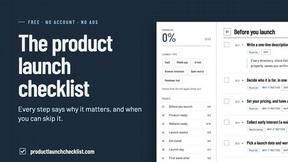
Product Launch Checklist
A free launch checklist for SaaS, apps, AI tools and more. Every step says why it matters and when you can skip it.
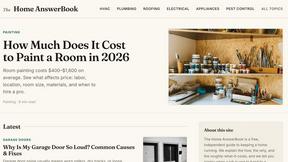
HomeAnswerBook
Practical, independent guides to home repairs, maintenance, costs, troubleshooting, and everyday fixes.
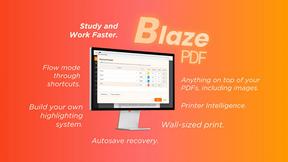
BlazePDF
Highlight faster. Study in flow with custom shortcuts and a workflow built around you. Print smarter, or turn any page into a tiled poster.
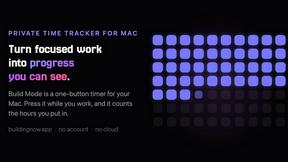
Build Mode for Mac
Build Mode is a Mac app that turns focused sessions into visible progress, so you can see the work adding up before the results arrive.



Efficienco
Efficienco is a free collection of practical online calculators for construction, materials, home improvement, engineering, trades, and business.
