LoadTester
LoadTester helps you easily run HTTP and API load tests from your browser or CI/CD pipeline to catch performance issues before they affect users.
Visit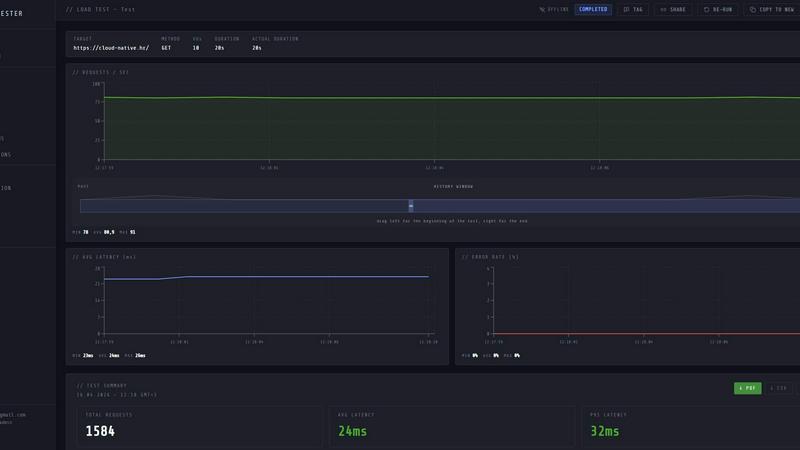
About LoadTester
LoadTester is a modern, cloud-based HTTP and API load testing tool designed to help engineering teams run performance tests without the headache of managing infrastructure. Built by Cloud Native d.o.o., this platform removes the traditional barriers to entry for load testing by offering instant execution, live analytics, and seamless integrations. Whether you are a solo developer checking a new endpoint or a large team running scheduled regressions before every release, LoadTester provides a simple, repeatable way to catch performance issues before your users notice them.
The core value proposition is simplicity. You do not need to provision servers, configure complex worker pools, or maintain a separate testing environment. Instead, you create a test scenario directly from your browser or CI/CD pipeline, choose your desired load in terms of virtual users (VUs) or requests per second (RPS), and launch the test. Within seconds, LoadTester distributes the workload across its own infrastructure, scaling workers automatically to handle up to 10,000 concurrent VUs or 10,000 requests per second. While the test runs, you can watch live metrics like throughput, latency percentiles (p50, p95, p99), and error rates update in real time. When the test finishes, you receive a clean, shareable summary with total requests, average latency, and data transferred. You can also compare runs side by side, set automated thresholds that stop tests on failure, and schedule nightly or pre-release baselines. With exports to PDF, CSV, and JSON, plus webhooks, Slack alerts, and email notifications, LoadTester fits naturally into modern development workflows. A free plan is available, making it accessible for teams of all sizes to start performance testing today.
Features of LoadTester
Instant Distributed Execution
LoadTester eliminates the need to set up and manage load testing infrastructure. When you launch a test, the platform automatically dispatches workers across its cloud environment, scaling to meet your specified load. Cold start to first request happens in under three seconds, and there is no queue time for your test to begin. This means you can focus on analyzing results and improving performance rather than wrestling with server configurations and orchestration.
Live Real-Time Analytics
While your test is running, LoadTester streams live data directly to your browser. You can watch key metrics such as requests per second (RPS), latency percentiles (p50, p95, p99), active virtual users, and error counts update in real time. A latency distribution chart shows how response times change over the last 60 seconds, helping you spot bottlenecks as they happen. This immediate feedback loop allows you to make informed decisions and even stop a problematic test early.
Smart Auto-Stop with Thresholds
You can define custom guardrails for your tests to prevent runaway scenarios or wasted resources. Set thresholds for maximum acceptable p95 latency or maximum error rate, and LoadTester will automatically stop the test if those limits are breached. You can also configure regression thresholds that compare current results against a baseline run, triggering alerts via Slack or email if performance degrades by a specified percentage. A webhook option lets you send result links to release bots or other automation tools when a test completes.
Seamless CI/CD and Workflow Integrations
LoadTester is built to integrate into your existing development pipeline. You can trigger tests directly from your CI/CD system using the API, run scheduled nightly baselines, or launch tests on every pull request. The platform supports exports in PDF, CSV, and JSON formats, making it easy to share results with your team or attach them to release notes. Slack and email alerts keep everyone informed about performance regressions, while webhooks allow you to connect LoadTester to custom workflows and bots.
Use Cases of LoadTester
Pre-Release Performance Gates
Before deploying a new feature or update to production, engineering teams can use LoadTester to run a quick load test against the staging environment. By setting thresholds for latency and error rates, the test acts as a gate that must pass before the release proceeds. If the new code introduces a regression, the test fails and alerts the team automatically, preventing poor performance from reaching end users.
API Endpoint Baseline Monitoring
For APIs that handle critical traffic, such as authentication, checkout, or search endpoints, LoadTester can run scheduled tests daily or weekly. These tests establish a performance baseline over time. When a new deployment causes latency to spike or error rates to increase, the regression detection feature flags the change immediately. This continuous monitoring helps teams catch subtle degradations that might otherwise go unnoticed until users complain.
Spike and Capacity Testing
When preparing for a major event like a product launch, flash sale, or holiday traffic surge, teams need to know how their system handles sudden spikes in load. LoadTester allows you to simulate high traffic scenarios with up to 10,000 concurrent virtual users or 10,000 requests per second. You can watch live metrics to see exactly where bottlenecks form and verify that your scaling strategy works before the real traffic arrives.
Developer-Friendly Local Testing
Individual developers can use LoadTester to quickly validate a new endpoint or microservice during development. Instead of writing complex scripts or setting up a local load testing environment, they simply create a test from the dashboard, point it at their local or dev server, and run it. The instant feedback on latency and error rates helps them optimize their code before pushing to shared environments, reducing the chance of introducing performance issues.
Frequently Asked Questions
Do I need to install any software or set up infrastructure to use LoadTester?
No. LoadTester is a fully cloud-based platform. You access it through your browser or via its API. There is nothing to install, configure, or maintain. Simply create an account, define your test, and run it. The platform handles all the worker scaling, execution, and data collection on its own infrastructure.
What types of tests can I run with LoadTester?
LoadTester is designed for HTTP and API load testing. You can test any HTTP method including GET, POST, PUT, and DELETE. You specify the target URL, choose between virtual user (VU) mode or requests per second (RPS) mode, set the duration, and launch the test. The platform supports up to 10,000 concurrent VUs or 10,000 RPS per test.
How does LoadTester help me catch performance regressions?
LoadTester allows you to set regression thresholds that compare a current test run against a previous baseline. If the p95 latency increases by more than a specified percentage, or if the error rate exceeds your limit, the test can automatically stop and send alerts to Slack or email. You can also view side-by-side comparisons of multiple runs in the dashboard to track performance trends over time.
Can I integrate LoadTester into my CI/CD pipeline?
Yes. LoadTester provides a full API that you can use to trigger tests programmatically from your CI/CD system, such as GitHub Actions, GitLab CI, Jenkins, or any other automation tool. You can also schedule tests to run at specific times, use webhooks to send results to other services, and export results in JSON or CSV format for further analysis.
Pricing of LoadTester
LoadTester offers a free plan that allows you to start running performance tests immediately without any upfront cost. For teams that need higher limits, more concurrent workers, or advanced features like scheduled tests and API access, paid plans are available. The specific pricing tiers, limits, and features for each plan can be found on the LoadTester pricing page. You can begin with the free plan and upgrade as your testing needs grow.
Similar to LoadTester



Firma.dev
Pay-as-you-go e-signature API and no-code sending. €0.049 per envelope, no monthly minimums, legally valid in 55+ countries.

AIQualityHQ
AIQualityHQ helps you write better AI prompts instantly by checking for structure, safety, and privacy risks in your browser for free.