
Gemini Omni AI Video Generator
Turn your ideas into cinematic 4K videos by simply typing, uploading images, or remixing clips with Gemini Omni's unified AI.
Visit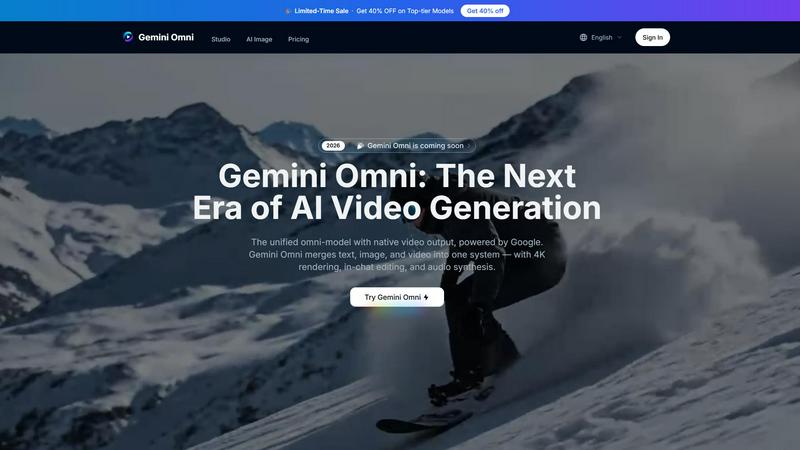
About Gemini Omni AI Video Generator
Gemini Omni AI Video Generator is Google's first unified omni-model that brings together text, image, and video generation into a single conversational system. Unlike traditional AI video tools that handle only one type of media at a time, Gemini Omni lets you create, edit, remix, and rewrite video scenes directly in a chat interface without switching between different software applications. This platform is built for creators of all skill levels, from beginners making their first AI video to professional studios producing high-quality content. The core value proposition is simplicity and power combined. You can upload a photo of yourself and generate a talking avatar that looks and sounds like you. You can sketch a rough drawing on a napkin and turn it into a fully animated scene. You can even describe a complex historical scene like a 1920s jazz club, and Gemini Omni uses its built-in world knowledge to produce accurate and meaningful visuals. The platform delivers native 4K resolution at up to 120fps, maintains character consistency across scenes with persistent world-state memory, and includes integrated Foley sound effects and dialogue synthesis. With the Gemini Omni Studio, you get early access tools, prompt guides, and a hands-on workspace to explore these capabilities alongside other models like Veo 3.1 and Seedance 2.0. Whether you are making social media clips, advertisements, or cinematic sequences, Gemini Omni removes the technical barriers and lets you focus on your creative vision.
Features of Gemini Omni AI Video Generator
Unified Omni-Model
Gemini Omni is natively multimodal from the ground up. This means you can feed it text, images, video clips, or audio, and it will return polished video output using a single unified model. There is no need to chain different tools together or run separate pipelines for each media type. Everything happens in one place, which saves you time and reduces complexity. Whether you start with a written script, a product photo, or a short video reference, Gemini Omni understands your input and generates consistent, high-quality video content that matches your vision.
In-Chat Video Editing
One of the most powerful features of Gemini Omni is the ability to edit videos directly in the chat interface using natural language. You can remix clips, swap objects, remove watermarks, and rewrite entire scenes just by typing instructions. No external video editing software is required. This makes the editing process incredibly fast and accessible, even for people who have never used professional editing tools. You can iterate on your video in real time, asking Gemini Omni to change the background, adjust the lighting, or alter character expressions with simple text commands.
AI Avatars That Look Like You
Gemini Omni can create a digital avatar that mirrors your face and voice from just a single photo. This avatar can be used in videos, presentations, or social media content. The key benefit is that your likeness stays consistent across every clip you generate, even as the scenes change. This feature is perfect for content creators who want to maintain a personal brand without filming themselves repeatedly. You can generate talking head videos, product demonstrations, or educational content with your own image and voice, all generated by AI.
Integrated Foley and Dialogue
Unlike other video generators that produce only visuals, Gemini Omni synthesizes sound effects, ambient noise, and spoken dialogue alongside the video in a single diffusion pass. This means audio is generated natively with the video, eliminating the need for a separate sound-design step. You can describe a scene with rain falling, footsteps on gravel, or a character speaking a specific line, and Gemini Omni will include those sounds automatically. This feature dramatically speeds up the content creation process and ensures that your audio and visuals are perfectly synchronized from the start.
Use Cases of Gemini Omni AI Video Generator
Social Media Content Creation
Social media creators can use Gemini Omni to quickly generate engaging video clips for platforms like TikTok, Instagram, and YouTube Shorts. You can upload a photo of yourself and have Gemini Omni create a talking avatar that delivers your script in a natural, lifelike manner. You can also describe a scene or concept, and the AI will generate a polished video complete with sound effects and dialogue. This eliminates the need for filming, lighting, and audio recording equipment, allowing you to produce consistent content in minutes. The ability to edit videos in chat means you can tweak your content on the fly to match trending formats or audience preferences.
Advertising and Marketing
Marketers can drop a script into Gemini Omni and receive an animated ad with bold typography and perfectly paced visuals. The platform can generate scroll-stopping sizzle reels where text and imagery work together to sell a product or service. You can start with a product photo or a rough storyboard, and Gemini Omni will turn it into a professional-looking advertisement. The built-in world knowledge ensures that historical or cultural references in your ad are accurate, which is especially valuable for campaigns targeting specific demographics or themes. No After Effects or motion graphics experience is required.
Film and Visual Effects
For filmmakers and VFX artists, Gemini Omni offers a powerful tool for prototyping and finalizing complex visual effects. You can describe a scene where a mirror turns into rippling liquid or a character's arm shifts to reflective chrome, and Gemini Omni will generate the footage. This allows you to experiment with creative ideas without spending hours in compositing software. The platform handles complex material transformations and camera moves, making it ideal for pre-visualization and concept development. You can also use Gemini Omni to generate background plates, atmospheric effects, or entire animated sequences that integrate seamlessly with live-action footage.
Educational and Training Videos
Educators and trainers can use Gemini Omni to create animated explainer videos, historical reenactments, or scientific visualizations. The platform's built-in world knowledge allows it to accurately depict scenes like a cellular mitosis sequence or a historical event. You can start with a simple sketch or a text description, and Gemini Omni will generate a fully animated scene that makes complex topics easier to understand. The AI avatar feature lets you create a consistent presenter who appears in every video, building familiarity and trust with your audience. This use case is especially valuable for online courses, corporate training, and public education campaigns.
Frequently Asked Questions
What is Gemini Omni AI Video Generator and how is it different from other AI video tools?
Gemini Omni is Google's first unified omni-model that combines text, image, and video generation into a single conversational system. Unlike other AI video generators that handle only one type of media, Gemini Omni lets you create, edit, and remix videos using natural language in a chat interface. It also includes features like AI avatars that look like you, integrated sound effects and dialogue, and the ability to turn sketches into animated scenes. This all-in-one approach eliminates the need to switch between different software applications.
What input types does Gemini Omni support for generating videos?
Gemini Omni is natively multimodal, meaning it accepts text, images, video clips, and audio as input. You can start with a written script, a product photo, a short video reference, or even a hand-drawn sketch. The platform processes your input and generates polished video content that matches your vision. This flexibility makes it suitable for a wide range of creative workflows, from social media content to professional film production.
Can I edit a video after it is generated using Gemini Omni?
Yes, you can edit videos directly in the chat interface using natural language instructions. You can remix clips, swap objects, remove watermarks, change backgrounds, and rewrite entire scenes without using external software. This makes the editing process fast and accessible, allowing you to iterate on your content in real time. Simply type what you want to change, and Gemini Omni will apply your edits to the video.
What are the technical specifications of videos generated by Gemini Omni?
Gemini Omni delivers native 4K resolution at up to 120fps, ensuring cinematic-grade output quality. The maximum duration per continuous clip is 10 seconds. The platform also includes persistent world-state memory, which maintains character consistency across different scenes and clips. Audio, including Foley sound effects, ambient noise, and dialogue, is generated natively with the video in a single diffusion pass, so you do not need to add sound separately.
Explore more in this category:
Similar to Gemini Omni AI Video Generator

Crazy Frog AI
Turn 1–2 photos into the viral Crazy Frog invisible-moped chase video in seconds.
GenX
All-in-one AI workspace to generate images, videos, and audio with multiple leading AI models.
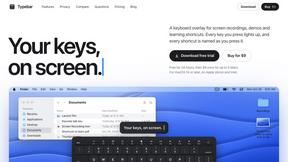
Typebar
Every key you press lights up on an on-screen keyboard, and each shortcut is named as you press it.

Nano AI
Create and edit AI images, generate videos, and compare models in one creative workbench.




Gas Station Dance AI Generator
Browser-based AI generator that recreates the viral gas station dance video from 1–3 photos.