
Geekflare Connect
Unify your AI tools on one platform to enhance collaboration and reduce costs by up to 65 percent.
Visit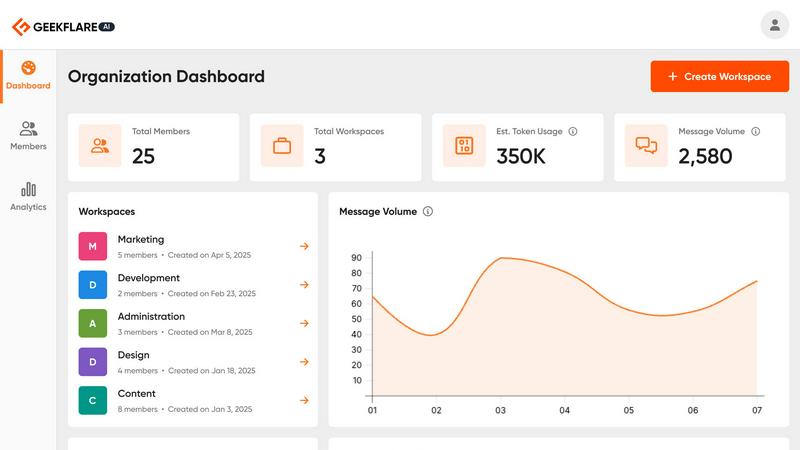
About Geekflare Connect
Geekflare Connect is a revolutionary BYOK (Bring Your Own Keys) AI platform designed to streamline the management of multiple AI tools and reduce associated costs. In an era where businesses face an overwhelming array of AI solutions, Geekflare Connect emerges as an all-in-one command center for organizations. By allowing users to connect existing API keys from major AI providers like OpenAI, Google, and Anthropic, it empowers teams to collaborate more effectively. The platform enables users to access top-tier AI models from a single, unified workspace, ensuring that businesses can choose the best AI for every task. With potential savings of up to 65% on AI expenses, Geekflare Connect not only enhances productivity but also provides unparalleled control over usage and costs, making it the ideal solution for over 3,500 teams globally.
Features of Geekflare Connect
Integrated with the World's Best AI Models
Geekflare Connect allows seamless integration with multiple leading AI models. Users can effortlessly connect their accounts from OpenAI, Google, Anthropic, and more, providing a comprehensive platform to enhance productivity.
Multi-Model Comparison
This feature enables users to compare outputs from different AI models side-by-side, such as GPT-5.2, Claude 4.5, and Gemini 3. This allows teams to select the most appropriate AI output for their specific tasks, enhancing decision-making.
Live Web Access
With real-time web search capabilities powered by Parallel, Exa, and Firecrawl, Geekflare Connect supercharges AI interactions by providing users with instant access to the latest data available on the internet.
Collaborative Workspaces
Users can create organized chat spaces by project, manage team members, and securely share conversations. This feature keeps everyone aligned, enhances collaboration, and fosters a more productive working environment.
Use Cases of Geekflare Connect
Streamlined Team Collaboration
Teams can utilize Geekflare Connect to collaborate effectively across multiple projects, sharing insights and data from various AI models in real-time while keeping all members informed and engaged.
Efficient AI Model Selection
By leveraging the multi-model comparison feature, businesses can quickly identify which AI model performs best for their specific needs, allowing for more informed and efficient choices in task execution.
Cost Management and Tracking
Organizations can monitor and analyze their AI usage and associated costs through the usage and cost analytics feature. This insight helps in identifying areas for potential savings and optimizing budget allocations.
Knowledge Sharing and Storage
With a private AI brain feature, users can upload documents and receive contextual answers based on their private data. This capability facilitates knowledge sharing and enhances the overall intelligence of the organization.
Frequently Asked Questions
What is Geekflare Connect?
Geekflare Connect is a BYOK AI platform designed for businesses to integrate multiple AI models, improve collaboration, and significantly reduce AI costs.
How can Geekflare Connect help my team?
By providing a unified workspace that allows teams to access and compare different AI models, Geekflare Connect enhances collaboration, improves decision-making, and minimizes AI-related expenses.
Is Geekflare Connect secure?
Yes, Geekflare Connect emphasizes security, allowing users to upload sensitive documents and maintain control over their data while using AI tools.
Can I try Geekflare Connect for free?
Absolutely! Geekflare Connect offers a free trial, enabling users to explore its features and capabilities before committing to a subscription plan.
Explore more in this category:
Similar to Geekflare Connect
AI Email Filter
AI Email Filter sorts incoming mail into folders using plain-language prompts you write. Works with any IMAP mailbox; bring your own LLM if you want.
GetYouTubeTranscript
Free YouTube transcripts on the web, a Chrome extension, and an API + MCP server so AI assistants can read YouTube.
Egmatic
No-code 2D game editor: visual node logic, drag-and-drop scenes, live preview. Exports to Windows, macOS, Linux, Android, iOS, Web.
Kody Tools
Free collection of online developer utilities, code formatters, and digital converters designed to streamline your daily workflow.


Forms Plugin
The #1 Native Form Builder Plugin for Framer - No Code, No Embeds, No External Platforms.

Product Launch Checklist
A free launch checklist for SaaS, apps, AI tools and more. Every step says why it matters and when you can skip it.