
Dreamflow
Dreamflow is a visual AI builder that turns your app ideas into real mobile apps effortlessly with a simple prompt.
Visit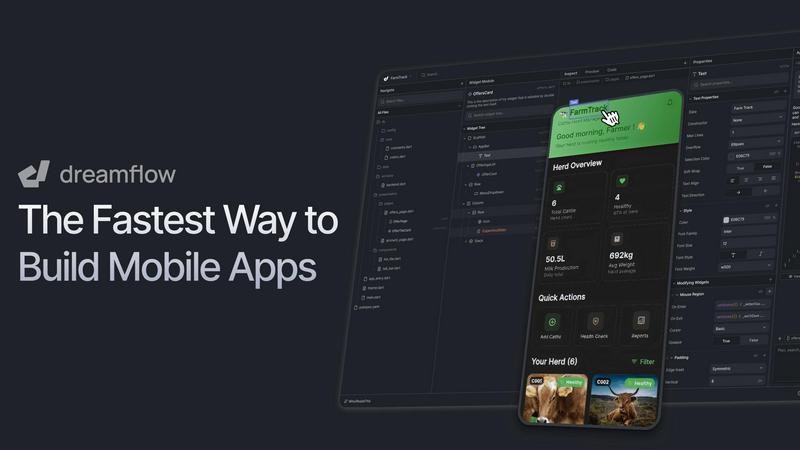
About Dreamflow
Dreamflow is an innovative visual AI builder that empowers creators to design and deploy production-ready mobile applications more efficiently and intuitively than ever. Tailored for a diverse audience, including entrepreneurs with a fresh idea, designers aiming to visualize their concepts, and seasoned developers looking to streamline their workflow, Dreamflow offers a unique approach to app development. Its standout feature is the "Tri-Surface" methodology, which integrates three distinct building methods: users can describe app features to an AI agent, utilize a visual drag-and-drop interface, or directly modify clean Flutter code. This flexibility ensures that all elements remain synchronized, allowing for a fast-paced AI generation process, easy visual adjustments, and full ownership of scalable code. With Dreamflow, you can effortlessly get your apps ready for launch on both the Apple App Store and Google Play Store, making it the ultimate all-in-one platform for mobile app creation without any compromises.
Features of Dreamflow
Tri-Surface Editing
Dreamflow's Tri-Surface Editing allows users to switch fluidly between three different ways of building their apps: AI prompts, a visual canvas, and direct code editing. This ensures that whether you prefer to describe features, visually design layouts, or fine-tune code, everything stays perfectly in sync, enhancing productivity and creativity.
AI-Powered Development
With Dreamflow's AI-powered development, you benefit from intelligent, context-aware generation. The smart AI understands your design patterns and best practices, enabling it to scaffold features quickly and accurately, making the app-building process faster and more efficient.
Responsive Design for Any Screen
Dreamflow enables the creation of robust, responsive applications that adapt seamlessly to various screen sizes. Leveraging the power of Flutter, you can deploy your app to the App Store, Play Store, and the web with just a few clicks, ensuring a broad reach for your app.
Built-in Backend Integrations
Dreamflow comes with out-of-the-box integrations for Firebase and Supabase, allowing you to build full-stack applications that are ready to scale from day one. This feature significantly reduces the complexity of backend setup, allowing you to focus on building your app's core functionalities.
Use Cases of Dreamflow
Rapid Prototyping for Startups
Entrepreneurs can use Dreamflow to quickly turn ideas into prototypes, facilitating rapid testing and iteration. This enables startups to validate concepts and gather user feedback efficiently, reducing time to market.
Visual Design for Non-Developers
Dreamflow is perfect for designers who may lack coding skills but want to bring their app ideas to life. The intuitive drag-and-drop interface allows them to create visually appealing apps without needing extensive technical knowledge.
Streamlined Development for Professionals
Professional developers can leverage Dreamflow to enhance their workflow by combining the speed of AI with the flexibility of visual design and the control of coding. This results in faster development cycles and the ability to manage complex projects more effectively.
Educational Projects and Learning
Students and educators can benefit from Dreamflow as a learning tool. It provides an accessible way to understand mobile app development concepts, allowing users to experiment with building apps while learning about design, coding, and deployment.
Frequently Asked Questions
What is Dreamflow?
Dreamflow is a visual AI builder designed to help users create production-ready mobile apps quickly and intuitively. It combines AI, visual design, and code editing in one seamless platform, catering to a variety of creators from entrepreneurs to professional developers.
How does the Tri-Surface Editing work?
Tri-Surface Editing allows users to switch between three building methods: describing app features to an AI agent, using a visual drag-and-drop interface, or editing the underlying Flutter code directly. All changes are synchronized, providing a cohesive development experience.
Can I deploy my app to multiple platforms?
Yes, with Dreamflow, you can create responsive applications that can be deployed to the Apple App Store, Google Play Store, and the web with just a few clicks, ensuring your app is accessible on various devices.
What backend integrations does Dreamflow support?
Dreamflow includes built-in integrations for Firebase and Supabase, enabling you to build full-stack applications effortlessly. This support helps streamline backend management, allowing you to focus on your app's features and user experience.
Explore more in this category:
Similar to Dreamflow
Wordy
Learn languages with real movie and TV show clips.
Egmatic
No-code 2D game editor: visual node logic, drag-and-drop scenes, live preview. Exports to Windows, macOS, Linux, Android, iOS, Web.
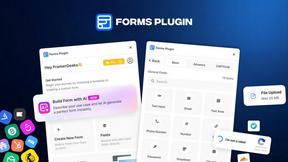
Forms Plugin
The #1 Native Form Builder Plugin for Framer - No Code, No Embeds, No External Platforms.

New AI Blog
Explore AI apps, agents and automation with New AI Blog. Read practical guides covering features, pricing, privacy and everyday workflows.
Traceback - Reveal No Caller ID
Traceback reveals the real number behind No Caller ID and unknown calls, so you always know who is really calling.

Lockimate - AI Live Wallpapers
Turn any photo into a real Apple Live Photo that animates when you wake your iPhone. Restyle it and choose the motion — customizable.