
CustomTattoo AI
Turn your tattoo idea into a realistic on-skin preview you can save and take to your artist.
Visit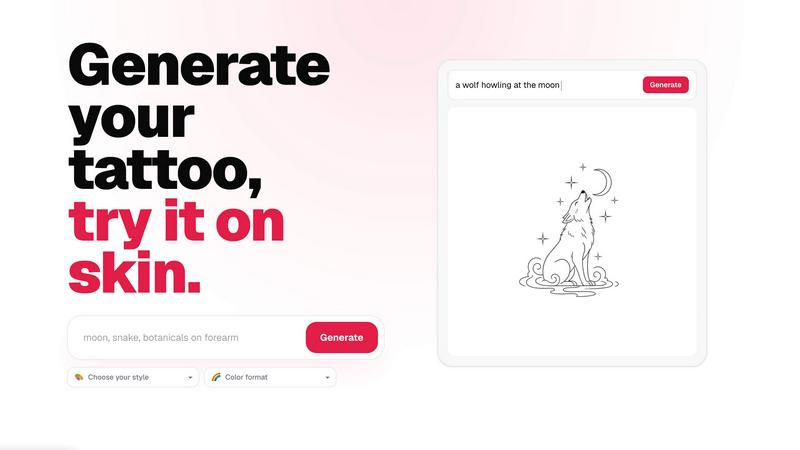
About CustomTattoo AI
CustomTattoo AI is an innovative, AI-powered platform designed to transform how people plan and visualize their next tattoo. Whether you are a first-time client feeling nervous about your first piece of ink or a seasoned tattoo enthusiast looking to explore new styles, this tool helps you bring your ideas to life before you ever step into a studio. At its core, the product allows you to describe your tattoo idea in plain language, choose from a wide range of artistic styles and color formats, and instantly generate multiple custom concepts. You can then save your favorite designs to a personal library and, most importantly, preview them directly on your own skin using the built-in try-on feature. This means you can see exactly how a design will look on your arm, leg, or back before committing to anything permanent. The main value proposition is confidence: instead of relying on vague descriptions or stock images, you and your tattoo artist will have a clear, artist-ready reference that captures your exact vision. CustomTattoo AI is especially useful for anyone who wants to compare different styles, test placement options, and refine their visual direction. It removes the guesswork from the tattoo planning process, making it easier to communicate your ideas and feel sure about your final choice. The platform is beginner-friendly and encouraging, offering step-by-step guidance that walks you from your first idea to a design you can actually use. With three free credits at signup and no hidden subscriptions, it is a risk-free way to explore your creativity and take the first step toward a tattoo you will love.
Features of CustomTattoo AI
AI Tattoo Generator
Describe your tattoo idea in your own words, and the AI will generate custom concepts that match your vision. You can specify the subject, placement, mood, and even choose from styles like gothic blackwork, traditional, or watercolor. The generator also lets you select a color format, such as black and grey or full color, so every design aligns with your personal taste. This feature turns a simple idea into multiple, professional-quality tattoo concepts in seconds.
On-Skin Preview
One of the most powerful features is the ability to preview any generated tattoo design directly on your own skin. Using your uploaded photo, the AI places the artwork on your body so you can see exactly how it fits your arm, leg, chest, or back. This try-on preview helps you assess size, placement, and proportion before you book a session, giving you the confidence that the design will look great on you.
Personal Design Library
Every tattoo concept you generate is automatically saved to your personal library. You can revisit your favorite designs, compare different styles side by side, and refine your choices over time. This library acts as your personal mood board, making it easy to track your evolving ideas and share the best ones with your tattoo artist for a collaborative discussion.
Artist-Ready Direction
CustomTattoo AI creates designs that are practical for real tattoo artists to work with. The generated concepts are clear, detailed, and include the style and color information you selected. This means you can bring a precise reference to your artist, reducing back-and-forth communication and ensuring the final tattoo matches your expectations. It turns your abstract idea into a concrete, actionable plan.
Use Cases of CustomTattoo AI
First-Time Tattoo Clients
If you have never gotten a tattoo before, the process can feel overwhelming. CustomTattoo AI helps you explore different styles and designs without pressure. You can start with a simple idea, generate a few concepts, and preview them on your skin to see what feels right. This step-by-step approach builds your confidence and helps you make an informed decision before your first appointment.
Tattoo Enthusiasts Exploring New Styles
For those who already have tattoos and want to expand their collection, this tool is perfect for experimenting with new artistic directions. You can test how a gothic blackwork design compares to a fine-line botanical piece, all on your own skin. It allows you to explore endless style possibilities without committing to a permanent design, helping you find the perfect match for your next piece.
Comparing Placement and Size Options
Choosing where to place a tattoo and how large it should be is a critical decision. With the on-skin preview, you can try the same design on different body parts, like your forearm, shoulder, or calf. You can also adjust the size to see how it fits within your anatomy. This feature ensures you select the placement that best complements your body and personal style.
Preparing for a Tattoo Artist Consultation
Walking into a tattoo studio with a clear visual reference makes the consultation process much smoother. Instead of describing your idea with words alone, you can show your artist the exact design you want, including the style and color format. This saves time, reduces misunderstandings, and helps the artist deliver a result that matches your vision. It is the ultimate tool for being prepared and professional.
Frequently Asked Questions
Is CustomTattoo AI free to try?
Yes, you can start with three free tattoo credits when you sign up. These credits allow you to generate your first designs and preview them on your skin without paying anything. There is no credit card required to claim your free credits, so you can test the platform risk-free and see if it works for you.
How does the on-skin preview work?
You upload a photo of the body part where you want the tattoo, such as your arm or leg. After generating a design, the AI automatically places the artwork onto your photo, adjusting for size and angle. You can then see a realistic preview of how the tattoo will look on your skin, helping you decide on placement and scale.
Will there be hidden subscriptions?
No, there are no hidden subscriptions or surprise charges. CustomTattoo AI operates on a straightforward credit system. You start with free credits, and if you want to generate more designs, you can purchase additional credits as needed. You are in full control of your spending, and you can stop anytime.
Can I take the design to my tattoo artist?
Absolutely. The designs you create are clear, detailed, and include the style and color information you chose. You can save them to your library and share them directly with your tattoo artist. This gives you a precise reference that makes the consultation and tattooing process much more efficient and accurate.
Similar to CustomTattoo AI

Seedance 2.5 Free
Create polished AI videos from text or images online with Seedance 2.5 Free.
Presentation Intelligence
AI-native presentation and visual content platform that turns prompts, documents, images, videos, and data into polished, shareable decks.

Try This Skill
One-click AI photo stylization for e-commerce & portraits
Lockimate - AI Live Wallpapers
Turn any photo into a real Apple Live Photo that animates when you wake your iPhone. Restyle it and choose the motion — customizable.


PromptExtract
PromptExtract converts a reference image into a detailed, structured AI image prompt that creators can edit and reuse.