ButterKit
ButterKit simplifies app development by creating stunning App Store screenshots and metadata in all languages, boosting user reach effortlessly.
Visit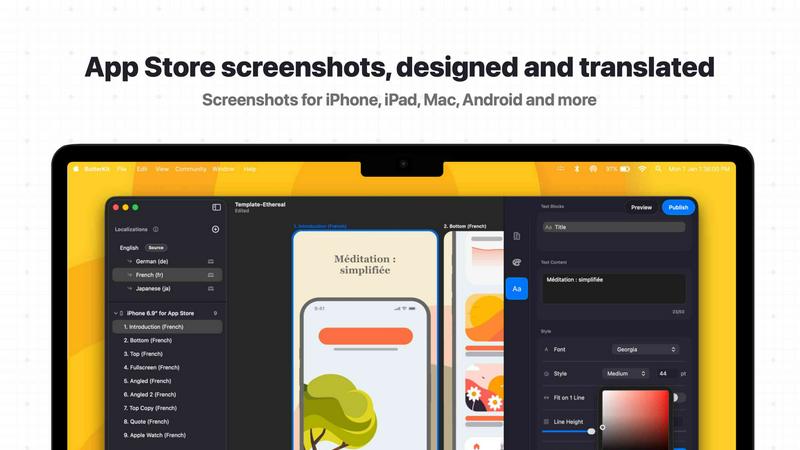
About ButterKit
ButterKit is a native macOS application specifically crafted to simplify and automate the App Store publishing workflow for Apple developers. Designed for those who create, manage, and publish mobile applications, ButterKit redefines the way developers capture and present their app visuals. With the ability to effortlessly take screenshots directly from the Xcode Simulator and insert them into stunning photorealistic 3D device frames, it enhances the visual appeal of app listings. Furthermore, ButterKit leverages advanced AI models to translate app metadata into all 50 App Store Connect languages, streamlining the localization process that often overwhelms developers. It integrates smoothly with the App Store Connect API, enabling one-click uploads of polished screenshots and metadata. Whether you're using professional templates or designing from scratch, ButterKit enhances productivity and efficiency, making it the go-to tool for developers looking to publish their apps with ease. Created by a solo developer for developers, ButterKit promises a smooth and efficient app publishing experience.
Features of ButterKit
Capture Tool for Xcode Simulator
ButterKit offers a unique capture tool that integrates seamlessly with Xcode and the Simulator. This feature allows developers to take screenshots directly from the Simulator, saving valuable time and allowing for rapid iterations to achieve the desired design without the need for external tools.
Stunning 3D Device Frames
With ButterKit, users can place their screenshots in photorealistic 3D device frames. This feature is powered by a high-resolution 3D rendering engine, enabling developers to create visually appealing screenshots that truly showcase their app's features and functionalities.
Instant Translation
One of ButterKit's standout features is its ability to translate app metadata and screenshots into all 50 App Store Connect languages in mere seconds. This instant translation keeps designs synced across languages, ensuring that developers can reach a global audience without additional hassle.
Direct Upload to App Store Connect
After creating polished screenshots and metadata, ButterKit makes it easy to upload everything directly to App Store Connect. This streamlined process allows developers to batch export images or upload them in the correct order, minimizing the risk of errors and saving time.
Use Cases of ButterKit
Streamlining App Launches
When preparing to launch a new app, developers can use ButterKit to quickly capture screenshots and create stunning visuals. The integration with Xcode allows for a seamless workflow, ensuring that the app is ready for release without unnecessary delays.
Enhancing Localization Efforts
For developers targeting multiple international markets, ButterKit simplifies the localization process. By translating app metadata into 50 languages instantly, developers can ensure that their app resonates with diverse audiences, increasing the chances of downloads and user engagement.
Efficient CI/CD Integration
ButterKit’s ability to link entire folders for input and output makes it an excellent fit for Continuous Integration and Continuous Deployment (CI/CD) pipelines. With tools like Fastlane, developers can automate the screenshot generation and publishing process, allowing for a more efficient workflow.
Creating Marketing Materials
Beyond App Store listings, ButterKit can be used to create marketing materials. Developers can design eye-catching promotional graphics using the 3D device frames and professional templates, helping to attract attention to their app across various platforms.
Frequently Asked Questions
What platforms does ButterKit support?
ButterKit is designed exclusively for macOS, providing a seamless experience for Apple developers working within the Mac ecosystem.
Can I use my own designs in ButterKit?
Absolutely! ButterKit allows you to create your own polished designs from scratch or choose from a variety of professionally designed templates, giving you the flexibility to align with your branding.
How does ButterKit handle translations?
ButterKit uses advanced AI models to translate app screenshots and metadata into all 50 App Store languages in seconds. This feature ensures that your designs remain consistent and synced across different languages.
Is there a trial version of ButterKit available?
Currently, there is no specific information about a trial version on the website. However, potential users are encouraged to check for any promotional offers or free templates available for download to explore the capabilities of ButterKit.
Similar to ButterKit

laya.tools
Free directory of 950+ projects built on Laya, the open-source model that turns text into typed decisions. Ports, SDKs, agents and demos.
Sprite Sheet Maker
A free browser-based toolkit for creating, cutting, converting, and previewing sprite sheet animations.
Forms Plugin
The #1 Native Form Builder Plugin for Framer - No Code, No Embeds, No External Platforms.