
BlueHumanizer
BlueHumanizer turns stiff AI text into clear, natural writing in one click, keeping your meaning and tone perfectly intact.
Visit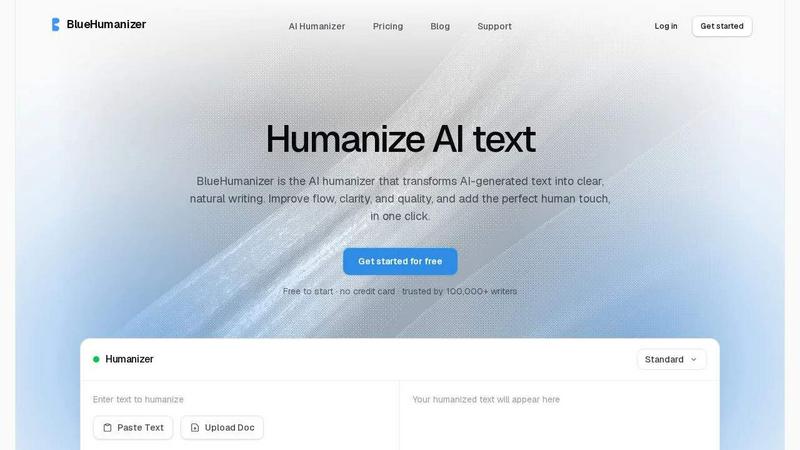
About BlueHumanizer
BlueHumanizer is an AI humanizer tool that transforms text generated by artificial intelligence into clear, natural writing with just one click. If you have ever used ChatGPT, Claude, Gemini, or any other AI writer, you know the output can sometimes feel stiff, robotic, or repetitive. BlueHumanizer fixes that by rewriting your AI-generated text into polished, human-sounding prose that flows better and uses sharper phrasing. The best part is that your original meaning, tone, and key points stay completely intact.
This tool is designed for anyone who writes with AI, including students, researchers, marketers, bloggers, and non-native English speakers. It supports over 50 languages, offers adjustable humanization levels, and gives you control over the tone of your writing. Unlike basic tools that simply swap words for synonyms, BlueHumanizer reshapes sentence structure and restores the natural rhythm that makes writing feel real. Quotes and citations remain untouched, so your sources stay accurate. Whether you are refining an essay, polishing a research paper, creating on-brand marketing copy, or warming up everyday emails and reports, BlueHumanizer delivers writing that reads clean, natural, and ready to publish. It is free to start with no credit card required, making it accessible for everyone.
Features of BlueHumanizer
Humanize AI Text in One Click
This feature makes the entire process incredibly simple. You just copy your AI-generated text, paste it into the BlueHumanizer interface, and click the humanize button. There is no setup required and no learning curve. The tool instantly rewrites your text into clear, polished writing that flows naturally. It works with text from ChatGPT, Gemini, Claude, and any other AI writer. You can also upload a document directly, making it convenient for longer pieces like essays or reports. The whole process takes seconds, so you can focus on your ideas instead of struggling with editing.
Clearer, Smoother Writing
BlueHumanizer goes beyond simple word replacement to actually improve the quality of your writing. It tightens phrasing, varies sentence rhythm, and improves overall flow so your text reads smoothly and naturally. The tool does not change what you actually said; it just makes it sound better. For example, a stiff sentence like "Physics delves into the intricate relationships between matter and energy" becomes "The field of physics looks at how matter and energy form the entire universe." This feature ensures your writing is easy to read and engaging for your audience.
Keeps Your Intent and Tone
One of the biggest concerns when using an AI humanizer is losing your original voice. BlueHumanizer solves this by preserving your tone, your intent, and your key points. The rewrite comes out with cleaner, smoother phrasing, but it still sounds like you. You can even adjust the tone using the tone controls, choosing from options like casual, professional, or friendly. This makes the tool perfect for maintaining brand voice in marketing copy or keeping a scholarly tone in academic papers. Your message stays exactly as you intended, just better expressed.
Keep Citations Untouched
For students, researchers, and academics, this feature is essential. BlueHumanizer ensures that your quotes, citations, and references stay exactly as they are. Only the writing around them changes. This means you do not have to worry about accidentally altering a citation format or misquoting a source. The tool recognizes and protects these elements, so your academic integrity remains intact. You can humanize your entire paper or essay without needing to double-check every citation afterward.
Use Cases of BlueHumanizer
Students Refining Essays and Assignments
Students often use AI tools to help draft essays and assignments, but the output can feel unnatural or too formal. BlueHumanizer helps by refining these AI-assisted drafts into clear, well-structured writing that flows smoothly. You can paste your ChatGPT or Claude output, humanize it, and get a polished essay ready for submission. The tool keeps your original arguments and ideas intact while improving readability. This is especially helpful for meeting word counts, improving sentence variety, and ensuring your work sounds like your own voice.
Researchers and Academics Polishing Papers
Researchers and academics frequently draft papers, abstracts, and literature reviews with AI assistance. BlueHumanizer refines these drafts into clear, natural prose while leaving every citation and reference untouched. This saves hours of manual editing time. You can upload a document, humanize it, and get a polished version that reads professionally. The tool is ideal for preparing manuscripts for journal submission, conference presentations, or grant proposals. Your research stays accurate, but the writing becomes much more engaging and easier to understand.
Marketers and Content Teams Creating Brand Copy
Marketers and content teams need to produce blog posts, emails, landing pages, and social media content quickly. BlueHumanizer helps by humanizing AI-generated drafts into copy that matches your brand tone. You can adjust the tone to be casual, professional, or friendly, ensuring consistency across all your channels. The tool tightens phrasing and improves flow, so your copy reads naturally and connects with your audience. This is perfect for shipping on-brand content faster without sacrificing quality.
Non-Native Writers Improving English Fluency
Non-native English speakers often use AI tools to help write in English, but the output can still feel awkward or unnatural. BlueHumanizer makes AI-generated English flow naturally, so your writing reads as fluent and effortless. The tool supports over 50 languages and automatically detects the input language. This means you can write in your native language first, translate with AI, then humanize the English output. Your emails, reports, and assignments will sound like they were written by a native speaker, boosting your confidence and professionalism.
Frequently Asked Questions
How does BlueHumanizer differ from other AI humanizers?
BlueHumanizer is different because it does not just swap words for synonyms like many basic tools do. Instead, it reshapes sentence structure and restores the natural rhythm of human writing. This means the output actually flows and reads clearly, rather than sounding like a thesaurus was applied. It also keeps your original meaning, tone, and key points intact, and it leaves quotes and citations untouched. Plus, it offers adjustable humanization levels and tone controls, giving you more control over the final result.
Is BlueHumanizer free to use?
Yes, BlueHumanizer is free to start with no credit card required. You can begin using the tool right away without any financial commitment. This makes it accessible for students, casual writers, and anyone who wants to try it out. If you need more advanced features or higher usage limits, there may be paid plans available, but the free version is robust enough for most everyday writing tasks. Trusted by over 100,000 writers, it is a popular choice for improving AI-generated text.
Can I use BlueHumanizer with any AI writing tool?
Absolutely. BlueHumanizer works with text from any AI writing tool, including ChatGPT, Claude, Gemini, Mistral AI, and many others. You simply copy and paste the output from whatever tool you are using, and BlueHumanizer will rewrite it into clear, natural prose. The tool is model-agnostic, meaning it does not matter which AI generated the text. It also supports over 50 languages, so you can humanize text in multiple languages as well.
Will my citations and references be changed?
No, your citations and references will stay exactly as they are. BlueHumanizer is designed to protect quotes, citations, and references. Only the writing around these elements is modified to improve flow and clarity. This is especially important for students and researchers who need to maintain academic integrity. You do not have to worry about accidentally altering a citation format or misquoting a source. The tool handles this automatically, so you can humanize your entire document with confidence.
Similar to BlueHumanizer
screenRIG
Signage and kiosk infrastructure for AI agents. Your agent publishes images, video, streams, web pages and apps to screens via one plugin.screenRIG is
Genjutsu AI
Genjutsu AI turns your ideas into cinematic videos, product ads, social media shorts, and high-quality images in minutes.

nanobanana 21
Fast, simple image studio powered by Nano Banana 2.1. Create and edit high-quality AI images with accurate details and readable text.
GetYouTubeTranscript
Free YouTube transcripts on the web, a Chrome extension, and an API + MCP server so AI assistants can read YouTube.




amaze.directory
Every AI tool here was opened and used on a real task before it went in. Free to submit.