TrafficClaw vs URL to Any
Side-by-side comparison to help you choose the right tool.

TrafficClaw
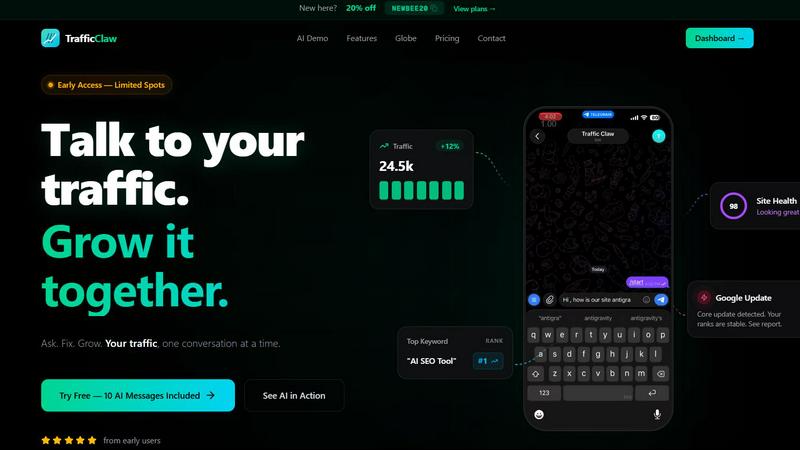
Transform your SEO and analytics data into actionable insights with TrafficClaw, your intelligent AI-powered growth partner.
Last updated: April 13, 2026

URL to Any
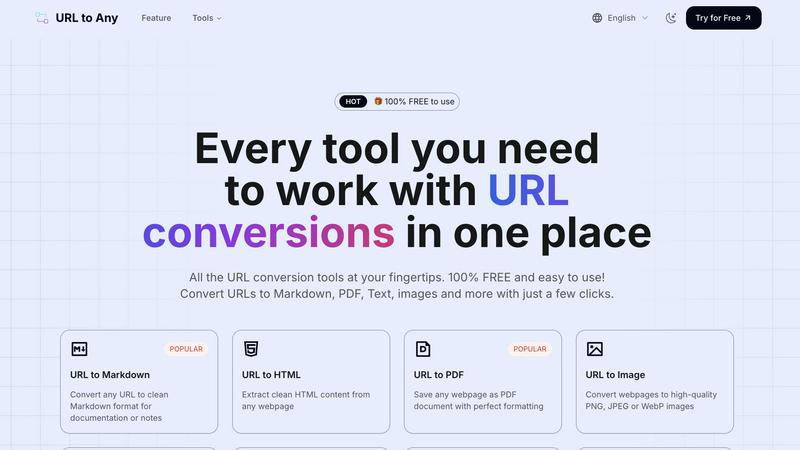
Effortlessly convert any webpage to your desired format with URL to Any's easy-to-use tools, all for free.
Last updated: March 2, 2026
Visual Comparison
TrafficClaw
URL to Any
Feature Comparison
TrafficClaw
AI Chat
The AI Chat feature allows users to ask questions about their analytics using natural language. This interactive tool provides instant answers, visual charts, and actionable insights, making it easy for anyone to understand complex data without needing technical expertise.
SEO Intelligence
TrafficClaw's SEO Intelligence feature goes beyond basic metrics to deliver deep insights into keyword gaps, content decay alerts, and cannibalization detection. This ensures that users can optimize their content strategy effectively and stay ahead of their competition.
Analytics Dashboard
With the Analytics Dashboard, users can view real-time visitor data, traffic trends, bounce rates, and conversion funnels all in one intuitive interface. This comprehensive overview helps users track their performance at a glance and make informed decisions quickly.
Site Audit
The Site Audit feature conducts deep page-level audits, providing performance scores and insights into Core Web Vitals. It also offers auto-fix suggestions, enabling users to address issues that may be affecting their website's performance and search visibility.
URL to Any
URL to Markdown
With the URL to Markdown feature, you can convert any webpage into a clean Markdown file that is perfect for documentation or note-taking. This feature simplifies the process of capturing web content, allowing you to focus on what matters most – the content itself.
URL to PDF
The URL to PDF feature lets you save any webpage as a beautifully formatted PDF document. This ensures that you retain the layout and design of the original article, making it ideal for archiving important information or sharing with others.
URL to Image
Transform any webpage into high-quality images with the URL to Image feature. You can choose from PNG, JPEG, or WebP formats, making it easy to use visual content in presentations, reports, or social media posts.
URL to QR Code
The URL to QR Code feature generates unique QR codes for any URL you provide. This is a convenient way to share links quickly and easily, allowing others to access your content with a simple scan using their mobile devices.
Use Cases
TrafficClaw
Identifying Traffic Drops
TrafficClaw is perfect for website owners who notice a sudden drop in traffic but are unsure of the cause. By simply asking the AI, users can quickly pinpoint issues such as algorithm changes or content cannibalization affecting their site.
Optimizing Content Strategy
Content creators can utilize TrafficClaw to analyze their existing content and identify keyword gaps. This enables them to develop new content that targets untapped keywords, improving their chances of ranking higher in search results.
Monitoring Site Health
Digital marketers can use TrafficClaw to keep a close eye on site health metrics, including performance scores and Core Web Vitals. This ongoing monitoring allows for proactive fixes that enhance user experience and SEO performance.
Enhancing SEO Performance
TrafficClaw helps businesses optimize their SEO strategies by providing insights into content decay and keyword performance. Users can leverage these insights to adjust their strategies, ensuring that their content remains fresh and competitive.
URL to Any
Research and Note-taking
Students and researchers can use URL to Any to convert online articles and studies into Markdown or PDF formats, making it easier to compile notes and references for assignments or projects.
Content Creation
Bloggers and content creators can streamline their workflow by converting web articles into clean Markdown files or images for use in their own projects, saving time on formatting and editing.
Sharing Information
Professionals can generate QR codes from important URLs to share resources during presentations or workshops, making it simple for attendees to access additional information on their devices.
Archiving Web Content
Anyone can use URL to Any to save and archive web pages in various formats, whether for personal use or to keep track of industry news and developments without losing the original formatting.
Overview
About TrafficClaw
TrafficClaw is a cutting-edge AI tool designed for digital marketers, website owners, and SEO professionals who want to understand and improve their website traffic. It bridges the gap between complex data analytics and actionable insights, allowing users to interact with their Google Analytics 4 (GA4) and Search Console data in a conversational manner. Instead of sifting through endless reports and graphs, users can simply ask questions like "Why did my traffic drop?" and receive data-backed answers that highlight specific issues and recommend fixes. With features like real-time analytics, site audits, and content tools, TrafficClaw empowers users to make informed decisions that can lead to significant traffic growth and improved website performance, all while ensuring they have control over their data.
About URL to Any
URL to Any is your go-to tool for transforming web content into formats that suit your needs. Whether you stumble upon an insightful article, a captivating blog post, or essential research, URL to Any enables you to convert these webpages effortlessly into various formats like Markdown, PDF, text, and images. This tool is designed for a wide audience, including students, content creators, developers, and anyone who values organization and efficiency in managing online information. The main value proposition of URL to Any lies in its simplicity and accessibility; it is completely free, requires no sign-up, and is incredibly user-friendly. With just a few clicks, you can turn any URL into a well-formatted file that you can save, share, or reference later, eliminating the hassle of manual copying and reformatting. Say goodbye to the tedious tasks of converting web content; URL to Any is here to streamline your digital life.
Frequently Asked Questions
TrafficClaw FAQ
What kind of data can I connect to TrafficClaw?
TrafficClaw connects seamlessly with Google Analytics 4 and Google Search Console. This integration allows the AI to analyze your data and provide tailored insights based on your unique website performance.
Is my data secure with TrafficClaw?
Yes, your data security is a top priority at TrafficClaw. The platform uses Google OAuth for authentication, ensuring that your data remains yours and is protected from unauthorized access.
How does TrafficClaw generate insights?
TrafficClaw uses advanced AI algorithms to analyze your real-time data from GA4 and Search Console. It generates insights based on this analysis, helping you understand your traffic patterns and identify areas for improvement.
Can I try TrafficClaw for free?
Absolutely! TrafficClaw offers a free trial that includes 10 AI messages, allowing you to experience its features and capabilities before committing to a paid plan. This is a great opportunity to see firsthand how it can benefit your website.
URL to Any FAQ
How do I convert a URL using URL to Any?
To convert a URL, simply paste the web address into the designated field, select your preferred format (such as Markdown or PDF), and click the convert button. Your content will be ready almost instantly.
Is there a cost associated with using URL to Any?
No, URL to Any is completely free to use. There are no hidden fees, and you do not need to create an account or provide any personal information.
Can I convert multiple URLs at once?
Yes, URL to Any offers a URL Opener feature that allows you to open multiple URLs simultaneously, making it easier to convert several pages in one go.
What formats can I convert URLs into?
URL to Any supports various formats including Markdown, PDF, images (PNG, JPEG, WebP), text, JSON, and XML, among others, providing you with flexibility for different needs.
Alternatives
TrafficClaw Alternatives
TrafficClaw is an innovative tool designed to empower users to interact with their SEO and analytics data in a more meaningful way. It falls under the categories of AI Assistants, Analytics & Data, SEO, and APIs, providing a unique approach to understanding website traffic patterns. By allowing users to ask direct questions about their data, TrafficClaw delivers actionable insights that go beyond standard analytics reports. Users often seek alternatives to TrafficClaw for various reasons, including pricing, specific feature sets, or compatibility with different platforms. As you explore options, consider what features are most critical for your needs, such as ease of use, data integration capabilities, and the quality of insights provided. Assessing these factors will ensure you find a solution that aligns perfectly with your goals and preferences.
URL to Any Alternatives
URL to Any is a versatile web content conversion tool that allows users to transform any webpage into their desired format with just a few clicks. It falls under the category of AI assistants, designed to simplify the process of saving, editing, and sharing online content. Users often seek alternatives to URL to Any due to various factors, such as pricing structures, feature sets, or compatibility with different platforms. When exploring alternatives, it's essential to consider the ease of use, the range of supported formats, and whether the tool is truly free or comes with hidden fees. A good alternative should also prioritize user accessibility, allowing seamless conversions without requiring extensive technical knowledge or lengthy sign-ups.