QuoteCraft AI vs TinyFast
Side-by-side comparison to help you choose the right tool.

QuoteCraft AI
QuoteCraft AI quickly creates clear, winning proposals for freelancers, helping you secure deals with ease.
Last updated: March 4, 2026

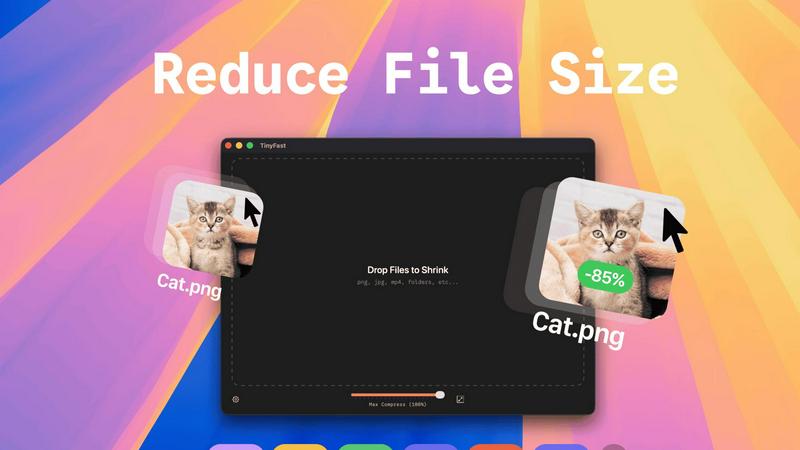
Shrink files quickly and privately on your Mac with a simple drag and drop.
Last updated: February 28, 2026
Visual Comparison
QuoteCraft AI

TinyFast
Feature Comparison
QuoteCraft AI
Voice-to-Proposal
With the innovative voice-to-proposal feature, users can speak their project details aloud, and QuoteCraft AI will transcribe the information instantly. This allows for quick proposal generation, making it easier for users to capture ideas immediately after client meetings or brainstorming sessions.
Interactive Proposals
QuoteCraft AI offers interactive proposals, allowing clients to customize their selections directly within the proposal. Clients can toggle line items on or off, and the total price updates in real time. This flexibility reduces the chances of rejection and fosters better communication between freelancers and clients.
Smart Follow-Ups
The platform includes smart follow-up notifications, automatically reminding clients who have not yet viewed their proposals. Users can set reminders to send gentle nudges after a specified number of days, helping to keep proposals top of mind without being intrusive.
Context Engine
QuoteCraft AI features an advanced Context Engine that learns from previous proposals. This AI-driven tool understands the user’s writing style, pricing strategies, and preferred deliverables, ensuring that each generated proposal feels personalized and consistent with the freelancer's unique voice.
TinyFast
Blazing-Fast Local Compression
TinyFast shrinks large files in seconds using optimized native engines built for speed. Because everything happens on your Mac, there's no waiting for files to upload to the internet or download back to your computer. This local processing makes the entire compression experience incredibly quick and responsive, saving you valuable time in your daily workflow.
100% Private & Secure by Design
Your files never leave your machine. TinyFast operates with total privacy by design, meaning no uploads to cloud servers and no risk of your sensitive or confidential assets being stored or accessed by third parties. This is perfect for anyone working under Non-Disclosure Agreements (NDAs) or who simply values their digital privacy.
Simple Drag-and-Drop Operation
Using TinyFast couldn't be easier. There are no complicated settings to learn. You simply drag your file or even an entire folder into the app, and then drag the compressed, optimized version back out to your desktop or any other location. This intuitive process makes file shrinking accessible to everyone, regardless of technical skill.
Batch Processing for Multiple Files
You can save massive amounts of time by compressing many files at once. Just drop an entire folder of images, videos, or documents into TinyFast, and it will process them all in one go, delivering a batch of optimized output files in seconds. This is ideal for preparing assets for a project or cleaning up a cluttered downloads folder.
Use Cases
QuoteCraft AI
Freelance Web Designers
Web designers can use QuoteCraft AI to quickly create professional proposals for potential clients. By inputting project details or using voice commands, they can generate tailored proposals that clearly outline the scope and pricing, leading to higher conversion rates.
Marketing Agencies
Marketing agencies benefit from QuoteCraft AI by streamlining their proposal writing process. The tool helps them present detailed marketing strategies and pricing structures in a visually appealing format, making it easier to win and manage client relationships.
Creative Studios
For creative studios, the ability to create interactive proposals means clients can directly engage with the offer. This interactivity helps clarify project scopes and ensures clients feel involved in the process, leading to more successful collaborations.
Consulting Firms
Consulting firms can utilize QuoteCraft AI to generate proposals that include comprehensive analyses and deliverables. The smart pricing feature helps them suggest competitive rates based on historical data, making their proposals more attractive to potential clients.
TinyFast
Web Developers Optimizing Site Assets
Web developers can use TinyFast to quickly compress all images, CSS, and JavaScript files for a website directly on their Mac. This reduces page load times without ever risking client assets by uploading them to an online service, ensuring both performance and client confidentiality are maintained.
Designers Preparing Files for Client Delivery
Graphic and UI/UX designers often need to send high-quality proofs or final assets to clients via email or file-sharing links, which have size limits. TinyFast lets them compress PNG, JPG, and PDF files locally to perfect, shareable sizes while keeping unreleased designs completely private and secure on their own device.
Content Creators Managing Video Clips
Video creators, bloggers, and social media managers can shrink large MP4 or MOV video files quickly to send via email, upload to platforms faster, or save storage space on their hard drives. Doing it locally with TinyFast means their raw footage never risks being exposed online during the compression process.
Professionals Emailing Large Documents
Professionals who need to email large PDF reports, presentations (DOCX), or batches of images can hit attachment size limits. TinyFast solves this by reducing these document file sizes dramatically right on their computer, ensuring the email sends successfully without using insecure online file compressors.
Overview
About QuoteCraft AI
QuoteCraft AI is a groundbreaking tool designed specifically for freelancers, enabling them to create professional proposals swiftly and efficiently. By leveraging advanced artificial intelligence, this platform simplifies the proposal process significantly. Users can either describe their project using natural language or select from a variety of seven starter templates, making it perfect for those who may not know where to start. Within seconds, QuoteCraft AI generates a comprehensive proposal that includes key components such as project scope, pricing, line items, and timelines. This tool is particularly beneficial for freelancers in fields like web design, marketing, creative studios, and consulting, addressing common challenges such as unclear project scope and ineffective pricing strategies. Unique features, including voice-to-proposal capabilities and a Context Engine that adapts to user feedback, make QuoteCraft AI an invaluable resource for enhancing proposal quality and winning more deals. Best of all, it is currently available for free during its beta phase, allowing early adopters to secure their access at no cost.
About TinyFast
TinyFast is your super-powered, privacy-focused file shrinker that lives right on your Mac. It's designed to make your digital life simpler by compressing a wide variety of files—like images (PNG, JPEG), videos (MP4, MOV), documents (PDF), and more—directly on your computer. The magic happens locally, which means your files never have to travel over the internet to some unknown server. You simply drag your file into the app and drag the smaller, optimized version back out. It’s incredibly fast because there are no upload or download waits. This app is built especially for developers, designers, and creators who value their time, their workflow speed, and the security of their confidential assets. Whether you're preparing images for a website, sending video clips via email, or managing project files, TinyFast ensures you can reduce file sizes dramatically without compromising on privacy or quality. It's the fast, safe, and simple solution for anyone who needs to save space and share files efficiently without the hassle and risk of online tools.
Frequently Asked Questions
QuoteCraft AI FAQ
How does the AI generate proposals?
QuoteCraft AI generates proposals by analyzing the project details provided by the user. It uses advanced algorithms to create a structured proposal that includes essential elements such as scope, pricing, and timelines, all tailored to the user's specifications.
Will my proposals look generic?
No, your proposals will not look generic. The Context Engine learns from your previous proposals, ensuring that the generated content reflects your unique writing style and branding, making each proposal feel personalized and authentic.
Can I edit proposals after generation?
Absolutely! After the AI generates a proposal, you have the option to edit and customize it further. This ensures that you can make adjustments based on specific client needs or preferences before sending the final version.
Is my data secure?
Yes, your data is secure with QuoteCraft AI. The platform adheres to industry standards for data protection and privacy, ensuring that your proposals and client information are kept confidential and safe from unauthorized access.
TinyFast FAQ
Is TinyFast really free to use?
Yes, TinyFast offers a completely free forever plan! You can compress up to 5 files per day with access to all core features. This is a great way to try it out and see how it fits into your workflow. For unlimited use, there are affordable one-time purchase and monthly subscription options available.
What file types does TinyFast support?
TinyFast supports a wide range of common file types. This includes images (PNG, JPG, TIFF, HEIC, WEBP, GIF, BMP, SVG), videos (MP4, MOV, M4V), documents (PDF, DOCX), code files (JS, CSS, JSON), and audio (MP3). It's a universal tool designed to handle most files you need to shrink.
How does local compression work?
Local compression means the entire process happens on your Mac's own processor. When you drag a file into TinyFast, the app uses its built-in compression engines to analyze and shrink the file directly on your computer's hardware. The file data is never sent over the internet, guaranteeing speed and privacy.
Can I resize images and videos with TinyFast?
Absolutely! Beyond just compression, TinyFast includes a handy feature to automatically resize the resolution of your images and videos. This allows you to not only make a file smaller in terms of data size but also physically reduce its dimensions, which is perfect for web use or specific platform requirements.
Alternatives
QuoteCraft AI Alternatives
QuoteCraft AI is an innovative tool designed for freelancers, helping them create professional proposals quickly and efficiently. Positioned within the Business & Finance and Productivity & Management categories, it caters specifically to those in creative fields like web design, marketing, and consulting. Users frequently seek alternatives to QuoteCraft AI for various reasons, including pricing considerations, feature sets that may better match their specific needs, or compatibility with other tools they use. When searching for an alternative, it's essential to evaluate factors such as user-friendliness, customization options, and the ability to integrate smoothly with your existing workflow to ensure you find the best fit for your proposal needs.
TinyFast Alternatives
TinyFast is a Mac application designed to quickly shrink files like images, videos, and documents directly on your computer. It falls into the category of local file compression and optimization tools, prized for its speed and strong privacy focus. People often explore other options for various reasons. They might need a tool that works on Windows or online, require a free solution, or look for specific features like support for different file formats or more advanced editing controls. It's a normal part of finding the perfect tool for your unique workflow. When searching for a different tool, consider what matters most to you. Key factors include whether the tool works on your operating system, how it handles your privacy, the types of files it can compress, its speed, and of course, its cost. Balancing these elements will help you find a great fit.