Playwriter vs Tailride
Side-by-side comparison to help you choose the right tool.

Playwriter
Playwriter lets you control your Chrome browser with AI using a simple CLI, keeping your logins and extensions intact for seamless automation.
Last updated: March 18, 2026

Tailride
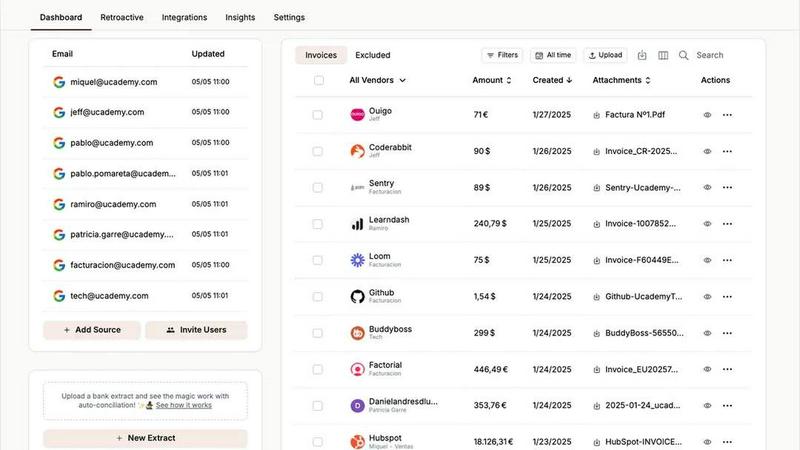
Tailride automates invoice and receipt management from your inbox, saving you hours and keeping your finances organized.
Last updated: February 26, 2026
Visual Comparison
Playwriter

Tailride
Feature Comparison
Playwriter
Existing Browser Session
Playwriter connects directly to your current Chrome browser session, allowing agents to work with all your logins, extensions, and cookies already in place. This eliminates the need for constant re-authentication and ensures a smooth workflow without the risks posed by bot detection.
Full Playwright API Access
With Playwriter, agents gain full access to the Playwright API through a single execution tool. This means there are no complicated wrappers or excessive context switching, making it easier for you to execute any Playwright code with minimal setup.
Real-Time Collaboration
Playwriter enables real-time collaboration between you and your AI agent. As the agent performs tasks, you can intervene when necessary, such as solving captchas or dealing with consent walls. This ensures a fluid and efficient working relationship between human and machine.
Debugger and Live Code Editing
The built-in debugger allows for breakpoints and live code editing, giving you the ability to intercept and modify the execution of scripts on the fly. This feature is invaluable for testing and refining automation scripts, making it easier to troubleshoot issues as they arise.
Tailride
Inbox Scanning
Tailride's inbox scanning feature allows you to effortlessly locate any invoice in your email inbox within seconds. It connects directly to your email client, ensuring that all incoming invoices are monitored and organized without the need for manual forwarding. This feature supports multiple email providers, including Gmail and Outlook, providing a comprehensive solution for managing invoices.
Online Portals
With Tailride's online portals feature, users can extract invoices from any website with ease. This functionality saves time by allowing business owners to focus on their core responsibilities, while the platform takes care of gathering invoices from various online sources. This is especially useful for companies that handle transactions across multiple platforms.
AI Processing
Tailride utilizes advanced AI processing to intelligently recognize and categorize invoices and receipts. This feature automates the data entry process, allowing businesses to reduce manual work significantly. Customizable AI rules enable users to tailor the categorization process according to their unique business needs, ensuring that all financial documents are organized efficiently.
Reconciliation
The reconciliation feature in Tailride simplifies the process of matching transactions with invoices. Users can easily identify missing documents and ensure that all financial records are accurate. This feature is particularly valuable during tax season or quarterly reviews, as it helps maintain comprehensive and organized financial documentation.
Use Cases
Playwriter
Automated Web Testing
Playwriter can be utilized for automated web testing, allowing testers to quickly navigate through applications, perform actions, and verify results all within your existing browser session. This expedites the testing process and ensures accuracy.
Data Scraping
With Playwriter, data scraping becomes a breeze. Agents can navigate websites, gather data, and even handle complex interactions like pagination or login forms, all while maintaining your session context for seamless operation.
Performance Profiling
Developers can use Playwriter to profile website performance directly within their browser. By utilizing the full Playwright API, they can set breakpoints and intercept network requests, providing valuable insights into how their applications perform under various conditions.
Interactive User Training
Playwriter can support interactive training sessions where users learn to navigate applications in real-time. The agent can guide new users through processes, while the human can step in to provide additional context or assistance when required.
Tailride
For Accountants
Accountants managing multiple clients can greatly benefit from Tailride's capabilities. The platform enables them to automatically capture and organize invoices from various email accounts, reducing the time spent on manual data entry and allowing them to focus on delivering quality service to their clients.
For Small Business Owners
Small business owners can use Tailride to streamline their expense management processes. By automating invoice extraction and categorization, they can save time and reduce the stress of managing financial documents, allowing them to concentrate on growing their business.
For Finance Teams
Finance teams in larger organizations can leverage Tailride to monitor incoming invoices and ensure that all documents are accounted for. This helps prevent chaos during busy periods, such as the end of the month or quarter, by keeping all invoices organized and accessible.
For Remote Teams
Tailride is an excellent solution for remote teams who need to manage invoices collaboratively. By allowing multiple users to connect their inboxes, Tailride ensures that all team members have access to the necessary documents, facilitating better communication and workflow.
Overview
About Playwriter
Playwriter is a revolutionary tool designed to enhance the capabilities of AI agents by providing them direct access to your existing Chrome browser session. Unlike traditional AI tools that operate in isolated environments or fresh browser instances, Playwriter allows agents to utilize your current logins, extensions, and cookies seamlessly. This results in a more efficient browsing experience without the hassle of bot detection or memory overhead associated with spawning new browser instances. Playwriter is perfect for developers, testers, and anyone looking to automate web interactions more effectively. With its open-source nature and MIT license, Playwriter encourages community contributions and ensures that users can adapt it to their specific needs. By integrating with popular tools like Cursor, Claude, and VS Code, Playwriter positions itself as an essential component in your automation toolkit.
About Tailride
Tailride is an innovative AI-powered accounting automation platform designed to streamline the invoicing process for businesses and accountants alike. By seamlessly connecting to your email inbox, Tailride automatically detects and extracts invoices and receipts from emails and attachments, eliminating the need for manual data entry. This platform is particularly beneficial for small to medium-sized enterprises and accounting firms with multiple clients, as it saves hundreds of hours by automating tedious tasks. With features such as intelligent document recognition, a user-friendly Chrome extension for quick invoice extraction from numerous platforms like Amazon and Meta Ads, and customizable AI rules for automatic categorization, Tailride simplifies the accounting workflow. Its integration capabilities with popular platforms like QuickBooks, Xero, and Google Drive further enhance its utility, making it an essential tool for businesses looking to improve efficiency and accuracy in their financial processes.
Frequently Asked Questions
Playwriter FAQ
How do I get started with Playwriter?
To start using Playwriter, first install the Chrome extension and then connect it to your local WebSocket relay by installing the CLI. After that, you're just a few commands away from having your agent browse effectively.
What programming skills do I need to use Playwriter?
While some familiarity with JavaScript and the Playwright API is beneficial, Playwriter is designed to be beginner-friendly. The included skill installation will teach your agent how to use the tool effectively, making it accessible even for those new to coding.
Can I use Playwriter with other automation tools?
Yes! Playwriter is compatible with a variety of MCP clients such as Cursor, Claude, and VS Code, allowing you to integrate it into your existing automation workflows seamlessly.
Is Playwriter secure to use?
Absolutely! Playwriter operates entirely on your local machine and uses a WebSocket relay to communicate with your browser, ensuring that your data never leaves your system and is kept secure.
Tailride FAQ
How does Tailride connect to my email?
Tailride connects to your email through a secure integration, allowing the platform to monitor your inbox for incoming invoices. It works with major email clients like Gmail, Outlook, and IMAP, ensuring a seamless experience.
Can I extract invoices from physical receipts?
Yes, Tailride allows users to handle physical receipts by taking pictures and sending them to the platform via Telegram or WhatsApp. The system will process these receipts and add them to your dashboard for easy management.
Is there a limit to the number of users I can invite?
No, Tailride allows you to link as many users as you want. This feature is particularly useful for teams, as it enables all members to keep track of their expenses and invoices in a collaborative environment.
What platforms does the Chrome extension support?
The Tailride Chrome extension supports invoice extraction from over 20 platforms, including popular services like Amazon, Meta Ads, Adobe, Notion, Microsoft, and ChatGPT, making it easy to gather invoices from various sources.
Alternatives
Playwriter Alternatives
Playwriter is an innovative tool that falls under the category of automation, specifically designed to enhance browser control through AI via command line interface (CLI) or multi-channel processing (MCP). By providing AI agents with access to your actual browser session, Playwriter enables seamless web automation, eliminating common issues faced by standard AI browsing solutions, such as lack of access to personal logins and extensions. Users often seek alternatives to Playwriter for various reasons, including pricing, the need for specific features, or compatibility with different platforms. When looking for an alternative, consider factors such as ease of use, available integrations, performance capabilities, and overall value for your specific automation needs. Always assess how well an alternative can meet your unique requirements and whether it offers the same level of functionality and support as Playwriter.
Tailride Alternatives
Tailride is an innovative AI-powered accounting automation platform that helps users manage invoices and receipts with ease. It belongs to the Business & Finance category, where it streamlines financial processes by automatically detecting and extracting important documents from emails and web portals. Users are increasingly seeking alternatives to Tailride for various reasons, including pricing considerations, specific feature sets, and compatibility with their existing platforms. It's essential to evaluate alternatives based on factors such as ease of use, integration capabilities, and the specific automation features they offer to ensure they meet your business needs. When choosing an alternative to Tailride, it's crucial to consider what specific functionalities are most important to you. Look for platforms that offer seamless integrations with your current tools, customizable automation rules, and comprehensive document management features. Additionally, pricing models and customer support can significantly influence your decision, so make sure to assess these aspects before making a choice. Finding the right alternative can enhance your financial management experience and improve overall efficiency.