
Mailopoly vs SupaSidebar
Side-by-side comparison to help you choose the right tool.

Mailopoly
Mailopoly is your AI email assistant that organizes your inbox, extracts key details, and drafts replies in your voice.
Last updated: February 26, 2026

SupaSidebar
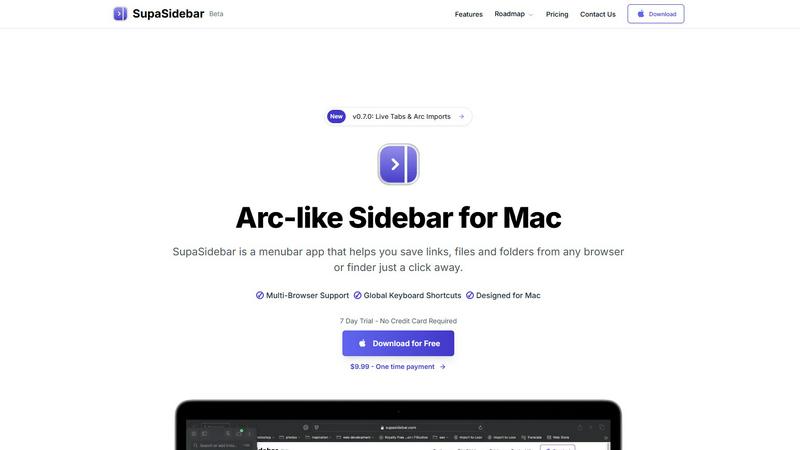
SupaSidebar is a Mac app that saves and organizes links, files, and folders for instant access with simple shortcuts.
Last updated: February 28, 2026
Visual Comparison
Mailopoly

SupaSidebar
Feature Comparison
Mailopoly
Clean Inbox Functionality
Mailopoly’s Clean Inbox feature ensures that only the most important emails reach your attention. The AI intelligently filters out noise, allowing you to see only relevant messages. This feature works from day one without any setup, meaning you can dive right into an organized inbox without stress.
AI Drafting Assistant
With Mailopoly, you don’t need to worry about crafting the perfect email response. The AI Drafting Assistant automatically writes replies in your unique voice, capturing your style and tone accurately. You receive multiple suggestions to choose from, allowing you to edit or send responses in just seconds.
Task Management Integration
Mailopoly is more than just an email client; it includes a built-in task management system. This feature tracks your personal finances, events, and shipments, providing a full timeline of important activities. You can stay organized with ease, ensuring nothing slips through the cracks amidst your busy schedule.
Instant Unsubscriber
Mailopoly’s Instant Unsubscriber allows you to quickly unsubscribe from unwanted senders with just one click. This feature helps maintain a clutter-free inbox, ensuring that you only receive communications from sources that matter to you.
SupaSidebar
Instant Saving and Copying
With SupaSidebar, saving links and files is a breeze. Use the global keyboard shortcuts CMD + CTRL + S to save items and CMD + CTRL + C to copy the current website link directly to your sidebar. This feature eliminates the tedious steps of manually saving or copying URLs, allowing you to focus on your tasks.
Recents Tracking
Never lose track of your browsing history again with the Recents feature. SupaSidebar automatically tracks every website you have visited in the last 48 hours, making it easy to find your work quickly. This is particularly useful for those who switch between multiple projects or need to revisit recent research.
Pinned Items for Quick Access
SupaSidebar allows you to pin your favorite links, files, and folders at the top of your sidebar. This feature ensures that your most-used items are always front and center, so you can access them with just a click, reducing time wasted searching for frequently used resources.
Fast Global Search
Switching between apps can slow down your productivity, but not with SupaSidebar. Just press CMD + CTRL + K and start typing to find any file, folder, website, or app instantly. This feature provides a powerful, efficient way to navigate your digital workspace without the hassle of digging through numerous tabs or folders.
Use Cases
Mailopoly
Streamlined Communication for Professionals
For busy professionals juggling multiple projects and meetings, Mailopoly simplifies email management. You can effortlessly track important correspondence, ensuring you never miss crucial messages or deadlines, all while saving time with AI-generated replies.
Enhanced Organization for Multitaskers
If you are someone who balances work, home life, and side hustles, Mailopoly is your perfect companion. It consolidates your emails and tasks into one platform, making it easy to manage your priorities and stay on top of essential responsibilities without feeling overwhelmed.
Efficient Event Planning
Mailopoly's event manager feature streamlines the process of sending invitations and tracking responses. Whether you are organizing a business meeting or a social gathering, this tool makes planning events straightforward and stress-free.
Financial Management Made Easy
With Mailopoly, keeping track of personal finances becomes a breeze. The integrated task manager updates you on upcoming payments and important financial deadlines, giving you peace of mind and helping you stay financially organized.
SupaSidebar
Efficient Research for Students
Students can greatly benefit from SupaSidebar during research projects. By saving important links and documents directly to the sidebar, they can easily access their sources without getting lost in a sea of browser tabs, allowing for a smoother and more organized study experience.
Project Management for Creatives
Creative professionals can use SupaSidebar to manage multiple projects simultaneously. By pinning relevant files, folders, and websites for each project, they can switch contexts quickly and efficiently, ensuring they stay in the flow without unnecessary interruptions.
Streamlined Web Browsing
For anyone who spends significant time online, SupaSidebar enhances the browsing experience by providing quick access to favorite sites and recent visits. This eliminates the frustration of endlessly scrolling through bookmarks or searching for previously opened tabs.
Enhanced Workflow for Remote Workers
Remote workers can leverage SupaSidebar to maintain an organized workspace while navigating various tasks. With easy access to necessary documents and links, they can streamline their workflow, increase productivity, and reduce the time spent switching between applications.
Overview
About Mailopoly
Mailopoly is a revolutionary email client designed to transform the way you manage your inbox and daily tasks. Unlike traditional email platforms, Mailopoly employs advanced AI technology to automatically extract essential information from your emails, allowing you to minimize reading time significantly. This means you can focus on what truly matters without the endless clutter of notifications and a crowded inbox. Mailopoly is perfect for busy professionals, multitaskers, and anyone looking to streamline their daily life. With features like integrated task management, an AI chatbot for personal assistance, and automatic reply suggestions, Mailopoly aims to reduce stress and enhance productivity. By organizing your emails and life admin tasks into one cohesive command center, Mailopoly empowers you to take control of your schedule and priorities, making your day more manageable and less overwhelming.
About SupaSidebar
Welcome to SupaSidebar, the ultimate productivity booster designed specifically for Mac users! If you often find yourself juggling too many browser tabs, struggling to recall that important link from yesterday, or simply wish to access your favorite files and websites more quickly, SupaSidebar is the perfect solution for you. This beautifully crafted, lightweight menubar app transforms your browsing experience by providing an Arc browser-inspired sidebar that integrates seamlessly with your entire Mac. With SupaSidebar, you transform your workspace into a universal command center, allowing you to save, find, and open anything with just a click or a keyboard shortcut. Whether you are a student conducting research, a creative professional managing multiple projects, or someone who wants to enhance web browsing efficiency, SupaSidebar has got you covered. It works flawlessly with all major browsers—Safari, Chrome, Firefox, Arc, and Brave—keeping your vital links, files, and folders always within reach. Your data remains secure on your Mac, and with its native macOS design, SupaSidebar feels like an integral part of your computer, empowering you to work smarter, not harder.
Frequently Asked Questions
Mailopoly FAQ
How does Mailopoly ensure my privacy and security?
Mailopoly is designed with security in mind and is SOC 2 certified, ensuring your data is protected. The platform prioritizes privacy, employing strict measures to safeguard your information while you manage your emails and tasks.
Can I use Mailopoly with multiple email accounts?
Yes, Mailopoly supports multiple email providers, including Gmail, Outlook, Yahoo, and any IMAP provider. This means you can consolidate all your email accounts into one convenient platform without losing access to existing accounts.
Is there a learning curve to using Mailopoly?
Not at all! Mailopoly is designed to be user-friendly and requires zero setup. The AI adapts to your preferences from day one, making it easy for you to start enjoying a clean and organized inbox immediately.
What types of notifications will I receive from Mailopoly?
Mailopoly sends notifications only for emails that are deemed crucial based on your preferences and activity. This ensures that you are only alerted about important messages, minimizing distractions and keeping you focused on what matters most.
SupaSidebar FAQ
Is SupaSidebar a browser extension?
No, SupaSidebar is a standalone menubar app designed for Mac that works across all major browsers, providing a unified experience for saving and accessing links and files.
Which browsers does SupaSidebar work with?
SupaSidebar is compatible with all major browsers, including Safari, Chrome, Firefox, Arc, and Brave, ensuring that you can access your important resources regardless of your preferred browser.
What macOS version do I need?
SupaSidebar requires macOS 13 or later to function properly, ensuring that users have the latest features and security enhancements.
Where is my data stored?
All your data is securely stored on your Mac, ensuring that you have complete control and privacy over your saved links, files, and folders without any external data sharing.
Alternatives
Mailopoly Alternatives
Mailopoly is an innovative AI-powered email client designed to streamline your email experience. It falls under the productivity and management category, as it not only helps reduce email clutter but also integrates various personal management tools. Users often seek alternatives to Mailopoly due to factors such as pricing, specific feature requirements, or compatibility with different platforms. When searching for an alternative, consider the essential features that matter most to you, such as task management capabilities, user interface design, and the level of AI assistance provided. Finding the right email client can significantly improve your productivity and reduce stress. Look for alternatives that offer intuitive navigation, seamless integration with your existing tools, and a comprehensive set of features tailored to your personal or professional needs. Evaluating user reviews and trial versions can also provide insight into whether a particular option will meet your expectations.
SupaSidebar Alternatives
SupaSidebar is a productivity-focused application designed for Mac users, providing an Arc-style sidebar experience that allows for quick access to links, files, and folders. This lightweight menubar app serves as a universal command center, helping users manage their digital lives more efficiently. However, many users often seek alternatives due to factors such as pricing, specific feature sets that may better meet their needs, or compatibility with different platforms or workflows. When choosing an alternative to SupaSidebar, it’s essential to consider what features are most important for your productivity. Look for options that offer similar functionality, such as quick search capabilities, easy access to open tabs, and seamless integration with your preferred browsers. Additionally, evaluate the user interface and overall design to ensure it aligns with your workflow preferences and enhances your computing experience.