SparkPix vs TinyFast
Side-by-side comparison to help you choose the right tool.

SparkPix
Edit any photo online for free by simply typing what you want, like removing a background or restoring an old picture.
Last updated: March 11, 2026

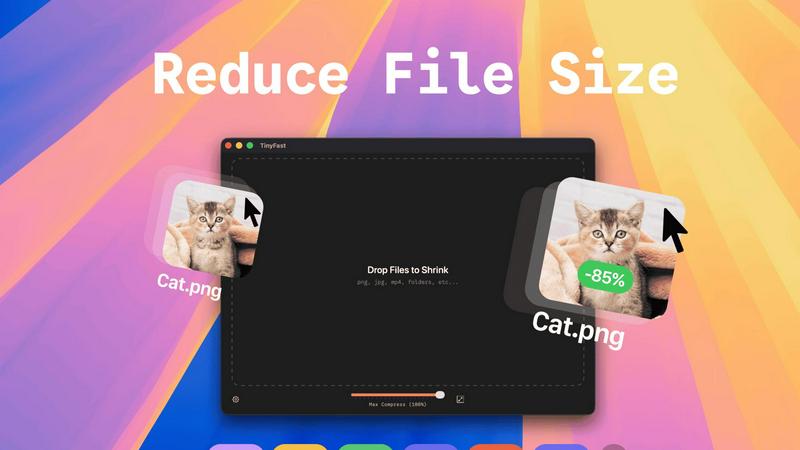
Shrink files quickly and privately on your Mac with a simple drag and drop.
Last updated: February 28, 2026
Visual Comparison
SparkPix

TinyFast
Feature Comparison
SparkPix
AI Photo Editor with Text Commands
This is the heart of SparkPix. Instead of hunting for tools and sliders, you simply type what you want to happen. For example, you can type "remove the background and put me on a beach" or "make this photo look like a vintage oil painting." The AI interprets your text prompt and applies the precise edits automatically, delivering results in under 30 seconds. It's intuitive, fast, and opens up editing possibilities you might never have tried with traditional software.
Background Remover
Get a clean, transparent background with just one click. This tool is perfect for creating professional portraits, standout product photos for your online store, or fun social media content. It handles complex scenes with detailed edges, like hair or fur, remarkably well. You can also go beyond simple removal by using the text editor to command a background change, instantly placing your subject in a primeval forest or a sleek office.
Photo Restoration & Enhancement
Breathe new life into your old memories. SparkPix can repair damaged photos by fixing scratches, tears, and severe fading. It also includes a powerful enhancer that can sharpen blurry details, boost colors, reduce digital noise, and upscale images to HD quality—all in one simple step. It's like having a digital restoration expert and a professional retoucher working for you instantly.
AI Image Generator & Style Transfer
Unleash your creativity by generating brand new images from text descriptions at high 1K, 2K, and 4K resolutions. Plus, transform any existing photo into various artistic styles. Choose from over 15 effects, including anime, watercolor, pencil sketch, and oil painting, to give your pictures a unique, artistic flair with a single click.
TinyFast
Blazing-Fast Local Compression
TinyFast shrinks large files in seconds using optimized native engines built for speed. Because everything happens on your Mac, there's no waiting for files to upload to the internet or download back to your computer. This local processing makes the entire compression experience incredibly quick and responsive, saving you valuable time in your daily workflow.
100% Private & Secure by Design
Your files never leave your machine. TinyFast operates with total privacy by design, meaning no uploads to cloud servers and no risk of your sensitive or confidential assets being stored or accessed by third parties. This is perfect for anyone working under Non-Disclosure Agreements (NDAs) or who simply values their digital privacy.
Simple Drag-and-Drop Operation
Using TinyFast couldn't be easier. There are no complicated settings to learn. You simply drag your file or even an entire folder into the app, and then drag the compressed, optimized version back out to your desktop or any other location. This intuitive process makes file shrinking accessible to everyone, regardless of technical skill.
Batch Processing for Multiple Files
You can save massive amounts of time by compressing many files at once. Just drop an entire folder of images, videos, or documents into TinyFast, and it will process them all in one go, delivering a batch of optimized output files in seconds. This is ideal for preparing assets for a project or cleaning up a cluttered downloads folder.
Use Cases
SparkPix
Restoring Family Photo Archives
Anyone with old, damaged family photos can use SparkPix to preserve their heritage. Simply upload a scanned photo of a faded or scratched portrait and use prompts like "restore this damaged old photo" or "colorize this black and white image." The AI will repair damage and add realistic color, bringing precious memories back to life for future generations without needing professional services.
Creating E-commerce Product Photos
Small business owners and online sellers can create stunning product imagery without a studio. Use the background remover for clean, white-background shots required by Amazon or Shopify. Then, use the AI editor to generate professional mockups by describing scenes like "a person holding this perfume bottle in a luxury bedroom setting," creating high-quality marketing assets in minutes.
Enhancing Social Media Content
Social media managers, influencers, and everyday users can make their posts pop. Quickly remove unwanted objects or people from a vacation shot, enhance a slightly blurry group photo, or apply a trendy art style to a portrait for a unique profile picture. SparkPix helps you create polished, engaging content that stands out in any feed with minimal effort.
Preparing Official Documents
Need a passport, visa, or professional LinkedIn headshot fast? SparkPix acts as an online passport photo maker. Upload a selfie and use a prompt like "generate a professional headshot with formal attire and a blue background." The AI will create a compliant, high-quality photo suitable for official documents and professional profiles, saving you a trip to a photo booth.
TinyFast
Web Developers Optimizing Site Assets
Web developers can use TinyFast to quickly compress all images, CSS, and JavaScript files for a website directly on their Mac. This reduces page load times without ever risking client assets by uploading them to an online service, ensuring both performance and client confidentiality are maintained.
Designers Preparing Files for Client Delivery
Graphic and UI/UX designers often need to send high-quality proofs or final assets to clients via email or file-sharing links, which have size limits. TinyFast lets them compress PNG, JPG, and PDF files locally to perfect, shareable sizes while keeping unreleased designs completely private and secure on their own device.
Content Creators Managing Video Clips
Video creators, bloggers, and social media managers can shrink large MP4 or MOV video files quickly to send via email, upload to platforms faster, or save storage space on their hard drives. Doing it locally with TinyFast means their raw footage never risks being exposed online during the compression process.
Professionals Emailing Large Documents
Professionals who need to email large PDF reports, presentations (DOCX), or batches of images can hit attachment size limits. TinyFast solves this by reducing these document file sizes dramatically right on their computer, ensuring the email sends successfully without using insecure online file compressors.
Pricing Comparison
SparkPix
SparkPix offers a free tier to get you started, which includes 5 credits at sign-up with no credit card required. If you need more power, paid plans begin at $9.99, which provides 350 credits for more extensive editing projects. This flexible model allows you to try the service risk-free and only pay when you need to scale your creative work.
TinyFast
TinyFast offers simple and transparent pricing to fit different needs. You can start with the Free Forever plan, which allows compression of up to 5 files per day. For unlimited use, choose the Lifetime Plan for a one-time payment of €17.99, which includes unlimited compressions, all features, lifetime updates, and supports future development. Alternatively, there is a Monthly Subscription for €2.99 per month (which includes a 3-day free trial), also offering unlimited compressions and access to all features. All plans provide the same core, privacy-focused functionality.
Overview
About SparkPix
SparkPix is your friendly, all-in-one AI photo editor that makes professional-level editing as simple as typing a sentence. Forget about complex software like Photoshop that requires years of skill to master. With SparkPix, you just upload your photo, describe the change you want in plain English, and our powerful AI does the rest in under 30 seconds. It's designed for absolutely everyone—from social media enthusiasts and small business owners to genealogy hobbyists and creative professionals who want to save time. Whether you're looking to remove an unwanted photobomber, restore a precious family heirloom, create a stunning product mockup, or just have fun turning a photo into an anime masterpiece, SparkPix handles it with ease. The best part? You can start for free with 5 credits to test the magic, with no credit card required. Accessible directly from your web browser on any device, SparkPix puts the future of photo editing at your fingertips, making creativity limitless and completely approachable.
About TinyFast
TinyFast is your super-powered, privacy-focused file shrinker that lives right on your Mac. It's designed to make your digital life simpler by compressing a wide variety of files—like images (PNG, JPEG), videos (MP4, MOV), documents (PDF), and more—directly on your computer. The magic happens locally, which means your files never have to travel over the internet to some unknown server. You simply drag your file into the app and drag the smaller, optimized version back out. It’s incredibly fast because there are no upload or download waits. This app is built especially for developers, designers, and creators who value their time, their workflow speed, and the security of their confidential assets. Whether you're preparing images for a website, sending video clips via email, or managing project files, TinyFast ensures you can reduce file sizes dramatically without compromising on privacy or quality. It's the fast, safe, and simple solution for anyone who needs to save space and share files efficiently without the hassle and risk of online tools.
Frequently Asked Questions
SparkPix FAQ
Is SparkPix really free to start?
Yes, absolutely! You can sign up and receive 5 free credits to try out the platform with no credit card required. This lets you test several edits and see how the AI works. After that, affordable plans are available if you need more credits for larger projects.
What kind of edits can I do by typing?
You can do almost anything you can imagine! Common and powerful edits include removing or changing backgrounds, restoring old photos, colorizing black and white images, removing unwanted objects or people, enhancing image quality, and applying artistic filters. The more specific your description, the better the AI can execute your vision.
Do I need to download any software?
No, you do not. SparkPix is entirely web-based. This means you can access it directly from your internet browser on any device, whether you're using a desktop computer, an iPhone, or an Android phone. There's no installation required, and you can start editing immediately.
How accurate is the background remover?
The AI-powered background remover is highly accurate, even with complex subjects like frizzy hair, pet fur, or intricate objects. It uses advanced machine learning to distinguish between the subject and the background, providing a clean cut-out. For the best results, use photos with good contrast between the subject and its original background.
TinyFast FAQ
Is TinyFast really free to use?
Yes, TinyFast offers a completely free forever plan! You can compress up to 5 files per day with access to all core features. This is a great way to try it out and see how it fits into your workflow. For unlimited use, there are affordable one-time purchase and monthly subscription options available.
What file types does TinyFast support?
TinyFast supports a wide range of common file types. This includes images (PNG, JPG, TIFF, HEIC, WEBP, GIF, BMP, SVG), videos (MP4, MOV, M4V), documents (PDF, DOCX), code files (JS, CSS, JSON), and audio (MP3). It's a universal tool designed to handle most files you need to shrink.
How does local compression work?
Local compression means the entire process happens on your Mac's own processor. When you drag a file into TinyFast, the app uses its built-in compression engines to analyze and shrink the file directly on your computer's hardware. The file data is never sent over the internet, guaranteeing speed and privacy.
Can I resize images and videos with TinyFast?
Absolutely! Beyond just compression, TinyFast includes a handy feature to automatically resize the resolution of your images and videos. This allows you to not only make a file smaller in terms of data size but also physically reduce its dimensions, which is perfect for web use or specific platform requirements.
Alternatives
SparkPix Alternatives
SparkPix is an AI-powered online photo editor that lets you transform images simply by typing your requests. It falls into the category of web-based, beginner-friendly image editing tools, designed for anyone who wants professional-looking edits without needing complex software like Photoshop. People often search for alternatives for various reasons. Some might need a different pricing structure or more free credits, while others may be looking for specific features not offered, like advanced layer editing or integration with other platforms. The need for a desktop app, different artistic filters, or higher resolution exports can also prompt the search for other options. When evaluating other tools, consider what matters most for your projects. Key factors include the cost and credit system, the range of AI features (like background removal or style transfer), the output quality and resolution, and whether the platform works on your preferred device. Prioritizing these aspects will help you find the best fit for your creative needs.
TinyFast Alternatives
TinyFast is a Mac application designed to quickly shrink files like images, videos, and documents directly on your computer. It falls into the category of local file compression and optimization tools, prized for its speed and strong privacy focus. People often explore other options for various reasons. They might need a tool that works on Windows or online, require a free solution, or look for specific features like support for different file formats or more advanced editing controls. It's a normal part of finding the perfect tool for your unique workflow. When searching for a different tool, consider what matters most to you. Key factors include whether the tool works on your operating system, how it handles your privacy, the types of files it can compress, its speed, and of course, its cost. Balancing these elements will help you find a great fit.