dmaya vs SimpleDraw
Side-by-side comparison to help you choose the right tool.

dmaya
dMaya is an AI design platform that helps teams create, present, and export production-ready UI designs in seconds.
Last updated: April 13, 2026

SimpleDraw
Easily create accurate floor plans and scale drawings online with SimpleDraw, no experience or downloads needed.
Last updated: March 1, 2026
Visual Comparison
dmaya

SimpleDraw
Feature Comparison
dmaya
Conversational AI Design Generation
Start your design process by simply describing what you need in plain English. Tell dmaya you want a "minimalist SaaS dashboard with dark mode" or a "vibrant e-commerce product page," and it will generate complete, production-ready UI screens for you in seconds. This feature removes the blank canvas anxiety and gives you a professional starting point instantly, so you can focus on refining the vision instead of building from scratch.
Real-Time Iteration via Chat
Refine your designs through a natural conversation with the AI. Instead of manually manipulating every element, just ask for what you want. You can say, "Make the primary color blue," "Swap the sidebar to the right," or "Add a testimonial section here." The AI understands your requests and applies the changes precisely and instantly, allowing for rapid exploration of different design directions without any technical hassle.
Client Review & Feedback Links
Streamline your approval process by sharing a simple, secure link to your design. Clients and stakeholders can view an interactive preview directly in their web browser—no account or login required. They can leave comments and feedback directly on the design. This collapses a review cycle that traditionally takes days into a matter of minutes, keeping projects moving forward faster.
Design-to-Code Export
When your design is fully approved, dmaya lets you export it as clean, well-structured HTML, CSS, and JavaScript code. This code is not a final product but a perfect, pixel-accurate blueprint. You can then hand this code directly to AI coding assistants like Claude Code or Cursor, which can use it as a reference to build the final product in your team's preferred framework, such as React, Next.js, or Flutter.
SimpleDraw
Accurate Measurements & Scale Drawing
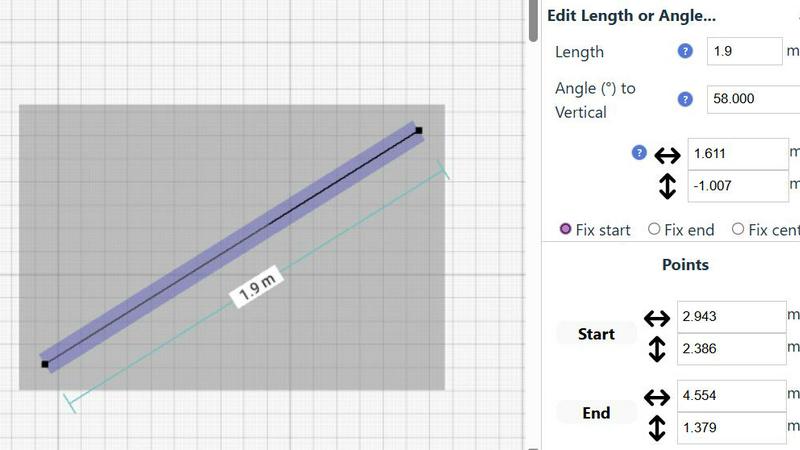
SimpleDraw provides precise measurements and smart alignment features that ensure your drawings are accurate and to scale. This capability is crucial for creating detailed and reliable plans, whether for a simple room layout or a complex renovation project.
Specialized Floor Plan Creator
With a dedicated Floor Plan Mode, SimpleDraw allows you to create detailed floor plans complete with walls, doors, windows, and furniture. This feature is tailored for users who want to visualize their spaces accurately before making any physical changes.
Smart Alignment System
The smart alignment system assists users in positioning points and lines exactly where needed. By providing visual cues, it helps ensure that your drawings are precise, and if adjustments are necessary, you can zoom in for greater accuracy.
Comprehensive Measurement System
SimpleDraw features a comprehensive measurement system that offers fine controls over which measurements are displayed. You can choose between metric or standard US units, and contextual measurements are dynamically shown as you work, providing clarity and precision at every step.
Use Cases
dmaya
Agency Design Pitches & Prototyping
Agencies can use dmaya to dramatically speed up their client pitch and discovery phase. During a sales call, you can quickly generate live design concepts based on the client's description. This allows you to present multiple visual directions in hours instead of weeks, impressing clients and winning more business by showcasing tangible ideas immediately.
Product Team Ideation & Alignment
Product managers and teams can use dmaya to explore UI concepts and user flows before committing engineering resources. It enables rapid prototyping to validate ideas, gather internal stakeholder buy-in, and ensure everyone is aligned on the visual direction and user experience before a single line of production code is written.
Freelancer Project Delivery
Freelancers and solo designers can leverage dmaya to take on more client work without increasing their hours. The AI handles the initial heavy lifting and tedious revisions, allowing you to deliver high-quality, client-ready designs faster. This efficiency enables you to increase your project throughput and potentially charge more for your accelerated, AI-enhanced service.
Design-Development Handoff Preparation
dmaya bridges the gap between design and development teams. Designers can create, iterate, and get final sign-off on visuals. Then, by exporting the clean code blueprint, they provide developers or AI coding agents with a perfect, unambiguous reference. This reduces misinterpretation, speeds up development, and ensures the final build matches the approved design exactly.
SimpleDraw
Kitchen & Bathroom Floor Plans
When planning a kitchen or bathroom renovation, SimpleDraw allows you to create accurate floor plans that visualize layouts before any work begins. This helps ensure your design meets your needs and fits the space effectively.
Room Layouts & Furniture Planning
If you are redesigning a bedroom, living room, or office, SimpleDraw makes it easy to see how furniture will fit within the space. You can experiment with different layouts to find the perfect arrangement without any physical effort.
House & Apartment Plans
SimpleDraw enables you to create complete floor plans for your home or rental listings. This feature is invaluable for space planning, helping you visualize how different areas of your house will work together before you start any renovations.
Community-Driven Development
By joining SimpleDraw's community, you can contribute to its ongoing development. User feedback shapes future features, ensuring that the tool evolves based on the needs and requests of its users, fostering a collaborative environment.
Overview
About dmaya
dmaya is an AI-powered design platform built specifically for professional teams, agencies, and freelancers who need to design before they code. It solves a critical gap in the modern workflow: while many AI tools jump straight to generating code, dmaya gives you the essential visual design step first. This allows you to make intentional creative decisions, catch problems early, and get full client alignment before any development begins. You simply describe your vision in plain language—like a SaaS dashboard or a mobile app flow—and dmaya's AI agent generates polished, professional UI screens in seconds. The magic continues as you chat with the AI to iterate: ask it to change colors, swap layouts, or adjust typography, and every change happens instantly. Once the design is perfect, you can share a preview link with clients for feedback and approval, a process that takes minutes instead of days. Finally, export your approved designs as clean HTML, CSS, and JS code, ready to hand off to AI coding agents like Cursor or Claude Code to build in React, Next.js, Flutter, or any other framework. dmaya is the design-first platform for teams that need to present, approve, and ship with confidence.
About SimpleDraw
SimpleDraw is your ultimate online solution for creating precise and accurate scale drawings effortlessly. This free tool combines the traditional feel of pen and paper with the advanced capabilities of digital design, making it perfect for casual users, DIY enthusiasts, and homeowners alike. Whether you are sketching out a new furniture arrangement, planning a garden layout, or preparing for a home renovation, SimpleDraw simplifies the process by providing an intuitive interface that is easy to navigate. With its main value proposition of offering professional-grade accuracy and a suite of useful features, SimpleDraw eliminates the complexities often associated with professional CAD software. It runs seamlessly in your web browser, requiring no downloads, installations, or sign-ups. You can dive right into creating your drawings with just a few clicks, transforming your ideas into clear, scaled plans without the usual headaches.
Frequently Asked Questions
dmaya FAQ
Who is dmaya built for?
dmaya is purpose-built for professional design workflows used by agencies, in-house product teams, and freelancers. It's perfect for anyone who needs to create, present, and iterate on visual UI designs with clients and stakeholders before moving into the development phase. It's not aimed at solo enthusiasts who want to skip design and go straight to code.
How does the AI design iteration work?
You iterate on your designs by chatting with dmaya's AI agent in natural language. Simply type your request into the chat panel, such as "change the font to Inter," "use a warmer color palette," or "add a pricing table below the header." The AI interprets your instruction and applies the change to your design in real-time, allowing for a fluid and intuitive creative process.
Can clients really review designs without an account?
Yes, absolutely! One of dmaya's key features is the ability to generate a shareable preview link for any project. You send this link to your client or stakeholder, and they can view the design in their browser, leave comments, and provide feedback without ever needing to create an account or log in. This makes the feedback loop incredibly simple and fast.
What code can I export, and how do I use it?
dmaya exports your final designs as clean, production-ready HTML, CSS, and JavaScript. This code represents the visual structure and style of your UI. To turn it into a functional application, you hand this code to an AI coding agent (like Cursor or Claude Code) or a developer, who can use it as the perfect reference to build the interface in any modern framework like React, Next.js, or Flutter.
SimpleDraw FAQ
How do I start using SimpleDraw?
Getting started with SimpleDraw is simple. Just visit the website, and you can begin drawing immediately without any downloads or sign-ups.
Is SimpleDraw really free to use?
Yes, SimpleDraw is completely free. There are no hidden fees or subscriptions, allowing you to use all features without any cost.
Can I save my drawings?
Yes, SimpleDraw allows you to save your drawings directly in your web browser. You can revisit and edit them anytime without losing your progress.
What types of projects can I create with SimpleDraw?
You can create a wide range of projects, including floor plans for homes, room layouts, garden designs, and even furniture arrangements. Its versatility makes it suitable for various DIY and planning needs.
Alternatives
dmaya Alternatives
dmaya is an AI-powered vibe design platform that helps agencies, teams, and freelancers create professional UI designs through conversation. It sits in the design tools category, focusing on the crucial visual design step before coding begins. Users often explore other options to find a tool that better fits their specific budget, required feature set, or preferred platform compatibility. When looking for a different solution, it's important to consider your primary goal. Do you need more advanced prototyping, deeper integration with other software, or a different approach to AI assistance? Evaluating tools based on your team's workflow, collaboration needs, and final output requirements will lead you to the best fit. The ideal alternative should streamline your process from initial idea to client-approved design and developer-ready assets. Focus on how a tool handles iteration, feedback, and handoff to ensure it saves time and reduces friction for your entire team.
SimpleDraw Alternatives
SimpleDraw is a user-friendly online tool designed for creating accurate scale drawings and floor plans. It stands out in the design tools category as a resource for casual users, DIY enthusiasts, and homeowners who seek to visualize their projects without the steep learning curve typically associated with professional CAD software. Users often seek alternatives to SimpleDraw due to various reasons, including the need for additional features, platform compatibility, or even pricing concerns. When selecting an alternative, consider factors such as ease of use, the range of functionalities offered, and whether the tool meets your specific design needs, ensuring it aligns with your project goals and workflow preferences.