ProcessBankStatement vs Tailride
Side-by-side comparison to help you choose the right tool.

ProcessBankStatement
Instantly turn your PDF bank statements into clean, ready-to-use CSV files with fast, secure, and accurate processing.
Last updated: March 19, 2026

Tailride
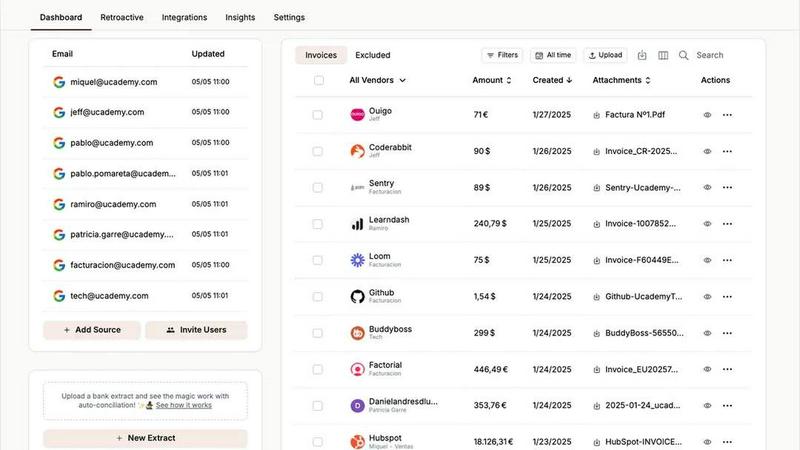
Tailride automates invoice and receipt management from your inbox, saving you hours and keeping your finances organized.
Last updated: February 26, 2026
Visual Comparison
ProcessBankStatement

Tailride
Feature Comparison
ProcessBankStatement
Universal PDF Support
ProcessBankStatement handles any PDF bank statement you throw at it. This includes both text-based PDFs downloaded directly from your online banking portal and scanned image PDFs of physical paper statements. You don't need to worry about file type; our smart parsing engine is designed to extract data accurately from both, making it a truly versatile tool for all your documents.
Blazing Fast Conversion
Say goodbye to long waits. Our intelligent parsing engine works in moments, converting most standard bank statements in mere seconds. This incredible speed transforms a task that used to take 30 minutes of manual entry into a process that finishes before your coffee gets cold, dramatically boosting your productivity and workflow efficiency.
High-Volume & Batch Processing
Built to handle real-world workloads, ProcessBankStatement supports multi-page statements and batch uploads. This is perfect for professionals like accountants and bookkeepers who need to process several months or even years of statements for a client at once. You can upload multiple files and convert them efficiently, saving immense time on high-volume tasks.
Bank-Grade Accuracy & Security
We prioritize the integrity and safety of your data. The platform boasts a 99%+ accuracy rate, delivering clean, structured data you can trust for critical tasks like bookkeeping and financial analysis. Your files are encrypted during transfer, and you maintain full control, with the ability to delete your data from our servers at any time for complete peace of mind.
Tailride
Inbox Scanning
Tailride's inbox scanning feature allows you to effortlessly locate any invoice in your email inbox within seconds. It connects directly to your email client, ensuring that all incoming invoices are monitored and organized without the need for manual forwarding. This feature supports multiple email providers, including Gmail and Outlook, providing a comprehensive solution for managing invoices.
Online Portals
With Tailride's online portals feature, users can extract invoices from any website with ease. This functionality saves time by allowing business owners to focus on their core responsibilities, while the platform takes care of gathering invoices from various online sources. This is especially useful for companies that handle transactions across multiple platforms.
AI Processing
Tailride utilizes advanced AI processing to intelligently recognize and categorize invoices and receipts. This feature automates the data entry process, allowing businesses to reduce manual work significantly. Customizable AI rules enable users to tailor the categorization process according to their unique business needs, ensuring that all financial documents are organized efficiently.
Reconciliation
The reconciliation feature in Tailride simplifies the process of matching transactions with invoices. Users can easily identify missing documents and ensure that all financial records are accurate. This feature is particularly valuable during tax season or quarterly reviews, as it helps maintain comprehensive and organized financial documentation.
Use Cases
ProcessBankStatement
Streamlining Bookkeeping & Accounting
Accountants and bookkeepers can instantly convert client-supplied PDF bank statements into CSV format for seamless import into QuickBooks, Xero, or other accounting software. This eliminates manual data entry errors, speeds up the monthly close process, and allows professionals to handle more clients efficiently by reclaiming hours spent on tedious transcription work.
Small Business Financial Management
Small business owners can quickly organize their transaction data from bank statements for cash flow analysis, expense tracking, and tax preparation. Instead of manually copying data into spreadsheets, they can upload their statement and get a clean CSV file ready for Excel or Google Sheets in seconds, making financial management simpler and less time-consuming.
Accelerating Loan Application Reviews
Loan officers and underwriters who need to review bank statements as part of an application process can use this tool to quickly extract transaction data. Converting statements to a structured spreadsheet format allows for faster analysis of income, expenses, and cash flow patterns, significantly reducing the turnaround time for loan approvals.
Simplifying Audit and Reconciliation Tasks
Auditors, tax preparers, and financial analysts can use ProcessBankStatement to quickly convert piles of bank statement PDFs into a uniform, digital format. This makes it easy to sort, filter, and reconcile transactions across accounts or periods, turning a daunting manual data compilation task into a streamlined, automated process.
Tailride
For Accountants
Accountants managing multiple clients can greatly benefit from Tailride's capabilities. The platform enables them to automatically capture and organize invoices from various email accounts, reducing the time spent on manual data entry and allowing them to focus on delivering quality service to their clients.
For Small Business Owners
Small business owners can use Tailride to streamline their expense management processes. By automating invoice extraction and categorization, they can save time and reduce the stress of managing financial documents, allowing them to concentrate on growing their business.
For Finance Teams
Finance teams in larger organizations can leverage Tailride to monitor incoming invoices and ensure that all documents are accounted for. This helps prevent chaos during busy periods, such as the end of the month or quarter, by keeping all invoices organized and accessible.
For Remote Teams
Tailride is an excellent solution for remote teams who need to manage invoices collaboratively. By allowing multiple users to connect their inboxes, Tailride ensures that all team members have access to the necessary documents, facilitating better communication and workflow.
Overview
About ProcessBankStatement
ProcessBankStatement is your intelligent, web-based solution designed to eliminate the tedious and error-prone task of manually entering data from bank statements. It instantly converts messy PDF bank statements—whether they are digital files from your online bank or scanned images of paper statements—into clean, organized CSV files. This tool is built specifically for finance professionals, accountants, bookkeepers, small business owners, and anyone who regularly works with transaction data. The core value is simple: reclaim hours of your valuable time each week. Instead of painstakingly typing numbers, you can simply upload a PDF and get a spreadsheet-ready file in seconds. The platform is secure, easy to use, and supports statements from all major U.S. banks like Chase, Bank of America, and Wells Fargo, as well as international banks. With ProcessBankStatement, you automate a frustrating manual process, ensuring remarkable accuracy and putting you in full control of your financial data, ready for import into QuickBooks, Excel, or any other analysis software.
About Tailride
Tailride is an innovative AI-powered accounting automation platform designed to streamline the invoicing process for businesses and accountants alike. By seamlessly connecting to your email inbox, Tailride automatically detects and extracts invoices and receipts from emails and attachments, eliminating the need for manual data entry. This platform is particularly beneficial for small to medium-sized enterprises and accounting firms with multiple clients, as it saves hundreds of hours by automating tedious tasks. With features such as intelligent document recognition, a user-friendly Chrome extension for quick invoice extraction from numerous platforms like Amazon and Meta Ads, and customizable AI rules for automatic categorization, Tailride simplifies the accounting workflow. Its integration capabilities with popular platforms like QuickBooks, Xero, and Google Drive further enhance its utility, making it an essential tool for businesses looking to improve efficiency and accuracy in their financial processes.
Frequently Asked Questions
ProcessBankStatement FAQ
What file types are supported?
Currently, ProcessBankStatement supports PDF bank statements. This includes both text-based PDFs (the kind you download from your online bank) and scanned image PDFs (created from a physical paper statement). We do not support other file formats like JPG or DOCX directly; they should be saved as a PDF first.
Is there a free trial available?
Yes, absolutely! You can try ProcessBankStatement without any commitment. Guest users can process up to 3 pages per day for free. When you register for a free account, you immediately get upgraded to 5 free pages per day, giving you more capacity to test the tool with your actual statements.
Is my financial data secure?
Your security is our top priority. All files are encrypted during the upload and download process (in transit). We are committed to data privacy; you retain full control over your information and can permanently delete your uploaded statements and converted files from your dashboard at any time.
Do you support international bank statements?
Yes, we do! While we proudly support all major U.S. banks, our parsing technology is designed to work with bank statements from financial institutions all over the world. You can upload PDFs from international banks, and our engine will work to accurately extract the transaction data for you.
Tailride FAQ
How does Tailride connect to my email?
Tailride connects to your email through a secure integration, allowing the platform to monitor your inbox for incoming invoices. It works with major email clients like Gmail, Outlook, and IMAP, ensuring a seamless experience.
Can I extract invoices from physical receipts?
Yes, Tailride allows users to handle physical receipts by taking pictures and sending them to the platform via Telegram or WhatsApp. The system will process these receipts and add them to your dashboard for easy management.
Is there a limit to the number of users I can invite?
No, Tailride allows you to link as many users as you want. This feature is particularly useful for teams, as it enables all members to keep track of their expenses and invoices in a collaborative environment.
What platforms does the Chrome extension support?
The Tailride Chrome extension supports invoice extraction from over 20 platforms, including popular services like Amazon, Meta Ads, Adobe, Notion, Microsoft, and ChatGPT, making it easy to gather invoices from various sources.
Alternatives
ProcessBankStatement Alternatives
ProcessBankStatement is a web-based tool in the business and finance category that converts PDF bank statements into organized CSV files. It automates manual data entry, saving time for professionals who handle financial records. People often explore different options for this task to find a solution that fits their specific budget, required features, or preferred platform. Some may need different export formats, integration with other software, or a different pricing model. When evaluating other tools, consider key factors like accuracy, security, processing speed, and compatibility with your bank. The right choice should reliably turn your statements into usable data without complicating your workflow.
Tailride Alternatives
Tailride is an innovative AI-powered accounting automation platform that helps users manage invoices and receipts with ease. It belongs to the Business & Finance category, where it streamlines financial processes by automatically detecting and extracting important documents from emails and web portals. Users are increasingly seeking alternatives to Tailride for various reasons, including pricing considerations, specific feature sets, and compatibility with their existing platforms. It's essential to evaluate alternatives based on factors such as ease of use, integration capabilities, and the specific automation features they offer to ensure they meet your business needs. When choosing an alternative to Tailride, it's crucial to consider what specific functionalities are most important to you. Look for platforms that offer seamless integrations with your current tools, customizable automation rules, and comprehensive document management features. Additionally, pricing models and customer support can significantly influence your decision, so make sure to assess these aspects before making a choice. Finding the right alternative can enhance your financial management experience and improve overall efficiency.