Print Chat vs Zignt
Side-by-side comparison to help you choose the right tool.

Print Chat
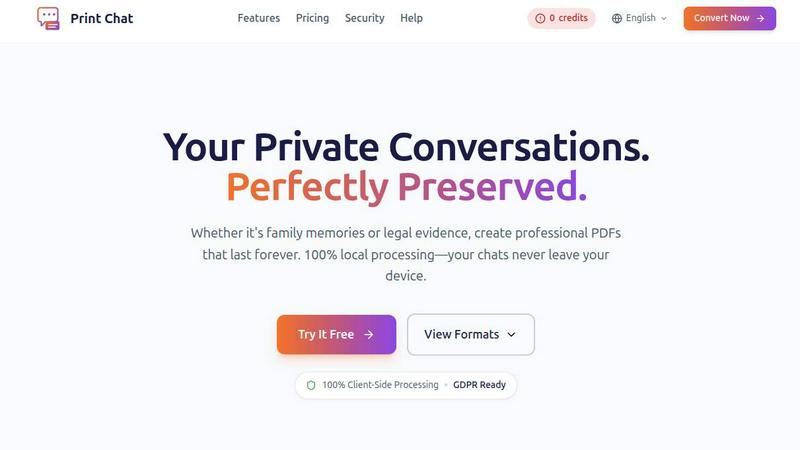
Convert your WhatsApp chats to secure, professional PDFs instantly, all without leaving your device.
Last updated: February 26, 2026

Zignt simplifies contract creation and signing with reusable templates, automated reminders, and bank-level security.
Last updated: March 1, 2026
Visual Comparison
Print Chat
Zignt

Feature Comparison
Print Chat
100% Client-Side Processing
Print Chat operates entirely within your browser, meaning all processing happens locally. Your files remain on your device, ensuring maximum privacy and compliance with regulations like GDPR.
Unlimited File Size
Unlike many other tools that impose strict limits on file sizes, Print Chat allows you to process files of any size, from 100MB to 50GB. This is perfect for users with extensive chat histories, ensuring that there are no freezes or crashes during the conversion process.
Legal & Evidence Ready
The tool preserves exact timestamps and sender information, formatting the final PDFs specifically for legal and court submissions. This makes it an indispensable resource for legal professionals needing to present conversations as evidence.
Voice & Video Embeds
Print Chat enhances your PDFs by embedding clickable links to voice messages and videos directly within the document. This feature ensures that the context of conversations is preserved, providing a richer experience when reviewing the material.
Zignt
Create Templates & Reuse Forever
Zignt allows you to create contract templates that can be reused indefinitely. By adding fields such as date fields, text boxes, and signature blocks to your documents, you can build a template just once and use it as many times as you need. This feature saves significant time and effort, allowing you to focus on more important tasks.
Seamless Sharing Options
With Zignt, you can share contracts effortlessly via email or through a unique Zignt Link. This feature acts like a payment link but for contracts, making it easy to send documents for signing. Automated reminders ensure that all parties stay informed about pending signatures, enhancing the signing experience.
Instant Document Delivery
Once all parties have signed the contract, Zignt automatically sends the executed PDF to everyone involved via email. This feature not only saves time but also includes essential compliance data such as timestamps, IP addresses, and signer details, ensuring legal protection and traceability.
AI-Powered Contract Management
Zignt's AI capabilities help you never miss a contract renewal again. The system automatically tracks renewal dates and sends timely reminders before contracts expire. This proactive approach allows you to stay organized and ahead of deadlines without the need for manual tracking.
Use Cases
Print Chat
Legal Documentation
Lawyers can use Print Chat to convert important client conversations into court-ready documents. The precision in timestamps and sender info ensures that the output meets legal standards for admissibility.
Personal Archiving
Individuals can preserve family memories by converting significant conversations into beautiful PDFs. This is especially useful for maintaining cherished records of messages, voice notes, and photos.
Workplace Investigations
HR professionals can utilize Print Chat to document group chats related to workplace issues, such as harassment claims. The clear transcript layout facilitates easy reference during investigations.
Language Translation
Print Chat supports global character sets, making it an ideal choice for users who need to convert multilingual chats into a standard PDF format. This feature is essential for maintaining the integrity of conversations across different languages.
Zignt
Streamlining Onboarding Processes
For HR teams, Zignt can simplify the onboarding process by allowing new hires to sign employment contracts electronically. This eliminates paperwork, speeds up the onboarding time, and ensures all documentation is securely stored.
Enhancing Sales Agreements
Sales teams can use Zignt to quickly send and manage sales agreements. The ability to create templates means that contracts can be customized and sent to clients in minutes, significantly reducing the time it takes to close deals.
Managing Vendor Contracts
Operations departments can benefit from Zignt by managing vendor contracts more efficiently. With the ability to track renewal dates and set reminders, teams can ensure that they never miss critical deadlines or renewals.
Facilitating Legal Document Signing
Legal teams can leverage Zignt for signing various legal documents. The platform's robust security measures and compliance with legal standards ensure that all signed documents are legally binding and securely stored.
Overview
About Print Chat
Print Chat is a revolutionary tool designed to help users convert their private conversations into professional PDF documents while ensuring complete data privacy. Whether you are a lawyer needing to preserve legal communication, or an individual looking to archive cherished family memories, Print Chat offers a 100% local processing solution that operates entirely in your browser. This means your sensitive data never leaves your device, eliminating the risks associated with third-party servers. With features tailored for legal work, such as Bates stamping and redaction tools, Print Chat ensures that your exported documents are not only secure but also formatted for court admissibility. The main value proposition is its commitment to privacy and professionalism, making it an essential tool for anyone who values their data security while needing to preserve conversations in a clean and legally compliant format.
About Zignt
Zignt is a modern, all-in-one contract management platform designed to revolutionize how businesses handle agreements. It simplifies the signing and management of contracts, making the process fast, simple, and secure. Unlike traditional methods that often involve tedious paperwork and delays, Zignt empowers teams to work smarter with powerful features. At the core of Zignt is the ability to create reusable contract templates, allowing users to send contracts repeatedly without recreating them from scratch. This is particularly valuable for modern businesses, startups, and legal teams aiming to streamline their operations. Zignt ensures seamless collaboration with secure sharing options, supports multiple signers, and offers features like auto-completion for forms and real-time document tracking. With mobile access, bank-grade security, and easy data export, Zignt guarantees that important contracts remain accessible, protected, and manageable. This makes it an ideal solution for organizations looking to eliminate the delays and costs associated with traditional contract processes.
Frequently Asked Questions
Print Chat FAQ
Is my data safe with Print Chat?
Absolutely! Print Chat processes everything locally on your device. Your conversations are never uploaded to any server, ensuring complete privacy.
Can I use Print Chat for large chat histories?
Yes, Print Chat can handle files ranging from 100MB to 50GB, making it perfect for processing extensive chat histories without any issues.
What types of files can I convert with Print Chat?
You can convert various chat formats, including WhatsApp messages and more, into professional PDFs, ensuring that all content is accurately preserved.
How does the trial work?
You can try Print Chat free of charge to see how the conversion process works. This allows you to evaluate the features and quality of the output before making a commitment.
Zignt FAQ
What types of documents can I manage with Zignt?
You can manage a wide range of documents, including contracts, agreements, and forms. Zignt's template feature allows for easy customization of any document type you may need.
Is Zignt secure for sensitive information?
Yes, Zignt employs bank-grade security measures, including 256-bit encryption and compliance with international legal standards, ensuring that all your sensitive information is protected.
Can I collaborate with my team using Zignt?
Absolutely! Zignt allows you to invite team members to collaborate on contract preparation and management. You can set permissions to control access and monitor team activity.
Do I need a credit card to start using Zignt?
No, you can start using Zignt for free without needing to provide a credit card. This allows you to explore the features and benefits before committing to a paid plan.
Alternatives
Print Chat Alternatives
Print Chat is a powerful tool designed for converting WhatsApp chats to PDF files quickly and securely. As a legal-focused product, it ensures that sensitive client conversations are processed entirely offline, preserving confidentiality and maintaining compliance with attorney-client privilege. Users often seek alternatives to Print Chat for various reasons, including pricing concerns, feature sets, or compatibility with different platforms. When considering alternatives, it's essential to evaluate factors like data security, ease of use, and specific features that cater to your needs. Look for options that prioritize privacy, especially if you're handling sensitive information, and assess whether the alternative offers the same level of functionality as Print Chat, such as Bates stamping and redaction tools.
Zignt Alternatives
Zignt is a modern contract management platform that streamlines the process of creating, signing, and managing agreements. It falls under the category of Business Intelligence tools, focusing on efficiency and security in contract workflows. Users often seek alternatives to Zignt for various reasons, such as exploring different pricing structures, feature sets, or platform compatibility that better suits their specific needs. When choosing an alternative, it's essential to consider factors like ease of use, security features, customer support, and the ability to integrate with existing systems to ensure a smooth transition and optimal functionality for your business.