Changeflow vs MeetingMind
Side-by-side comparison to help you choose the right tool.

Changeflow
Changeflow delivers AI-driven insights on crucial market changes, ensuring you never miss important updates again.
Last updated: March 4, 2026

MeetingMind
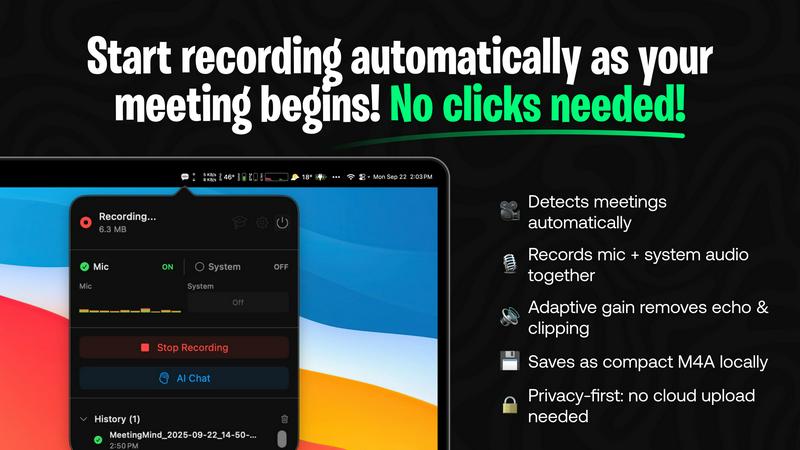
MeetingMind automatically records and transcribes Zoom meetings, ensuring you capture every important detail.
Last updated: March 1, 2026
Visual Comparison
Changeflow

MeetingMind
Feature Comparison
Changeflow
AI-Powered Monitoring
Changeflow uses advanced AI technology to intelligently monitor web pages, ensuring users receive only the most relevant updates. This feature reduces noise and false alerts, allowing teams to focus on what truly matters.
Natural Language Setup
Setting up Changeflow is a breeze. Users can simply describe what they want to track in plain English, without any technical jargon or complex configurations. This user-friendly approach makes it accessible to everyone.
Customized Summaries
With Changeflow, users receive AI-generated summaries that highlight what has changed and explain why it matters to their specific business needs. This feature saves time and enhances decision-making by providing clarity.
Advanced Anti-Blocking Technology
Changeflow employs sophisticated anti-blocking strategies to access content on challenging websites. This means users can rely on it to monitor updates even on sites that may restrict access to automated tools.
MeetingMind
Automatic Detection
MeetingMind automatically detects your Zoom meetings, meaning there are no clicks needed to start recording. This feature allows you to focus on the conversation without worrying about missing any important moments.
AI Assistant
Choose your preferred AI assistant between local Ollama or cloud-based OpenRouter for generating insightful summaries and highlights from your meetings. This flexibility ensures that you get the best assistance tailored to your needs.
Markdown Export
After your meetings, MeetingMind provides AI-generated summaries and transcripts that are saved as formatted markdown files. This makes it easy to share and reference key points with your team.
100% Private
MeetingMind processes all data locally on your Mac, ensuring that your meetings never leave your device. This commitment to privacy allows you to capture and store sensitive information securely without concerns about external data breaches.
Use Cases
Changeflow
Competitor Pricing Tracking
Businesses can use Changeflow to keep an eye on competitor pricing strategies. By monitoring specific web pages, teams can receive timely updates on price changes, helping them to stay competitive in the market.
Regulatory Change Monitoring
Legal teams and compliance officers can monitor regulatory changes by following relevant government websites and publications. Changeflow ensures that they are promptly informed of any updates, allowing for swift adjustments.
News Mentions Tracking
Public relations and marketing teams can track news mentions of their company or industry. Changeflow provides insights into how the brand is perceived, enabling teams to respond proactively to public sentiment.
Market Movement Monitoring
Changeflow is useful for financial analysts and business strategists who need to keep tabs on market movements. By monitoring key financial news sites and reports, they can make informed decisions based on real-time data.
MeetingMind
Team Meetings
In team meetings, MeetingMind helps capture crucial discussions and decisions, allowing team members to stay aligned on projects. The interactive notes make it easy to revisit important topics.
Client Calls
During client calls, MeetingMind ensures that all details are accurately recorded. This is perfect for following up on commitments and maintaining a professional relationship with clients.
Brainstorming Sessions
In brainstorming sessions, MeetingMind can capture creative ideas as they flow. The ability to access these notes later allows for continuous innovation and development of concepts discussed.
Performance Reviews
For performance reviews, MeetingMind provides a structured way to document feedback and discussions. This ensures that both employees and managers have clear records of what was discussed and agreed upon.
Overview
About Changeflow
Changeflow is an innovative web monitoring tool designed to help businesses stay informed about vital changes on the internet. It goes beyond basic monitoring by not just alerting users when something has changed, but by providing clear and concise summaries of what those changes mean. The platform employs advanced AI technology to read web pages, understand the context, and filter out irrelevant information, ensuring that users are only notified of what truly matters to them. Changeflow is ideal for various professionals, including business teams tracking competitor pricing, legal librarians monitoring court dockets, and compliance teams keeping an eye on regulatory updates. With a simple setup process requiring only a URL and a brief description of what to monitor, users can quickly start receiving valuable insights. Changeflow’s sophisticated features, including shared workspaces and API access, make it an essential tool for any organization looking to enhance their web monitoring capabilities.
About MeetingMind
MeetingMind is a revolutionary intelligent meeting assistant designed to enhance the way you capture and manage your meetings effortlessly. Tailored for professionals, team leaders, and anyone who regularly attends meetings, this powerful tool automatically detects and records your Zoom meetings without any manual intervention. By leveraging on-device AI technology, MeetingMind ensures that you never miss a crucial detail again, transforming your meetings into interactive and searchable notes. The result is a seamless experience where you can focus entirely on the conversation while MeetingMind handles the organization and documentation of your discussions. With real-time, speaker-attributed transcripts delivered in clean markdown format, you can easily refer back to key points and important discussions whenever needed. MeetingMind prioritizes privacy with all processing done locally on your device, ensuring that your sensitive meeting data remains confidential. Say goodbye to the hassle of note-taking and welcome a smarter way to manage your meetings.
Frequently Asked Questions
Changeflow FAQ
How does Changeflow monitor web pages?
Changeflow monitors web pages by using an AI agent that checks for updates based on user-defined parameters. It navigates to the pages, assesses changes, and provides concise summaries of what is relevant.
Is it easy to set up Changeflow?
Absolutely! Users only need to provide a URL and a brief description of what they want to track. There is no complicated setup process, making it easy for anyone to get started.
Can I collaborate with my team using Changeflow?
Yes, Changeflow offers shared workspaces that allow teams to collaborate effectively. This feature ensures everyone is on the same page regarding crucial updates and changes.
What type of support does Changeflow offer?
Changeflow provides comprehensive support, including email and chat assistance. Users can also benefit from onboarding calls and fast troubleshooting to resolve any issues quickly.
MeetingMind FAQ
How does MeetingMind automatically detect my meetings?
MeetingMind uses intelligent algorithms to recognize when you join a Zoom meeting, automatically starting the recording process without requiring any input from you.
Is my data safe with MeetingMind?
Yes, MeetingMind processes all information locally on your Mac, meaning your data is never uploaded to the cloud. This privacy-first approach ensures your meeting details remain confidential.
Can I access my transcriptions and summaries after the meeting?
Absolutely! After your meeting, you will receive a transcription and summary in markdown format, which you can easily access and share with your team.
What should I do if I have issues with the app?
If you encounter any problems with MeetingMind, you can reach out to our support team through the app or visit our website for assistance. We are here to help you resolve any issues promptly.
Alternatives
Changeflow Alternatives
Changeflow is an AI-driven tool that specializes in providing market and competitor insights by monitoring changes on web pages. It falls within the Productivity & Management category, catering to businesses and teams seeking to stay updated on critical information without the hassle of manual tracking. Users often seek alternatives for various reasons, such as pricing concerns, the desire for additional features, or the need for compatibility with specific platforms. When choosing an alternative, it's essential to consider the effectiveness of the tool, its ease of use, and the specific insights it can provide to meet your unique requirements. --- [{"question": "What is Changeflow?", "answer": "Changeflow is an AI-driven tool that monitors web pages for changes, providing users with detailed insights on what matters most."}, {"question": "Who is Changeflow for?", "answer": "Changeflow is designed for business teams, legal librarians, and compliance teams who need to track market movements, regulatory changes, and competitor information."}, {"question": "Is Changeflow free?", "answer": "The provided content does not specify whether Changeflow offers a free version."}, {"question": "What are the main features of Changeflow?", "answer": "Main features include tracking competitor pricing, monitoring regulatory changes, API access, and shared workspaces for team collaboration."}]
MeetingMind Alternatives
MeetingMind is an innovative intelligent meeting assistant designed to enhance productivity in the realm of virtual meetings. It automatically records and transcribes Zoom meetings, ensuring that users never miss critical details. As professionals increasingly rely on digital communication, many users seek alternatives to MeetingMind for various reasons, including pricing options, feature sets, and compatibility with different platforms. When exploring alternatives, it's essential to consider factors such as the ease of use, the quality of audio and transcription, additional features like AI summarization, and the overall privacy and security of the tool. Each user's needs may vary, so taking the time to evaluate these aspects will help you find the most suitable meeting assistant for your requirements.