MarketWrk vs Threat Watch
Side-by-side comparison to help you choose the right tool.

MarketWrk
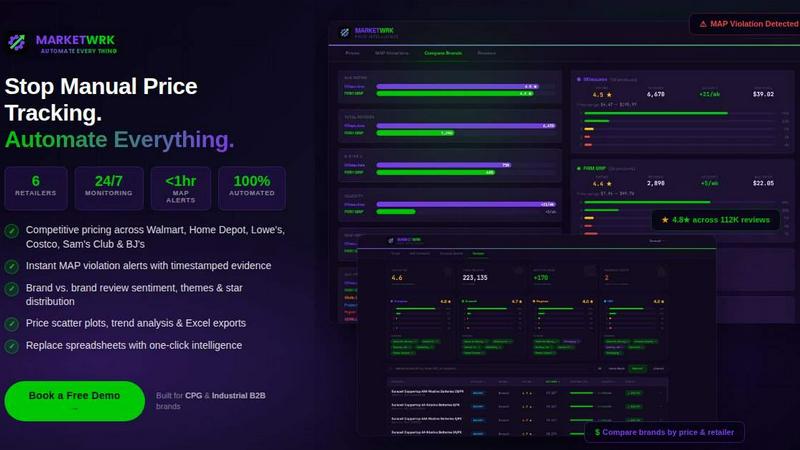
MarketWrk automates your pricing and MAP monitoring to save time and protect your brand.
Last updated: March 18, 2026

Threat Watch
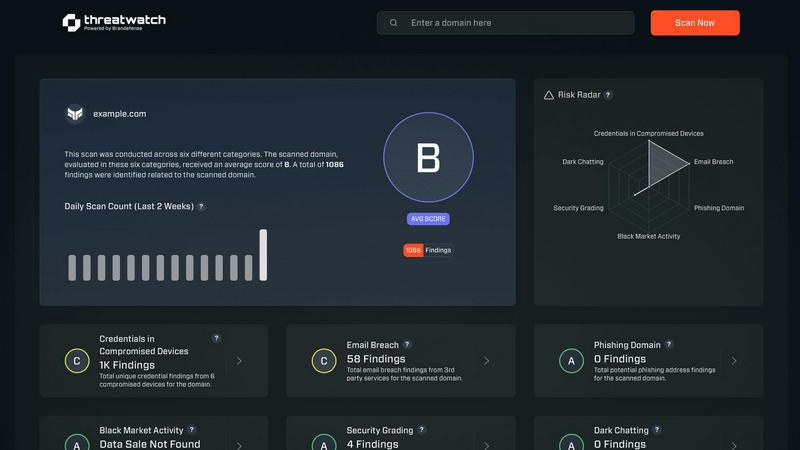
Quickly assess your cybersecurity health and get easy steps to enhance your protection against online threats.
Last updated: March 1, 2026
Visual Comparison
MarketWrk
Threat Watch
Feature Comparison
MarketWrk
Automated Retail Price Monitoring
MarketWrk automatically tracks competitor pricing across the digital shelf, updating data continuously so you always have the latest information. You can monitor prices by specific zip codes to understand regional competition and see historical price trends. This feature turns raw data into actionable pricing intelligence, showing you exactly when and where competitors change their prices, all exportable to Excel with a single click.
Instant MAP Violation Detection & Alerts
Protect your brand's value and profit margins with automated Minimum Advertised Price (MAP) monitoring. MarketWrk scans all authorized and unauthorized sellers across tracked retailers and sends you an instant email notification the moment a violation occurs. This allows you to take immediate action to enforce your pricing policy, preventing brand erosion and margin loss before it impacts your business.
AI-Powered Ratings & Reviews Monitoring
Never miss a critical customer conversation. MarketWrk monitors your product reviews and Q&A sections across all major retailers. Using AI, it extracts common themes from review sentiment and alerts your team immediately when a negative review is posted or a customer asks a question. This enables you to respond quickly, improve customer satisfaction, and protect your conversion rates.
Comprehensive Brand Comparison Engine
Understand your true competitive position. This feature benchmarks your products against key competitors across every important metric: pricing, star ratings, review sentiment, and retail shelf presence. Interactive charts and indexes help you visually identify where you are winning, where you are losing, and where there is untapped market opportunity to capture more sales.
Threat Watch
Continuous Scanning
Threat Watch continuously scans your digital landscape to identify vulnerabilities and potential threats in real-time. This proactive approach ensures that you are always aware of your cybersecurity posture, allowing you to take immediate action when necessary.
Compromised Credentials Monitoring
With Threat Watch, you can monitor for compromised credentials across various platforms. If any of your accounts are found to have leaked passwords, you will be alerted promptly, enabling you to take swift action to secure your accounts.
Dark Web Monitoring
Threat Watch dives deep into the dark web to uncover any mentions or data leaks related to your organization. This feature helps you stay one step ahead of cybercriminals by identifying potential threats before they escalate.
Guided Risk Remediation
Not only does Threat Watch identify risks, but it also provides guided steps to resolve them. This feature is particularly useful for teams without dedicated security experts, offering clear instructions on how to enhance your cybersecurity measures effectively.
Use Cases
MarketWrk
Enforcing MAP Pricing Policies
Brands use MarketWrk to automatically monitor online retailers for compliance with their Minimum Advertised Price (MAP) policy. Instead of manually searching for violations, teams receive instant alerts when a price drops below the set floor. This allows for rapid enforcement, protecting brand equity and ensuring all retailers compete on a level playing field, which maintains healthy profit margins for everyone.
Analyzing Competitor Price Movements
Sales teams and product managers leverage MarketWrk to connect the dots between competitor actions and their own sales data. By studying detailed price history charts, they can see exactly when a competitor ran a promotion or cut prices. This intelligence helps explain sudden sales dips or peaks and informs smarter pricing and promotional strategies to stay competitive.
Managing Online Reputation & Customer Feedback
Customer service and marketing teams utilize the ratings and reviews monitoring to safeguard brand reputation. Instant alerts on negative reviews or unanswered questions allow them to respond proactively. Addressing concerns quickly can turn a negative experience into a positive one, improve product pages, and ultimately boost conversion rates and customer loyalty.
Conducting Competitive Market Analysis
Product development and strategy teams use the Brand Comparison Engine to perform in-depth competitive analysis. They benchmark their product portfolio against competitors to identify pricing gaps, areas of strength in customer ratings, and overall market positioning. This data is crucial for making informed decisions about new product launches, packaging, and overall brand strategy.
Threat Watch
Business Owner Protection
As a business owner, protecting your digital assets is crucial. Threat Watch allows you to monitor online mentions of your business, compromised credentials, and potential vulnerabilities, ensuring your company's reputation and data remain secure.
IT Team Support
IT teams can leverage Threat Watch to gain insights into the security status of their organization. By utilizing its automated assessments, IT professionals can focus on managing other critical tasks while being alerted to any emerging security risks.
Security Team Efficiency
Security teams can enhance their efficiency with Threat Watch's comprehensive scanning and reporting capabilities. This tool helps teams prioritize their efforts by providing a clear picture of the most significant threats to address first.
Compliance Assurance
Organizations that need to comply with industry regulations can use Threat Watch to demonstrate their commitment to cybersecurity. By continuously monitoring and addressing vulnerabilities, businesses can maintain compliance and avoid potential penalties.
Overview
About MarketWrk
MarketWrk is your all-in-one command center for brand management, specifically designed for CPG (Consumer Packaged Goods) and industrial B2B brands. If you're tired of manually checking prices, hunting for MAP violations, and guessing why sales change, MarketWrk automates it all for you. It continuously monitors your products and competitors across major retailers like Walmart, Home Depot, Lowe's, Costco, and more. The platform gathers critical data on pricing, inventory, ratings, and reviews, then presents it in an easy-to-understand, dark-mode dashboard with interactive charts. This means you can stop wasting hours on spreadsheets and start making smart, data-driven decisions to protect your margins and grow your brand. The best part? MarketWrk delivers powerful enterprise-level insights without the enterprise-level cost or complexity, getting you set up and seeing value in days, not months.
About Threat Watch
Threat Watch is your comprehensive cybersecurity health dashboard, crafted to provide clear insights and control over your organization's digital safety. In an era where online threats proliferate from various sources—such as leaked passwords, unpatched software, and even mentions on the dark web—having a robust defense is essential. Threat Watch makes safeguarding your organization easier by continuously scanning and analyzing your digital assets, vulnerabilities, and exposures across the internet. This tool is tailored for business owners, IT managers, and security teams who may lack dedicated cybersecurity expertise. Its primary value lies in offering real-time insights and automated assessments, empowering you to shift from feeling overwhelmed to being proactive. With Threat Watch, you can swiftly identify your most pressing risks, understand their implications, and receive guided steps to mitigate them, all from a single, user-friendly platform. Think of it as a regular check-up for your company's online health, helping you prevent security breaches before they occur.
Frequently Asked Questions
MarketWrk FAQ
What retailers does MarketWrk monitor?
MarketWrk monitors major retailers critical for CPG and B2B brands, including Walmart, Home Depot, Lowe's, Costco, Sam's Club, BJ's, and Ace Hardware. The platform tracks pricing, inventory, and reviews across these retailers' digital shelves, giving you a comprehensive view of your online market presence.
How quickly can we get started with MarketWrk?
Unlike complex enterprise tools that can take months (or quarters) to implement, MarketWrk is designed for a fast setup. You can be up and running, tracking your products and receiving data, in a matter of days. This quick onboarding means you can start gaining valuable insights and protecting your brand almost immediately.
How does MarketWrk handle data exports and reporting?
MarketWrk makes data easy to use. All the competitive pricing, violation alerts, and review data from the dashboard can be exported directly to Microsoft Excel with just one click. This allows your team to easily incorporate the intelligence into their own reports, presentations, or further analysis without any manual copy-pasting.
Is MarketWrk suitable for small brands or only large enterprises?
MarketWrk is built to be accessible. While it is trusted by large national brands like Duracell, it is specifically priced and designed to be a fraction of the cost of traditional enterprise solutions. This makes its powerful automation and intelligence features available to growing brands that need professional-grade tools without the prohibitive cost or complexity.
Threat Watch FAQ
What types of threats does Threat Watch monitor?
Threat Watch monitors a variety of threats, including compromised credentials, phishing addresses, breached accounts, and dark web content related to your organization.
How does Threat Watch help non-expert users?
Threat Watch is designed with user-friendliness in mind. It provides clear insights and guided steps for remediation, making it accessible even for users without extensive cybersecurity knowledge.
Can Threat Watch integrate with other security tools?
Threat Watch is designed to complement existing security measures and can be integrated with other tools to create a more robust cybersecurity posture for your organization.
Is there a free trial available for Threat Watch?
Yes, Threat Watch offers a free scan to help you uncover your cybersecurity health. This allows you to experience the benefits before committing to a subscription.
Alternatives
MarketWrk Alternatives
MarketWrk is a brand management platform that automates key tasks like competitive pricing, MAP monitoring, and review analysis for CPG and industrial B2B brands. It falls into the business intelligence and retail analytics category, helping brands protect their pricing and reputation across major online retailers. Users often explore alternatives for various reasons. They might need a different feature set, have budget constraints, require integration with specific software, or seek a platform tailored to a different business model or retailer network. It's a normal part of finding the perfect operational fit. When evaluating other options, focus on your core needs. Key considerations include the retailers and marketplaces covered, the depth and automation of pricing and MAP violation alerts, the quality of review sentiment analysis, the overall cost relative to value, and how quickly you can get the system up and running to start seeing data.
Threat Watch Alternatives
Threat Watch is a comprehensive cybersecurity health dashboard that helps organizations monitor and improve their digital safety. As a tool designed for business owners, IT managers, and security teams, it simplifies the complex landscape of cybersecurity by providing real-time insights and automated assessments of an organization's security posture. Users often seek alternatives to Threat Watch for reasons such as pricing, specific feature sets, or compatibility with existing platforms. When considering alternatives, look for tools that offer a clear overview of your cybersecurity health, real-time monitoring capabilities, and easy-to-understand metrics. Additionally, ensure that the alternative you choose aligns with your organization's specific needs, whether that's budget constraints or specific security focus areas. Finding the right fit can help you maintain control over your cybersecurity without feeling overwhelmed.