HeyVid vs Learniverse
Side-by-side comparison to help you choose the right tool.

HeyVid AI simplifies content creation by generating high-quality videos and images from text and images in just a few clicks.
Last updated: April 4, 2026

Learniverse
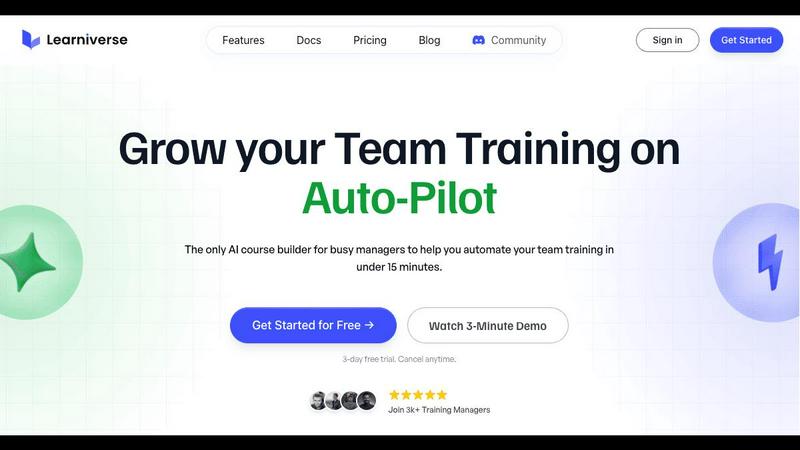
Learniverse turns your documents into automated training courses in minutes.
Last updated: February 28, 2026
Visual Comparison
HeyVid

Learniverse
Feature Comparison
HeyVid
Text to Video
HeyVid's Text to Video feature allows users to effortlessly convert written content into engaging videos. Simply input your text, and the AI will generate a professional-quality video that aligns with your narrative. This feature is perfect for creators looking to transform blog posts, articles, or social media updates into dynamic visual content.
Image to Video
With HeyVid's Image to Video functionality, you can bring your still images to life. This feature enables users to create animated videos from a series of images, making it ideal for presentations, marketing campaigns, or storytelling. The animations add an extra layer of engagement to your visuals, captivating your audience.
AI Image Generator
The AI Image Generator in HeyVid allows users to create stunning visuals from scratch. By utilizing advanced AI models, you can generate unique images based on prompts, making it a fantastic tool for graphic designers and marketers needing fresh content. The versatility of this feature ensures that your visuals stand out and resonate with your audience.
AI Voice and Music Generation
HeyVid doesn't just stop at video and images; it also offers AI-generated voiceovers and music. This feature allows users to add professional audio to their videos, enhancing the overall quality of their content. Whether you need a narration for your video or background music, HeyVid's AI tools help create a cohesive and polished final product.
Learniverse
AI-Powered Course Creation
Simply upload your existing materials like PDFs, videos, or documents, and watch as Learniverse's AI assistant automatically builds a structured course. It creates interactive lessons, generates relevant quizzes for knowledge checks, and sets up progress tracking—all without you needing any design or technical skills. You can even chat with the AI to describe a new module or process, and it will build the content for you on the fly.
Branded Academy Portal
Launch a professional and polished training hub that reflects your company's identity. Learniverse allows you to fully customize your academy with your logo, brand colors, and even your own domain. This creates a cohesive and credible learning experience for your team, moving away from generic, impersonal platforms to a portal that looks and feels uniquely yours.
Automated Progress & Analytics
Gain clear insights into your team's learning journey without the headache of manual spreadsheets. The built-in analytics dashboard lets you easily track who has completed courses, identify where learners are getting stuck, monitor engagement levels, and see assessment results. This data helps you understand the impact of your training and make informed decisions to improve it.
Centralized Knowledge Hub
End the scavenger hunt for information across Slack, emails, and shared drives. Learniverse acts as a single source of truth for all your training content. By aggregating scattered knowledge into one organized platform, you ensure your team always has access to consistent, up-to-date procedures and information, drastically reducing confusion and errors.
Use Cases
HeyVid
Social Media Content Creation
HeyVid is an excellent tool for social media managers and influencers looking to create engaging posts. With its various features, users can produce eye-catching videos and images tailored for platforms like Instagram, TikTok, or Facebook, increasing engagement and reach.
Educational Materials
Educators can utilize HeyVid to create visually engaging tutorials, presentations, and training materials. By transforming complex information into easy-to-understand videos, teachers can enhance learning experiences and retain student interest more effectively.
Marketing Campaigns
Marketers can leverage HeyVid to produce compelling promotional videos and advertisements. With features like text-to-video and image-to-video, businesses can create visually stunning content that captures attention and drives conversions, making their campaigns more effective.
Corporate Communications
HeyVid is also perfect for businesses aiming to improve their internal and external communications. From team updates and onboarding videos to client presentations, HeyVid helps create professional-grade content that effectively conveys messages and enhances company image.
Learniverse
Onboarding New Employees
Speed up and standardize the onboarding process for every new hire. Instead of overwhelming them with a disorganized mix of documents and links, create a seamless onboarding academy in Learniverse. New employees can progress through structured modules, complete interactive quizzes, and access all essential company knowledge in one engaging portal, leading to faster ramp-up times.
Compliance & Safety Training
Ensure critical compliance, safety, and procedural training is consistently delivered and completed. Easily transform policy PDFs and safety manuals into mandatory courses with built-in assessments. The tracking features provide auditable proof of completion, giving managers peace of mind that their team is informed and compliant with necessary regulations.
Product & Process Updates
Quickly disseminate new information when products or internal processes change. Instead of sending a long, easily ignored email, use Learniverse to instantly create a short, focused training module. Drop in a recording of the announcement meeting or the updated process document, and let AI build a micro-course to get the entire team aligned in minutes.
Customer & Partner Education
Extend your training beyond internal teams to customers or external partners. Launch a branded external academy to educate your clients on how to use your products effectively or train franchisees on standard operating procedures. This professional approach enhances the user experience and ensures consistent knowledge across your entire ecosystem.
Overview
About HeyVid
HeyVid is a powerful AI-driven tool designed for anyone looking to create stunning videos and images quickly and efficiently. Whether you are a content creator, marketer, educator, or business professional, HeyVid simplifies the creative process by allowing users to transform text, images, or even existing videos into captivating new content. With a variety of features, including text-to-video and image-to-video capabilities, HeyVid is your all-in-one solution for high-quality multimedia generation. The platform is user-friendly, requiring no prior video editing skills, making it accessible to beginners while still offering the depth that professionals demand. With HeyVid, you can enhance your storytelling, promote your brand, and share your message through visually engaging content, boosting your online presence and audience engagement.
About Learniverse
Learniverse is your all-in-one, AI-powered training assistant designed to eliminate the chaos of creating and managing team training. If you're tired of juggling scattered Google Docs, outdated videos, and endless SOPs, Learniverse is here to help. It's built specifically for busy training managers, educators, and team leaders who need to get their team up to speed quickly without spending weeks on manual course setup. The core magic of Learniverse is its ability to take your existing knowledge—whether it's in PDFs, documents, video recordings, or even just ideas—and automatically transform it into a complete, interactive, and branded learning academy. This means you can go from a pile of documents to a professional training portal in just minutes, not weeks. The platform handles the heavy lifting of design, structure, and quiz creation, freeing you to focus on what truly matters: delivering consistent, engaging training that your team will actually complete and enjoy.
Frequently Asked Questions
HeyVid FAQ
How does HeyVid generate videos from text?
HeyVid uses advanced AI algorithms to analyze the text input and create a video that visually represents the content. It combines relevant images, animations, and transitions to produce a polished final product.
Can I customize the video output?
Yes, HeyVid allows users to customize various aspects of the video, including resolution, aspect ratio, and additional features like voiceovers and music. This flexibility ensures that your videos align with your branding and messaging.
Is HeyVid suitable for beginners?
Absolutely! HeyVid is designed with user-friendliness in mind, making it accessible for beginners. The intuitive interface and step-by-step guidance enable anyone to create professional-quality content quickly.
What types of media can I create with HeyVid?
With HeyVid, you can create a wide range of media, including videos from text or images, images from prompts, and even audio content like voiceovers and music. This versatility makes it a comprehensive tool for all your creative needs.
Learniverse FAQ
How does the AI create a course from my documents?
Learniverse's AI analyzes the content you upload, such as PDFs, videos, or text documents. It identifies key topics, concepts, and logical flow within the material. Then, it automatically structures this information into digestible lessons, generates summaries, and creates relevant quiz questions to reinforce learning. You maintain full control to edit and refine the AI's output.
Can I customize the look of the training academy?
Absolutely! A core feature of Learniverse is its custom branding. You can upload your company logo, select your brand's color scheme, and apply these elements across the entire learning portal. For an even more professional touch, you can connect your own custom domain so the academy lives at a URL like training.yourcompany.com.
What kind of analytics and reports are available?
Learniverse provides a straightforward dashboard with essential metrics. You can see overall course completion rates, track individual learner progress, identify modules with low engagement, and review quiz scores. These insights help you understand what training is effective and where your team might need additional support or content clarification.
Is there a free trial available?
Yes, Learniverse offers a 7-day free trial. This allows you to explore the platform, test the AI course creation with your own materials, and experience the setup process firsthand with no commitment. The trial includes access to core features so you can confidently evaluate if it's the right solution for your team's training needs.
Alternatives
HeyVid Alternatives
HeyVid is an all-in-one AI video and image generator designed to help users create high-quality visual content quickly and easily. It falls under the category of productivity and management tools, making it an ideal choice for businesses, content creators, and marketers looking to enhance their media output. However, users often find themselves exploring alternatives to HeyVid due to various reasons such as pricing, specific features, or platform compatibility that may not align with their needs. When searching for an alternative to HeyVid, it's essential to consider the range of features offered, ease of use, and the pricing structure. Additionally, think about the type of projects you plan to work on and whether the alternative can support those requirements. Compatibility with existing tools and platforms is also a crucial factor to ensure a seamless integration into your workflow.
Learniverse Alternatives
Learniverse is an AI-powered Learning Management System (LMS) that helps teams quickly turn their existing documents and knowledge into automated, branded training courses. It falls into the productivity and management category, focusing on making course creation fast and simple so teams can focus on effective training instead of complex setup. People often explore other options for various reasons. Your budget, the specific features your team needs, or the desire for a platform that integrates with different tools can all lead you to look at what else is available. It's a normal part of finding the perfect fit for your organization's unique training goals. When evaluating different platforms, consider what matters most for your success. Look at the ease of creating and updating content, the ability to customize the learning portal to match your brand, and the depth of reporting to track your team's progress. Finding a tool that feels intuitive and grows with your needs is key.