Kling 5 vs Klipzy
Side-by-side comparison to help you choose the right tool.

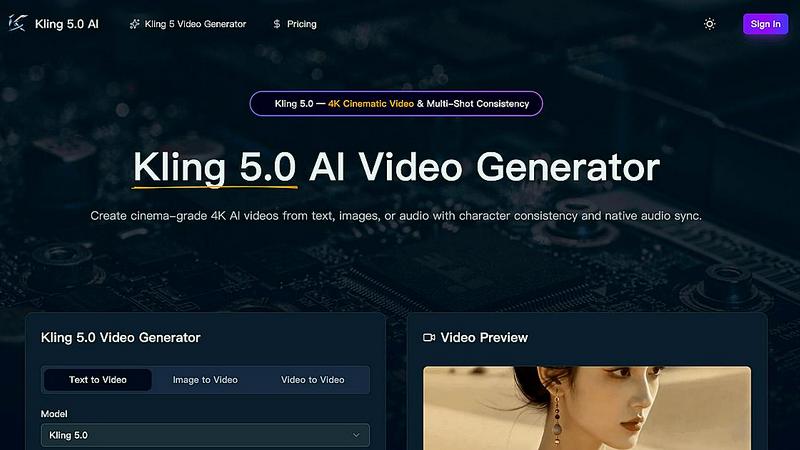
Kling 5.0 is an AI video generator that creates professional 4K videos from text or images with consistent characters and audio.
Last updated: April 13, 2026

Turn your photos into stunning videos with AI effects, no editing skills needed.
Last updated: February 28, 2026
Visual Comparison
Kling 5
Klipzy

Feature Comparison
Kling 5
4K Cinematic Video Generation
Kling 5.0 transforms your text prompts into breathtaking, cinema-grade videos in stunning 4K resolution. The AI understands detailed descriptions of scenes, lighting, and style to produce videos with a professional look and feel, complete with realistic textures and accurate lighting that make your content stand out.
Multi-Shot Character Consistency
This is a revolutionary feature for storytellers. Using the Omni Subject Library, Kling 5.0 can "lock" a character's facial features, hairstyle, and clothing. This means you can generate multiple different shots or scenes, and your character will remain perfectly consistent throughout, enabling you to create coherent short films or episodic content with ease.
Native Audio Generation & Lip-Sync
Kling 5.0 doesn't just create silent videos. It generates synchronized audio—including dialogue, sound effects, and ambient music—all in one go. Even more impressively, it provides phoneme-level lip-sync for generated speech in multiple languages, making characters look like they are truly talking.
Advanced Physics Simulation
The AI is powered by a sophisticated physics engine that makes movement look natural and believable. Whether it's the flow of water, the flutter of fabric, the flicker of fire, or realistic human motion, Kling 5.0 simulates these elements with incredible accuracy, adding a layer of depth and realism to every video.
Klipzy
20+ Cinematic AI Effects
Klipzy comes packed with over twenty different motion styles to suit any mood or project. From subtle zooms and smooth pans (left to right, right to left) to dynamic orbits, swings, and even fun effects like a simulated hand shake or motion blur, you have a full toolkit. The AI intelligently applies these effects to your image, creating a professional, cinematic movement that would normally require advanced editing skills and much more time.
Built-in Watermark Remover
This handy feature saves you time and the need for another app. If your source image has an unwanted watermark or logo, Klipzy's built-in remover can help you erase it directly within the application. This ensures your final video clip is clean, professional, and ready for sharing on any platform, making your content creation workflow smoother and more efficient.
Native Mac App with Local Processing
Klipzy is built specifically for macOS, which means it runs smoothly, feels integrated with your system, and works offline. All processing happens locally on your Mac—your photos and videos are never uploaded to the cloud. This guarantees privacy, security, and fast export speeds, giving you complete control over your creative assets from start to finish.
Multiple Aspect Ratios & HD Export
Create content for any platform effortlessly. Klipzy supports five different aspect ratios, including vertical (9:16) for Instagram Reels and TikTok, square (1:1), and landscape (16:9). Once you've crafted your moving image, you can export it as a high-definition MP4 video file, ready to be shared directly to your social media channels, marketing campaigns, or personal projects.
Use Cases
Kling 5
Social Media Content Creation
Quickly produce eye-catching, original videos for platforms like TikTok, Instagram Reels, and YouTube Shorts. Describe a fun scenario, a quick tutorial, or a promotional idea, and get a polished video in seconds to engage your audience and grow your following without any video editing hassle.
Prototyping for Filmmakers & Animators
Storyboard ideas and visualize scenes before expensive production begins. Filmmakers and game developers can use Kling 5.0 to generate concept clips, test character designs with consistency, and simulate complex shots with realistic physics, saving significant time and resources in the pre-production phase.
Marketing & Advertising
Create high-quality promotional videos, product demos, or brand story clips on demand. Marketing teams can generate tailored video ads for different campaigns, maintain consistent brand characters across multiple videos, and rapidly iterate on ideas without needing a full production crew or budget.
Educational & Explainer Videos
Teachers, trainers, and educators can bring complex topics to life. Simply describe a historical event, a scientific process, or a step-by-step tutorial, and Kling 5.0 will generate a clear, engaging visual explanation, making learning more interactive and accessible for students of all ages.
Klipzy
Social Media Reels & Stories
Breathe new life into your social media feed! Transform your best photos into eye-catching videos for Instagram Reels, TikTok, YouTube Shorts, or Facebook/Instagram Stories. A moving image stops the scroll far more effectively than a static photo, helping you boost engagement, attract more followers, and tell compelling visual stories about your life, brand, or hobbies.
Real Estate Property Showcases
Real estate agents and photographers can use Klipzy to create captivating video tours from single property photos. Apply a smooth pan across a living room or a gentle zoom into kitchen details to highlight selling points. These cinematic clips are perfect for social media promotions, listing websites, and email campaigns, giving potential buyers a more immersive first look.
E-commerce Product Highlights
Make your online products stand out. Online sellers can transform product photos into short, engaging videos that show items from different angles. A subtle orbit or zoom effect can showcase design details, texture, and features much better than a still image, potentially increasing dwell time and conversion rates on product pages and social ads.
Travel & Personal Memory Videos
Turn your favorite vacation or family photos into beautiful, moving memories. Instead of a standard slideshow, apply cinematic motion to your best shots from a trip, a celebration, or a weekend adventure. Create a short, emotional video set to music to relive the moment and share it with friends and family in a uniquely dynamic format.
Overview
About Kling 5
Welcome to Kling 5.0, your new creative partner for making stunning videos with the power of artificial intelligence. Imagine being able to describe a scene with words, and within seconds, having a beautiful, cinematic video ready to share. That's exactly what Kling 5.0 does. It's a revolutionary AI video generator designed for absolutely everyone—whether you're a complete beginner, a social media creator, a marketer, or a filmmaker. You don't need any technical skills or complex editing software. The platform is built to be incredibly intuitive. You simply type in what you want to see, and Kling's advanced AI brings it to life in high-quality 4K resolution. Beyond just text, you can also upload an image for it to animate or even generate videos with perfectly synced audio and lip movements. Its standout feature is "character consistency," which means you can create multiple scenes with the same character, and they will look identical every time—a game-changer for storytelling. Kling 5.0 empowers you to create professional, captivating video content for YouTube, TikTok, Instagram, or business presentations in minutes, not days.
About Klipzy
Ever looked at a beautiful photo and wished it could move and tell a story? Klipzy makes that dream a reality. It's a native Mac application designed to transform your ordinary, static images into stunning, cinematic video clips in just seconds. Using AI-powered technology, Klipzy applies professional motion effects like smooth zooms, pans, and the classic Ken Burns effect to bring your photos to life. You don't need any video editing experience or complex software. With an incredibly intuitive interface, you simply upload your photo, choose an effect, and download your HD video. It's perfect for content creators, social media managers, real estate agents, small business owners, or anyone who wants to create engaging content without the steep learning curve. Klipzy's mission is to democratize professional video creation, offering a powerful, one-time purchase tool that empowers everyone to capture attention and share their stories in a more dynamic way.
Frequently Asked Questions
Kling 5 FAQ
What do I need to start creating videos with Kling 5.0?
All you need is an idea! You start by typing a text description (called a prompt) of the video scene you want to create. You can be as simple or as detailed as you like. There's no software to download—it works right in your web browser. Just sign up for an account, and you're ready to generate your first video.
How does the character consistency feature work?
When you create a character you like, you can save it to your "Omni Subject Library." Think of this as a digital character locker. Whenever you want that same character to appear in a new video, you simply select them from your library before generating. The AI will then ensure their appearance remains identical in the new scene.
In which languages does the lip-sync feature work?
Kling 5.0's advanced audio generation provides realistic lip-sync for speech in five major languages: English, Chinese, Japanese, Korean, and Spanish. This allows creators from around the world to make videos where characters speak naturally in their native language.
What is the maximum video length I can generate?
With Kling 5.0, you can generate video clips up to 15 seconds long. This is perfect for social media clips, quick scenes, or stringing together multiple consistent shots to tell a longer story. You control the duration within that limit when you set up your generation parameters.
Klipzy FAQ
What image formats are supported?
Klipzy supports common image formats including JPG, PNG, and WebP. You can upload any image file in these formats, as long as it is under 50MB in size, which covers the vast majority of high-quality photos from cameras and smartphones.
How long can the videos be?
Each video clip you create with Klipzy has a maximum duration of 15 seconds. This is the perfect length for most social media short-form video platforms like Reels, Shorts, and TikTok, ensuring your content is concise, engaging, and platform-optimized.
Is this a subscription?
No, Klipzy is not a subscription service. It is available for a simple, one-time purchase license fee. You pay once and own the app forever, including access to all current features and effects, with no recurring monthly or annual payments.
What platforms are supported?
Currently, Klipzy is available as a native application for macOS. This means it is designed to run on Apple Mac computers. The team is dedicated to the Mac platform, ensuring a fast, secure, and integrated experience for all Mac users.
Alternatives
Kling 5 Alternatives
Kling 5.0 is a popular AI video generator that makes creating professional-looking videos from simple text prompts easy. It falls into the category of AI-powered creative tools designed to simplify video production for everyone, from beginners to professionals. People often look for alternatives to tools like Kling 5 for various reasons. This could be due to budget constraints, needing a different set of features, or wanting a tool that works on a specific platform like a mobile app. It's a normal part of finding the perfect tool for your unique creative workflow. When choosing an alternative, focus on what matters most for your projects. Consider the video quality, ease of use, available styles, and of course, the pricing model. The best choice is the one that feels intuitive and helps you bring your ideas to life without frustration.
Klipzy Alternatives
Klipzy is an AI-powered tool in the productivity and management category that makes it simple to turn your photos into engaging videos. It's designed for anyone who wants to create professional-looking content without needing video editing skills. People often look for alternatives for various reasons. This could be due to budget, as they might need a free plan or different pricing options. Others might be searching for specific features, like more advanced editing tools or compatibility with different devices and platforms. When choosing a different tool, consider what's most important for your projects. Think about ease of use, the range of effects and customization available, and the overall value for the price. The best choice is one that fits your specific creative needs and skill level.