Hush Touch | Voice-to-Text for MacOS vs Prompt Builder
Side-by-side comparison to help you choose the right tool.

Hush Touch | Voice-to-Text for MacOS
Hush Touch offers smart offline voice-to-text for Mac, learning your vocabulary and simplifying dictation for just $20.
Last updated: February 26, 2026

Prompt Builder
Create, refine, and manage AI prompts effortlessly in one tool, producing optimized results for any model in seconds.
Last updated: April 13, 2026
Visual Comparison
Hush Touch | Voice-to-Text for MacOS

Prompt Builder
Feature Comparison
Hush Touch | Voice-to-Text for MacOS
Dual Engine Recognition
Hush Touch employs a dual-engine recognition system that combines DictationTranscriber for natural flow and punctuation with SFSpeechRecognizer for enhancing your custom vocabulary. Together, they ensure that your dictation is not only accurate but also contextually relevant.
Custom Vocabulary
The app allows users to build a custom vocabulary of up to 500 terms, which it learns and adapts over time. This feature is particularly beneficial for professionals with specialized jargon, such as medical or technical terminology, ensuring that Hush Touch understands and accurately transcribes what you say.
Smart Text Processing
Hush Touch incorporates smart text processing features that include filler word removal and auto-correction. It detects unnecessary words and corrects common errors in real time, making your dictation cleaner and more professional without any extra effort on your part.
Context Modes & Hands-Free Operation
With context modes tailored for General, Email, Code, and Notes, Hush Touch adapts to your specific dictation needs. You can also activate hands-free dictation by saying "Hey Siri, start touch," allowing for a completely hands-free experience that automatically inserts text after a pause.
Prompt Builder
Prompt Generator
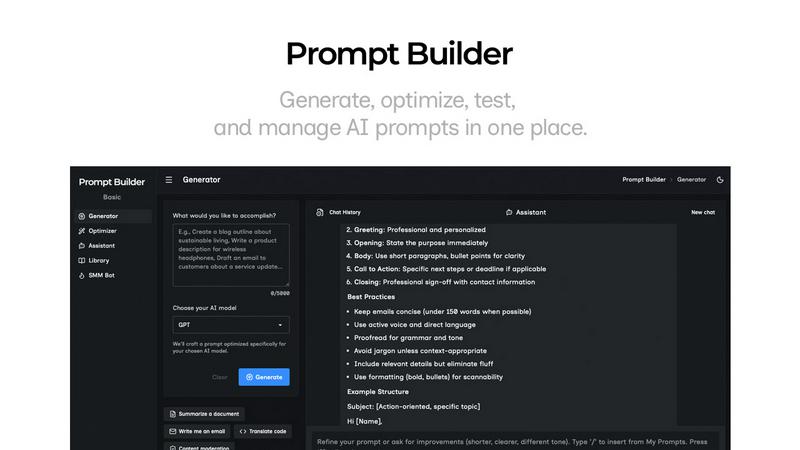
The Prompt Generator feature allows users to input their ideas and select a target AI model for optimization. It produces a professional-grade prompt that can be further refined through an interactive chat interface, making it easy to create tailored prompts quickly.
Chat Refinement
Built directly into the workspace, the chat refinement feature enables users to iterate on their prompts in real-time. This functionality supports fast adjustments and improvements, allowing for a seamless editing experience that enhances prompt quality based on immediate feedback.
Prompt Optimizer
The Prompt Optimizer takes existing prompts and enhances them for clarity and effectiveness. Users can paste prompts or select from their Library to generate clearer and more refined versions, ensuring that the prompts yield better results across different AI models.
Prompt Library
With the Prompt Library, users can save, organize, and reuse their best prompts conveniently. This feature allows for easy access to frequently used prompts, community-contributed prompts, and efficient management through search and category filters, ensuring users never lose track of their valuable resources.
Use Cases
Hush Touch | Voice-to-Text for MacOS
Drafting Emails
Hush Touch is perfect for busy professionals who need to draft emails quickly. With hands-free dictation and customizable command phrases, you can compose messages without interrupting your workflow, ensuring efficient communication.
Taking Notes
Students and professionals alike can benefit from using Hush Touch to take notes during lectures or meetings. You can focus on listening and understanding while the app captures your thoughts accurately, allowing you to revisit important information easily.
Writing Content
For writers and content creators, Hush Touch offers a unique way to brainstorm and draft articles or blog posts. Its ability to recognize context and specialized vocabulary makes it an invaluable tool for producing high-quality written content effortlessly.
Managing Tasks
You can also use Hush Touch to manage your daily tasks or create to-do lists by simply dictating your tasks. This feature helps you stay organized without needing to type, making it easier to keep track of your responsibilities.
Prompt Builder
Content Creation
Prompt Builder is an invaluable tool for content creators who need to generate high-quality written material quickly. By utilizing the tool's features, they can produce optimized prompts for blog posts, articles, and social media content tailored to their target audience.
Educational Purposes
Educators can leverage Prompt Builder to create engaging prompts for lessons and assignments. The tool's ability to refine prompts based on specific educational goals ensures that students receive clear and targeted instructions that enhance their learning experience.
Marketing Campaigns
Marketers can use Prompt Builder to develop compelling ad copy, social media posts, and promotional materials. The platform's ability to generate model-specific prompts allows for creating effective campaigns that resonate with diverse audiences across various platforms.
Research and Development
Research professionals can benefit from Prompt Builder by generating prompts that guide their inquiries or data analysis. The tool helps in framing questions or topics for exploration, ensuring that the prompts are precise and relevant to their research objectives.
Overview
About Hush Touch | Voice-to-Text for MacOS
Hush Touch is a revolutionary voice-to-text application designed specifically for MacOS users who seek a fast, natural, and private dictation experience. This app operates entirely on-device, ensuring that your dictation is processed offline, which enhances privacy and speed. By utilizing two advanced Apple transcription engines combined with an Apple Intelligence final processing pass, Hush Touch delivers cleaner and more accurate text output. Ideal for professionals and everyday users alike, it streamlines tasks such as drafting emails, messages, notes, and documents without the need for typing. With its lightweight installation of just 5.5 MB, Hush Touch seamlessly integrates into your daily writing workflow, allowing you to dictate hands-free or with customizable voice commands. Experience the convenience of accurate dictation without relying on cloud services, making it the perfect tool for anyone who values privacy and efficiency.
About Prompt Builder
Prompt Builder is an innovative prompt engineering workspace designed to help users craft, test, and save prompts efficiently. Ideal for AI enthusiasts, content creators, and professionals who utilize various AI models, this tool streamlines the process of creating effective prompts tailored to specific models like GPT, Claude, Gemini, and more. With Prompt Builder, users can quickly generate a solid first draft of a prompt, refine it in an interactive chat environment, and save multiple versions for future use. This capability not only enhances productivity but also improves the quality of outputs generated by AI models. The built-in Optimizer feature allows for quick enhancements of existing prompts, ensuring users achieve the best results without the hassle of rewriting. Overall, Prompt Builder empowers users to turn their ideas into actionable prompts in a matter of seconds, revolutionizing the way prompts are developed and utilized across various AI applications.
Frequently Asked Questions
Hush Touch | Voice-to-Text for MacOS FAQ
How does Hush Touch ensure privacy?
Hush Touch processes all voice data entirely on your Mac, with no reliance on cloud services. This means that your voice and dictation data is not collected or stored online, ensuring maximum privacy.
Can I customize my vocabulary in Hush Touch?
Yes! Hush Touch allows you to create a custom vocabulary of up to 500 terms, which can be learned over time. This is particularly useful for those who frequently use specialized jargon or unique terminology.
Is Hush Touch compatible with all MacOS versions?
Hush Touch is designed for MacOS and is compatible with a wide range of versions. However, it's always recommended to check the specific system requirements on the official website before downloading.
What is the pricing model for Hush Touch?
Hush Touch offers a one-time purchase option for a lifetime license at just $20. There are no subscriptions or ongoing fees required, making it a cost-effective solution for voice-to-text needs.
Prompt Builder FAQ
What AI models does Prompt Builder support?
Prompt Builder supports a wide range of AI models, including GPT, Claude, Gemini, Llama, Mistral, DeepSeek, Grok, and Perplexity. This extensive compatibility allows users to generate prompts tailored for their preferred model.
How does the chat refinement feature work?
The chat refinement feature allows users to interactively edit and improve their prompts in real-time. After generating a draft, users can engage in a chat to make adjustments, ensuring that the final prompt is precisely tailored to their needs.
Can I save and reuse prompts?
Yes, users can save their prompts in the Prompt Library for easy access and reuse. The library organizes prompts by category and model, allowing for efficient management and retrieval of valuable resources.
Is there a free version available?
Prompt Builder offers a free trial that includes 25 assistant requests per month, allowing users to explore its features without the need for a credit card. This trial helps potential users evaluate the platform before committing to a paid plan.
Alternatives
Hush Touch | Voice-to-Text for MacOS Alternatives
Hush Touch | Voice-to-Text for MacOS is an innovative app designed to provide seamless dictation for macOS users. As a part of the AI Assistants category, it offers an offline solution that combines advanced transcription technology with an emphasis on privacy and user control. Many users seek alternatives to Hush Touch for various reasons, including pricing concerns, feature sets, and specific platform requirements. When considering alternatives, it's essential to evaluate factors such as compatibility with your operating system, the accuracy of voice recognition, ease of use, and whether the solution supports offline functionality. Additionally, think about the licensing model and whether it aligns with your budget and long-term needs.
Prompt Builder Alternatives
Prompt Builder is a versatile tool designed to help users generate, optimize, test, and manage AI prompts efficiently. As part of the AI Assistants category, it serves as a comprehensive workspace where users can craft prompts tailored to various AI models like GPT, Claude, and others. Despite its robust features, users often seek alternatives for reasons such as pricing, specific feature sets, or compatibility with different platforms, which can vary significantly based on individual needs and preferences. When choosing an alternative to Prompt Builder, it's essential to consider several factors. Look for tools that offer similar functionalities, such as prompt generation and optimization, along with community resources like reusable prompts and templates. Additionally, evaluate the user experience, customer support, and integration capabilities with the AI models you intend to use. Understanding your unique requirements will help you find a solution that best fits your workflow.