
FilexHost vs SupaSidebar
Side-by-side comparison to help you choose the right tool.

FilexHost
Easily host and share any file in seconds with drag-and-drop simplicity and a secure, shareable link.
Last updated: February 26, 2026

SupaSidebar
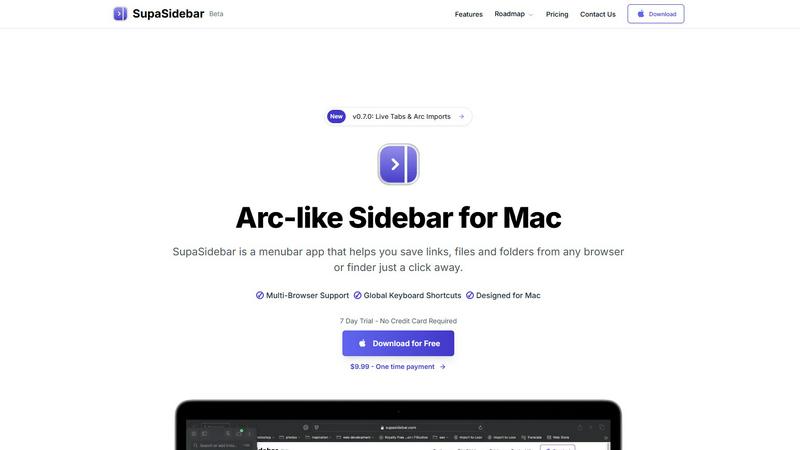
SupaSidebar is a Mac app that saves and organizes links, files, and folders for instant access with simple shortcuts.
Last updated: February 28, 2026
Visual Comparison
FilexHost

SupaSidebar
Feature Comparison
FilexHost
Instant Subdomains
When you upload a file, FileXhost automatically generates a unique subdomain for it, such as your-file.filex.host, without any setup required. This feature allows you to share your files quickly and efficiently, making it easier for your recipients to access them.
Free SSL Encryption
Every link generated by FileXhost is secured with free SSL encryption, ensuring that your files are protected during transfer. This automatic security measure gives you peace of mind, knowing that your data remains secure and private.
Smart View Modes
FileXhost offers flexible viewing options with its smart view modes. You can choose between direct rendering of files or a download page, depending on how you want your recipients to access the content. This adaptability ensures that everyone can interact with your files in the way that suits them best.
Optional Password Protection
For those needing an extra layer of security, FileXhost provides optional password protection for your files. You can set expiry settings ranging from 24 hours to forever, granting you full control over who can access your content and for how long.
SupaSidebar
Instant Saving and Copying
With SupaSidebar, saving links and files is a breeze. Use the global keyboard shortcuts CMD + CTRL + S to save items and CMD + CTRL + C to copy the current website link directly to your sidebar. This feature eliminates the tedious steps of manually saving or copying URLs, allowing you to focus on your tasks.
Recents Tracking
Never lose track of your browsing history again with the Recents feature. SupaSidebar automatically tracks every website you have visited in the last 48 hours, making it easy to find your work quickly. This is particularly useful for those who switch between multiple projects or need to revisit recent research.
Pinned Items for Quick Access
SupaSidebar allows you to pin your favorite links, files, and folders at the top of your sidebar. This feature ensures that your most-used items are always front and center, so you can access them with just a click, reducing time wasted searching for frequently used resources.
Fast Global Search
Switching between apps can slow down your productivity, but not with SupaSidebar. Just press CMD + CTRL + K and start typing to find any file, folder, website, or app instantly. This feature provides a powerful, efficient way to navigate your digital workspace without the hassle of digging through numerous tabs or folders.
Use Cases
FilexHost
Sharing Client Reports
Professionals can utilize FileXhost to share important client reports quickly and securely. By simply dragging and dropping their files, they can generate a link that can be sent to clients without worrying about file size limits or access requests.
Hosting Development Projects
Developers can host landing pages or mock APIs effortlessly with FileXhost. The platform supports various file types, making it easy to showcase projects to clients or team members with minimal effort and maximum impact.
Distributing Digital Products
Creators can use FileXhost to distribute digital products like eBooks, music files, or software applications. With the ability to share files quickly and securely, creators can enhance their delivery process and improve customer satisfaction.
File Collaboration
Collaborative teams can benefit from FileXhost by sharing large files without the hassle of email attachments or request access emails. By utilizing the platform's drag-and-drop feature, teams can focus on their work rather than the logistics of file sharing.
SupaSidebar
Efficient Research for Students
Students can greatly benefit from SupaSidebar during research projects. By saving important links and documents directly to the sidebar, they can easily access their sources without getting lost in a sea of browser tabs, allowing for a smoother and more organized study experience.
Project Management for Creatives
Creative professionals can use SupaSidebar to manage multiple projects simultaneously. By pinning relevant files, folders, and websites for each project, they can switch contexts quickly and efficiently, ensuring they stay in the flow without unnecessary interruptions.
Streamlined Web Browsing
For anyone who spends significant time online, SupaSidebar enhances the browsing experience by providing quick access to favorite sites and recent visits. This eliminates the frustration of endlessly scrolling through bookmarks or searching for previously opened tabs.
Enhanced Workflow for Remote Workers
Remote workers can leverage SupaSidebar to maintain an organized workspace while navigating various tasks. With easy access to necessary documents and links, they can streamline their workflow, increase productivity, and reduce the time spent switching between applications.
Overview
About FilexHost
FileXhost is a user-friendly file hosting and sharing platform designed to simplify the process of managing and distributing files. It caters to a wide variety of file types, including documents, media, spreadsheets, and even entire websites, making it an ideal solution for professionals, developers, and creators alike. With its innovative "Drop & Share" feature, users can effortlessly upload files, receive a secure link, and share it with others instantly. There is no need for complicated setups, server configurations, or user logins for recipients. FileXhost prioritizes the viewer's experience by ensuring that files are displayed beautifully and correctly, which eliminates the hassle of downloads or plugins. Whether you are sharing client reports, hosting a landing page, or distributing digital products, FileXhost provides the convenience and efficiency you need for seamless file delivery.
About SupaSidebar
Welcome to SupaSidebar, the ultimate productivity booster designed specifically for Mac users! If you often find yourself juggling too many browser tabs, struggling to recall that important link from yesterday, or simply wish to access your favorite files and websites more quickly, SupaSidebar is the perfect solution for you. This beautifully crafted, lightweight menubar app transforms your browsing experience by providing an Arc browser-inspired sidebar that integrates seamlessly with your entire Mac. With SupaSidebar, you transform your workspace into a universal command center, allowing you to save, find, and open anything with just a click or a keyboard shortcut. Whether you are a student conducting research, a creative professional managing multiple projects, or someone who wants to enhance web browsing efficiency, SupaSidebar has got you covered. It works flawlessly with all major browsers—Safari, Chrome, Firefox, Arc, and Brave—keeping your vital links, files, and folders always within reach. Your data remains secure on your Mac, and with its native macOS design, SupaSidebar feels like an integral part of your computer, empowering you to work smarter, not harder.
Frequently Asked Questions
FilexHost FAQ
What is FileXhost?
FileXhost is a file hosting and sharing service that allows users to upload any file type and share it via a secure link, simplifying the process of file management and distribution.
Is it really free?
Yes, FileXhost offers a free plan that allows you to host up to 1,000 files, with a maximum file size of 25MB, and provides a 7-day expiry for each link. However, the free plan is ad-supported.
What file types are supported?
FileXhost supports a wide range of file types, including documents (PDF, TXT), media (MP4, MP3), images (JPG, PNG), spreadsheets (XLSX), and even HTML projects, ensuring versatility for all users.
How do I update my site?
To update your hosted site, simply drag and drop your new or modified files into FileXhost. The service will automatically generate a new link or update the existing one, making the process seamless and efficient.
SupaSidebar FAQ
Is SupaSidebar a browser extension?
No, SupaSidebar is a standalone menubar app designed for Mac that works across all major browsers, providing a unified experience for saving and accessing links and files.
Which browsers does SupaSidebar work with?
SupaSidebar is compatible with all major browsers, including Safari, Chrome, Firefox, Arc, and Brave, ensuring that you can access your important resources regardless of your preferred browser.
What macOS version do I need?
SupaSidebar requires macOS 13 or later to function properly, ensuring that users have the latest features and security enhancements.
Where is my data stored?
All your data is securely stored on your Mac, ensuring that you have complete control and privacy over your saved links, files, and folders without any external data sharing.
Alternatives
FilexHost Alternatives
FilexHost is a user-friendly file hosting and sharing service that allows you to quickly upload and share files with a simple drag and drop interface. It falls into the Productivity & Management category, providing a seamless solution for professionals and individuals alike who need to share various file types without the hassle of complicated setups. Users often seek alternatives to FilexHost for various reasons, including pricing, specific feature requirements, or compatibility with different platforms. When exploring alternatives, it’s essential to consider factors such as file size limits, security features, user interface, and the overall ease of sharing files. Finding a solution that aligns with your needs can enhance your file-sharing experience and efficiency.
SupaSidebar Alternatives
SupaSidebar is a productivity-focused application designed for Mac users, providing an Arc-style sidebar experience that allows for quick access to links, files, and folders. This lightweight menubar app serves as a universal command center, helping users manage their digital lives more efficiently. However, many users often seek alternatives due to factors such as pricing, specific feature sets that may better meet their needs, or compatibility with different platforms or workflows. When choosing an alternative to SupaSidebar, it’s essential to consider what features are most important for your productivity. Look for options that offer similar functionality, such as quick search capabilities, easy access to open tabs, and seamless integration with your preferred browsers. Additionally, evaluate the user interface and overall design to ensure it aligns with your workflow preferences and enhances your computing experience.