DocuExtractor vs Vendor Space
Side-by-side comparison to help you choose the right tool.

DocuExtractor
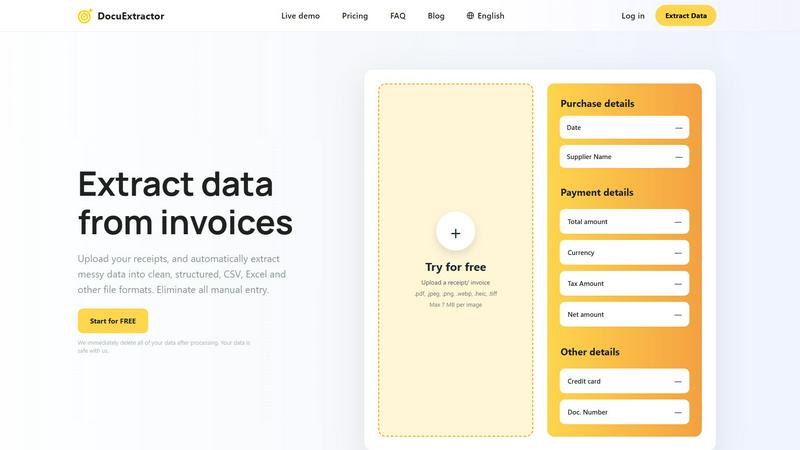
DocuExtractor instantly transforms your receipts and invoices into clean, structured data without any manual entry.
Last updated: February 28, 2026

Vendor Space
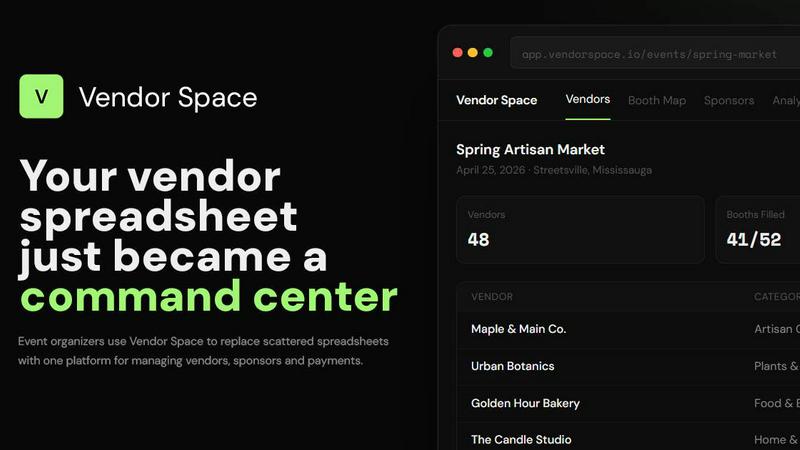
Vendor Space is your simple command center to manage all event vendors, sponsors, and payments in one place.
Last updated: April 13, 2026
Visual Comparison
DocuExtractor
Vendor Space
Feature Comparison
DocuExtractor
Advanced OCR Technology
DocuExtractor utilizes cutting-edge Optical Character Recognition technology to accurately read and extract data from various document types. This means you can trust the software to pull out critical details like dates, supplier names, totals, and more with incredible precision.
Batch Processing
With DocuExtractor, you can upload multiple documents at once, significantly reducing the time it takes to process large volumes of receipts and invoices. This feature is perfect for businesses that handle numerous transactions daily, allowing for efficient and quick data extraction.
Customizable Data Fields
The software allows you to customize the data fields you want to extract, making it adaptable to your specific needs. Whether you require standard fields or unique data, DocuExtractor can cater to your requirements, ensuring that you get the exact information you need.
Multi-language Support
DocuExtractor supports over 45 languages, making it an ideal tool for businesses operating in diverse regions. The automatic language detection feature ensures that you can process documents in various languages without any hassle, expanding your operational capabilities.
Vendor Space
All-in-One Vendor Management Dashboard
This is your mission control. Instead of toggling between windows, manage every vendor from application to check-in on one screen. See their status, category, booth assignment, and payment info at a glance. You can add notes, update details, and communicate without ever leaving the platform, turning a complex web of tasks into a simple, streamlined process.
Interactive Visual Booth Mapping
Say goodbye to confusing paper maps and manual spreadsheets. Create a visual floor plan of your event space and assign booths with a simple drag-and-drop. The map shows real-time availability, clearly marking spots as taken, reserved, or available. This feature automatically helps prevent double-bookings and lets you and your vendors see the exact layout, making setup day a breeze.
Integrated Payments & Digital Contracts
Collect payments and signatures without the back-and-forth. Vendor Space has built-in, secure payment processing through Stripe, so vendors can pay their fees instantly upon application. You can also send legally-binding digital contracts and required forms directly through the platform for vendors to sign electronically. Everything is tracked in one place, so you always know who has paid and signed.
Sponsor Management & Tiered Packages
Easily manage your sponsors alongside your vendors. Create custom sponsorship packages (like Gold, Silver, Bronze) with specific benefits and pricing. Track each sponsor's status, deliverables, and payments from the same dashboard you use for vendors. This integration ensures your sponsor logos, booth placements, and perks are coordinated perfectly with your overall event plan.
Use Cases
DocuExtractor
Accounting and Bookkeeping
Accountants and bookkeepers can greatly benefit from DocuExtractor by automating the data entry process for invoices and receipts. This leads to significant time savings and a reduction in errors, allowing professionals to focus on more critical tasks.
Expense Management
Businesses can use DocuExtractor to streamline their expense management by quickly extracting data from receipts and invoices. This automation facilitates accurate tracking of expenses, simplifying reimbursements and financial analysis.
Financial Audits
During financial audits, accurate data extraction is crucial. DocuExtractor enables auditors to quickly pull necessary details from various financial documents, ensuring that the auditing process is smooth and efficient.
Data Migration
Companies looking to migrate data from physical documents to digital formats can use DocuExtractor to ease the transition. The software automates the extraction process, allowing businesses to convert their paper records into structured digital data effortlessly.
Vendor Space
Seasonal Craft Fairs & Holiday Markets
Perfect for organizers running recurring artisan events. Use custom forms to curate vendor applications, use the booth map to design your market layout season after season, and process payments for dozens of crafters efficiently. The vendor portal allows artisans to apply and manage their own details, saving you endless administrative time.
Food Festivals & Farmers Markets
Manage a diverse mix of food trucks, farmers, and beverage vendors. Create specific categories for easy organization, use digital forms to collect crucial health and safety documentation, and utilize the visual map to strategically place vendors for optimal foot traffic and safety compliance.
Trade Shows & Business Expos
Handle larger-scale events with professional exhibitors. The platform supports tiered sponsor packages for premium partners and standard vendor booths for other businesses. Digital contracts formalize agreements, and the integrated payment system simplifies invoicing for companies, providing a corporate-friendly experience.
Community Pop-Up Markets & Fundraisers
Ideal for one-off or smaller events run by community groups or nonprofits. The free-to-start model is budget-friendly. Quickly set up an event page, share the registration link, and let local vendors sign up and pay online. The simple tools help small teams look professional and organized without a steep learning curve or cost.
Overview
About DocuExtractor
Welcome to DocuExtractor, the ultimate solution for anyone struggling with document chaos! This AI-powered software is designed to help you streamline your data extraction process, making it easier than ever to transform messy, unstructured documents into clean, organized datasets. Whether you are an accountant, bookkeeper, or business professional, DocuExtractor has you covered. It uses advanced Optical Character Recognition (OCR) technology, combined with deep learning and artificial intelligence, to accurately extract key information from receipts, invoices, and bank statements. In just a few seconds, you can upload your documents and download the extracted data in ready-to-use formats like CSV or Excel. Say goodbye to hours spent on tedious manual data entry and hello to a more efficient workflow. With a commitment to data security, DocuExtractor ensures that all files are deleted immediately after processing, providing peace of mind as you tackle your document challenges.
About Vendor Space
Vendor Space is your all-in-one command center for managing vendors and sponsors at any event. Built by an event organizer who understands the struggle, it replaces the chaos of endless spreadsheets, scattered email threads, and manual payment tracking with a single, intuitive platform. If you organize craft fairs, farmers markets, trade shows, or community festivals, this tool is designed specifically for you. It consolidates every step of the vendor lifecycle into one dashboard. You can create custom application forms, design interactive booth maps, send digital contracts for e-signature, and collect payments seamlessly. It even integrates sponsor management, so your paid partnerships are handled in the same system. The best part? Vendor Space operates on a beautifully simple model: it's completely free to use. You only pay a small, flat fee when you successfully collect money from a vendor or sponsor. This means no monthly subscriptions, no hidden costs, and no risk. It empowers you to professionalize your events, save dozens of administrative hours, and provide a smooth, modern experience for everyone involved.
Frequently Asked Questions
DocuExtractor FAQ
How does DocuExtractor ensure data security?
DocuExtractor prioritizes your data's security by automatically deleting all files immediately after processing. This ensures that your sensitive information is never stored or misused.
What types of documents can I upload?
You can upload various document types, including receipts, invoices, and bank statements in formats such as PDF, JPEG, PNG, and more. The software is versatile and designed to handle different file types with ease.
Is there a limit on the size of documents I can upload?
Yes, each document uploaded to DocuExtractor can be a maximum of 7 MB. This size limit ensures that the software remains efficient and responsive during the extraction process.
How fast can I expect results after uploading my documents?
DocuExtractor is designed for speed, providing extracted data within seconds. This rapid processing time allows you to quickly download your results and get back to your important tasks without delay.
Vendor Space FAQ
How quickly can I set up my first event?
You can be up and running incredibly fast! Most organizers have their first event live and ready to accept vendors within 15 minutes. The process is simple: create your event, set your booth options and pricing, and then instantly share your unique registration page with potential vendors. There's no complex setup or technical knowledge required.
Is there really no monthly subscription fee?
That's correct! Vendor Space is completely free to use. There are no monthly fees, no annual contracts, and no hidden setup costs. The platform only makes money when you do. We simply charge a small, transparent transaction fee (6%) only when you successfully collect a payment from a vendor or sponsor through the system.
How do vendors apply and pay?
It's designed to be easy for them, too! You share a professional, branded registration page. Vendors click your link, fill out your custom application form, select their preferred booth (if available), and pay their fees securely by credit card right then and there. They then get access to their own portal to see their status, contracts, and event details.
Can I manage sponsors and vendors together?
Absolutely! This is a key benefit of Vendor Space. You can create custom sponsorship tiers (like Gold, Silver, Bronze) with different benefits and pricing. You then manage these sponsors in the same dashboard as your regular vendors, tracking their payments, contracts, and deliverables seamlessly alongside everyone else, giving you a unified view of your entire event.
Alternatives
DocuExtractor Alternatives
DocuExtractor is an innovative software solution designed to simplify the tedious task of data entry by using advanced AI technology to extract information from receipts, invoices, and bank statements. It falls under the category of productivity and management tools, specifically tailored for accountants, bookkeepers, and business professionals who need efficient data handling. Users often seek alternatives to DocuExtractor for various reasons, such as pricing differences, specific feature requirements, or compatibility with their existing platforms. When choosing an alternative, it's essential to consider factors like extraction accuracy, ease of use, batch processing capabilities, and the variety of output formats available. A good alternative should meet your specific needs while providing a seamless experience.
Vendor Space Alternatives
Vendor Space is an all-in-one vendor and sponsor management platform designed for event organizers. It falls into the business and finance software category, specifically helping to streamline operations and payments for events. It replaces scattered tools like spreadsheets and email threads with a single, centralized dashboard. People often look for alternatives to any software for a few common reasons. They might need different features, prefer a different pricing structure like a monthly subscription, or require integrations with other tools they already use. It's always smart to explore what else is available to find the perfect fit for your specific event needs. When evaluating alternatives, focus on what matters most for your workflow. Consider the total cost, including any transaction fees or subscriptions. Look at the key features like contract management, payment processing, and communication tools. Finally, prioritize ease of use to ensure you and your vendors will have a smooth experience.