Dividend Data vs Tradepal
Side-by-side comparison to help you choose the right tool.

Dividend Data
Instantly access 30+ years of stock data, including dividends and financials, directly in Google Sheets or Excel with our free add-in.
Last updated: March 11, 2026

Tradepal
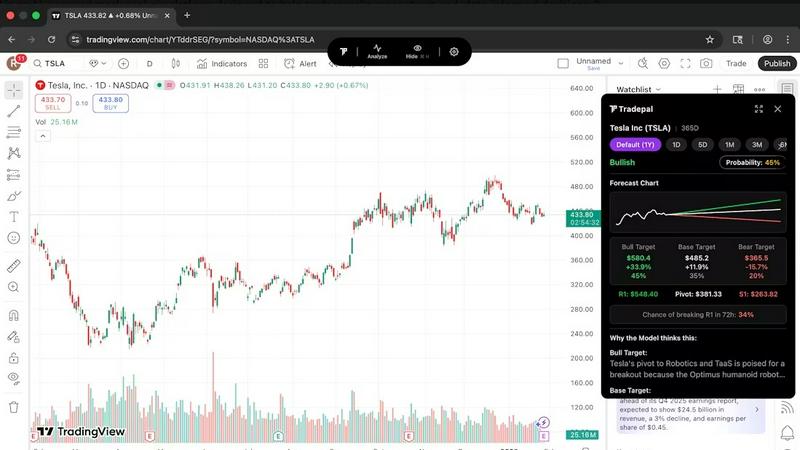
Tradepal transforms stock chart screenshots into actionable insights with AI-driven analysis and real-time forecasts.
Last updated: February 26, 2026
Visual Comparison
Dividend Data

Tradepal
Feature Comparison
Dividend Data
Free Tier with Monthly Credits
Dividend Data offers a generous free tier featuring 2,500 monthly credits, allowing users to explore the platform without the pressure of a trial expiration. This way, you can test the features and see how it fits your investment strategy.
Custom Functions for Dividend Investors
With 16 custom functions at your disposal, Dividend Data covers all the essential metrics that dividend investors need. Whether you are looking for dividend yields, payout ratios, or growth rates, these functions streamline data retrieval directly into your spreadsheets.
Extensive Historical Data
Dividend Data provides over 30 years of historical stock market data. This extensive database allows investors to conduct thorough analyses and track performance over time, enabling informed investment decisions.
Compatibility with Google Sheets and Excel
Dividend Data seamlessly integrates with both Google Sheets and Microsoft Excel. This compatibility ensures that you can access live data in your preferred spreadsheet software, making it easy to incorporate into your existing workflows.
Tradepal
AI Forecasts
Tradepal provides intraday forecasts for ranges, reversals, and volatility through a blended AI ensemble. This feature updates in real-time, allowing traders to identify potential risks before they impact price movements, offering a proactive approach to trading.
Price Cone Projections
With Tradepal, users can visualize forward price cones directly on their charts. The layout is both fast and intuitive, allowing traders to personalize their view according to their preferences and save settings for future trading sessions.
News and Sentiment Analysis
Stay informed with Tradepal’s news and sentiment analysis feature, which aggregates market mood from professional traders and financial news sources. This allows traders to gauge crowd conviction and anticipate market moves before they happen.
Breakout Signals
Tradepal's breakout signals feature detects early signs of strength or potential failures by monitoring live sentiment streams, order flow hints, and momentum shifts. This helps traders capitalize on critical market movements while they are still forming.
Use Cases
Dividend Data
Analyzing Dividend Stocks
Investors can utilize Dividend Data to analyze a variety of dividend stocks. By using custom formulas, they can quickly access vital metrics such as dividend yields and payout ratios, which are crucial for evaluating potential investments.
Portfolio Management
Dividend Data allows users to track their dividend portfolios effortlessly. Investors can automatically link their portfolios to the tool, providing them with aggregate statistics and performance insights that save time and enhance decision-making.
Financial Research
With the AI-powered research assistant, users can conduct detailed financial analysis with ease. Dividend Data equips investors with the tools necessary to chat with the AI for insights, making complex analyses simpler and faster.
Historical Performance Review
Dividend Data's extensive historical information enables investors to review long-term performance trends of their investments. By examining past earnings and price histories, they can better understand how stocks have performed and strategize accordingly.
Tradepal
Real-Time Stock Analysis
Traders can utilize Tradepal for real-time analysis of any U.S.-listed stock chart. By clicking "Analyze," they receive instant insights that inform their trading strategies, enabling quicker and more confident decisions.
Risk Management
With AI-generated forecasts and price cone projections, traders can proactively manage risk. By understanding potential price movements and volatility, they can adjust their positions accordingly to protect their investments.
Trend Identification
Tradepal helps traders identify emerging trends early. By utilizing the breakout signals feature, traders can recognize when a stock is gaining momentum, allowing them to enter positions before the crowd.
Emotional Bias Reduction
By providing objective analysis and clear scenarios, Tradepal assists traders in reducing emotional bias. This leads to more rational decision-making, especially in high-pressure trading environments where emotions can cloud judgment.
Overview
About Dividend Data
Dividend Data is a powerful tool that brings over 30 years of stock market data for more than 80,000 tickers directly into your Google Sheets and Microsoft Excel spreadsheets. Designed specifically for dividend and fundamental investors, it eliminates the need for API keys, coding, or tedious copy-pasting. With Dividend Data, you gain instant access to a wealth of information including dividends, yields, payout ratios, growth rates, financial statements, earnings, ratios, price history, and over 100 metrics. By simply typing a formula, you can pull live data into your spreadsheets, making it incredibly user-friendly. This tool is built by a dividend investor who understands the needs of fellow investors, ensuring that you have the resources necessary to make informed decisions without the high costs typically associated with institutional-grade data.
About Tradepal
Tradepal is an innovative AI-powered trading assistant tailored for active traders and investors seeking swift and objective chart analysis without the hassle of manual guesswork. Designed specifically for individuals engaged in trading U.S.-listed stocks, Tradepal simplifies the analysis process by enabling users to click "Analyze" on their screen or upload a screenshot directly through the web app. The platform employs advanced AI to identify crucial technical patterns, support and resistance levels, as well as trend strength and momentum. With this information, Tradepal generates clear scenarios—bull, base, and bear—along with confidence scores and price targets. Unlike traditional trading platforms that execute trades, Tradepal serves as a reliable second set of eyes, aiding traders in validating ideas, mitigating emotional bias, and enhancing decision-making. Built for speed and efficiency, Tradepal seamlessly integrates into existing workflows, ensuring traders can leverage AI support without altering their trading habits. It is an essential tool for those who desire an edge in the fast-paced trading environment.
Frequently Asked Questions
Dividend Data FAQ
How does Dividend Data integrate with Google Sheets and Excel?
Dividend Data integrates directly into Google Sheets and Microsoft Excel, allowing users to input specific formulas to retrieve live data without any coding or complex setups.
What kind of data can I access using Dividend Data?
With Dividend Data, you can access a wide range of stock market data including dividends, yield percentages, payout ratios, growth rates, financial statements, and over 100 additional metrics.
Is there a limit to the number of credits I can use?
Yes, the free tier provides you with 2,500 monthly credits. If you find that you need more data, you can explore additional pricing options available within the platform.
Who is Dividend Data designed for?
Dividend Data is specifically designed for dividend and fundamental investors who seek reliable, institutional-grade market data without the high costs associated with traditional financial services.
Tradepal FAQ
How do I use Tradepal?
After signing up, download Tradepal for macOS or Windows. The app stays accessible while you trade. When viewing a U.S.-listed stock chart, simply click "Analyze" to generate insights. Alternatively, upload a screenshot through the web platform for the same analysis.
Is Tradepal financial advice?
Tradepal is not a substitute for professional financial advice. It provides data-driven insights and analysis based on AI technology, but users should consider their financial situations and consult with financial advisors as needed.
Do I need trading experience to use Tradepal?
No previous trading experience is required to use Tradepal. The platform is designed to be user-friendly, making it accessible for both beginners and seasoned traders looking to enhance their analysis capabilities.
Does Tradepal work on all timeframes?
Yes, Tradepal is compatible with multiple timeframes. Traders can analyze charts across different intervals, ensuring they have the flexibility to make informed decisions regardless of their trading style.
Alternatives
Dividend Data Alternatives
Dividend Data is a robust tool designed for dividend and fundamental investors, offering over 30 years of stock market data for more than 80,000 tickers directly in Google Sheets and Microsoft Excel. This service allows users to access a wealth of information, including dividends, yields, and financial metrics, without the need for coding or complex setups. As users explore their options, they often seek alternatives due to factors like pricing, specific features that may better suit their investment strategies, or preferences for particular platforms. When looking for an alternative, consider factors such as the availability of historical data, ease of use, and the range of metrics provided. It's also essential to assess whether the alternative meets your unique investment needs while ensuring that it integrates well with the tools you currently use. By focusing on these aspects, you can find a solution that enhances your investment analysis and decision-making process.
Tradepal Alternatives
Tradepal is an AI-powered trading assistant that specializes in stock chart analysis. Designed for active traders and investors, it provides quick, objective insights from U.S.-listed stock charts without the need for manual analysis. Users can simply upload screenshots or click to analyze charts, receiving clear bullish, bearish, and neutral scenarios along with price targets. Many users seek alternatives to Tradepal for various reasons, including pricing, feature sets, and compatibility with their preferred trading platforms. When choosing an alternative, it’s essential to consider factors such as ease of use, the accuracy of analysis, and how well the tool integrates into your existing trading workflow, ensuring it enhances your trading experience without unnecessary complications.