DigitalMagicWand vs URL to Any
Side-by-side comparison to help you choose the right tool.

DigitalMagicWand
DigitalMagicWand empowers you to effortlessly create, transform, and analyze visuals, audio, video, and text with cutting-edge AI tools.
Last updated: March 18, 2026

URL to Any
Effortlessly convert any webpage to your desired format with URL to Any's easy-to-use tools, all for free.
Last updated: March 2, 2026
Visual Comparison
DigitalMagicWand

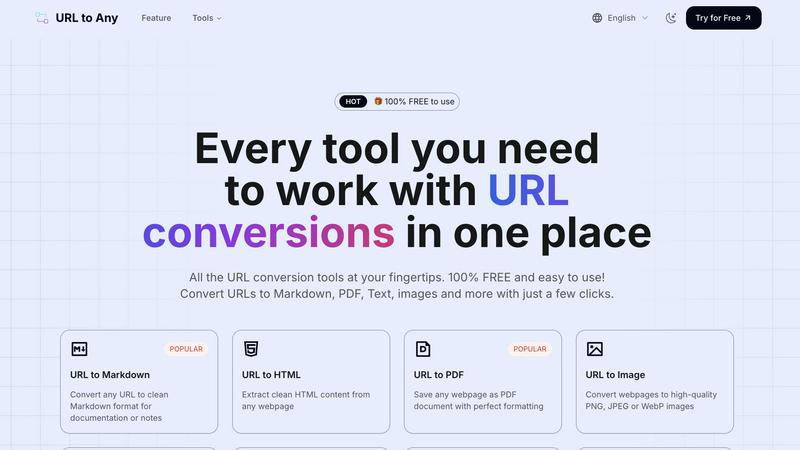
URL to Any
Feature Comparison
DigitalMagicWand
Accurate AI Detector for Text
Our Accurate AI Detector for Text provides a one-click solution to determine if a piece of text was written by a human or generated by an AI tool like ChatGPT or Claude. You receive precise confidence scores that indicate the likelihood of AI generation, making it an essential tool for editors, educators, and anyone needing clarity in content authenticity.
Undetectable AI Text Humanizer
The Undetectable AI Text Humanizer transforms machine-generated text into natural, human-like writing. Using proprietary algorithms, it removes AI detection patterns while maintaining the original message, making it ideal for academic papers, creative writing, and professional communications without losing the essence of your content.
Digital Ear™: Convert Piano Tracks to MIDI
Digital Ear™ is a specialized tool that converts piano performances into MIDI files with unmatched accuracy. Perfect for musicians and producers, this tool captures the nuances of solo piano playing and changes the way you interact with music, allowing for seamless integration into your digital audio workstation.
UnMixIt™ Pro: Stems for Musicians & DJs
UnMixIt™ Pro allows users to isolate individual elements of a track—vocals, drums, bass, and more—with studio-grade precision. This feature is essential for DJs, music producers, and audio professionals, providing the flexibility to create remixes, mashups, or restore archival recordings without any hassle.
URL to Any
URL to Markdown
With the URL to Markdown feature, you can convert any webpage into a clean Markdown file that is perfect for documentation or note-taking. This feature simplifies the process of capturing web content, allowing you to focus on what matters most – the content itself.
URL to PDF
The URL to PDF feature lets you save any webpage as a beautifully formatted PDF document. This ensures that you retain the layout and design of the original article, making it ideal for archiving important information or sharing with others.
URL to Image
Transform any webpage into high-quality images with the URL to Image feature. You can choose from PNG, JPEG, or WebP formats, making it easy to use visual content in presentations, reports, or social media posts.
URL to QR Code
The URL to QR Code feature generates unique QR codes for any URL you provide. This is a convenient way to share links quickly and easily, allowing others to access your content with a simple scan using their mobile devices.
Use Cases
DigitalMagicWand
Enhance Your Creative Writing
With the Accurate AI Detector for Text and the Undetectable AI Text Humanizer, writers can ensure their work maintains authenticity while exploring AI-generated ideas. This combination is perfect for authors looking to refine their narrative voice while being aware of AI influences.
Professional Audio Production
Musicians and audio professionals can leverage Digital Ear™ for precise MIDI transcription and UnMixIt™ for isolating tracks. These tools streamline the audio production process, enabling artists to focus on creativity rather than technical limitations.
Effortless Image Creation
Using our AI Image Generation tools, users can create stunning visuals from simple text descriptions. This feature is particularly beneficial for marketers, social media managers, and designers who need high-quality images quickly and easily without extensive design skills.
Streamlined Content Editing
Content editors and marketers can utilize the AI Image Editor and Instant Background Removal features to enhance and customize images efficiently. These tools allow for quick adjustments, making it easy to create professional content for websites, social media, and promotional materials.
URL to Any
Research and Note-taking
Students and researchers can use URL to Any to convert online articles and studies into Markdown or PDF formats, making it easier to compile notes and references for assignments or projects.
Content Creation
Bloggers and content creators can streamline their workflow by converting web articles into clean Markdown files or images for use in their own projects, saving time on formatting and editing.
Sharing Information
Professionals can generate QR codes from important URLs to share resources during presentations or workshops, making it simple for attendees to access additional information on their devices.
Archiving Web Content
Anyone can use URL to Any to save and archive web pages in various formats, whether for personal use or to keep track of industry news and developments without losing the original formatting.
Overview
About DigitalMagicWand
DigitalMagicWand™ is a revolutionary online platform designed to empower creators, professionals, and hobbyists alike with AI-powered tools for image, audio, video, and text processing. Whether you're an artist, musician, content creator, or a business professional, DigitalMagicWand is here to simplify your digital content creation process. Our intuitive applications leverage advanced artificial intelligence technologies, allowing you to enhance, transform, and create with unprecedented ease and efficiency. From generating stunning visuals from simple text prompts to transcribing audio into MIDI files, our suite of tools eliminates barriers to creativity. With DigitalMagicWand, you can focus on what matters most—bringing your ideas to life. Explore our diverse range of applications, and watch your creative possibilities expand!
About URL to Any
URL to Any is your go-to tool for transforming web content into formats that suit your needs. Whether you stumble upon an insightful article, a captivating blog post, or essential research, URL to Any enables you to convert these webpages effortlessly into various formats like Markdown, PDF, text, and images. This tool is designed for a wide audience, including students, content creators, developers, and anyone who values organization and efficiency in managing online information. The main value proposition of URL to Any lies in its simplicity and accessibility; it is completely free, requires no sign-up, and is incredibly user-friendly. With just a few clicks, you can turn any URL into a well-formatted file that you can save, share, or reference later, eliminating the hassle of manual copying and reformatting. Say goodbye to the tedious tasks of converting web content; URL to Any is here to streamline your digital life.
Frequently Asked Questions
DigitalMagicWand FAQ
What is DigitalMagicWand?
DigitalMagicWand is an online platform offering a suite of AI-powered tools for processing images, audio, video, and text, designed to enhance and simplify the content creation process.
How can I use the AI Text Tools?
The AI Text Tools allow you to check if text is AI-generated, humanize machine-written content, and enhance your writing. Just choose the tool, upload your text, and follow the simple prompts to get started.
Is there a learning curve to using DigitalMagicWand?
No, DigitalMagicWand is designed to be beginner-friendly! With intuitive interfaces and step-by-step guidance, anyone can quickly learn to use our tools, no technical skills required.
Can I use DigitalMagicWand for commercial purposes?
Yes! DigitalMagicWand's tools can be used for both personal and commercial projects, making it a versatile choice for freelancers, businesses, and educational institutions looking to create high-quality digital content.
URL to Any FAQ
How do I convert a URL using URL to Any?
To convert a URL, simply paste the web address into the designated field, select your preferred format (such as Markdown or PDF), and click the convert button. Your content will be ready almost instantly.
Is there a cost associated with using URL to Any?
No, URL to Any is completely free to use. There are no hidden fees, and you do not need to create an account or provide any personal information.
Can I convert multiple URLs at once?
Yes, URL to Any offers a URL Opener feature that allows you to open multiple URLs simultaneously, making it easier to convert several pages in one go.
What formats can I convert URLs into?
URL to Any supports various formats including Markdown, PDF, images (PNG, JPEG, WebP), text, JSON, and XML, among others, providing you with flexibility for different needs.
Alternatives
DigitalMagicWand Alternatives
DigitalMagicWand is an innovative platform that harnesses the power of artificial intelligence to enhance and create various forms of digital content, including images, audio, video, and text. As part of the AI Assistants category, it offers users a comprehensive suite of tools designed to streamline the creative process and improve the quality of their digital projects. However, users often seek alternatives for a variety of reasons, such as pricing concerns, specific feature requirements, or compatibility with different platforms. When searching for an alternative, it's essential to consider factors like the range of tools available, ease of use, customer support, and overall value for money to ensure you find the best fit for your needs.
URL to Any Alternatives
URL to Any is a versatile web content conversion tool that allows users to transform any webpage into their desired format with just a few clicks. It falls under the category of AI assistants, designed to simplify the process of saving, editing, and sharing online content. Users often seek alternatives to URL to Any due to various factors, such as pricing structures, feature sets, or compatibility with different platforms. When exploring alternatives, it's essential to consider the ease of use, the range of supported formats, and whether the tool is truly free or comes with hidden fees. A good alternative should also prioritize user accessibility, allowing seamless conversions without requiring extensive technical knowledge or lengthy sign-ups.