Alertr: Inventory Management vs DeliveryNote.io
Side-by-side comparison to help you choose the right tool.

Alertr: Inventory Management
Alertr simplifies inventory management by predicting stockouts and sending timely reorder alerts, ensuring you never run low on stock.
Last updated: March 26, 2026

DeliveryNote.io
Effortlessly manage and delete your Threads posts with smart automation and instant cleanup for a cleaner digital.
Last updated: February 28, 2026
Visual Comparison
Alertr: Inventory Management
DeliveryNote.io
Feature Comparison
Alertr: Inventory Management
Daily Inventory Sync
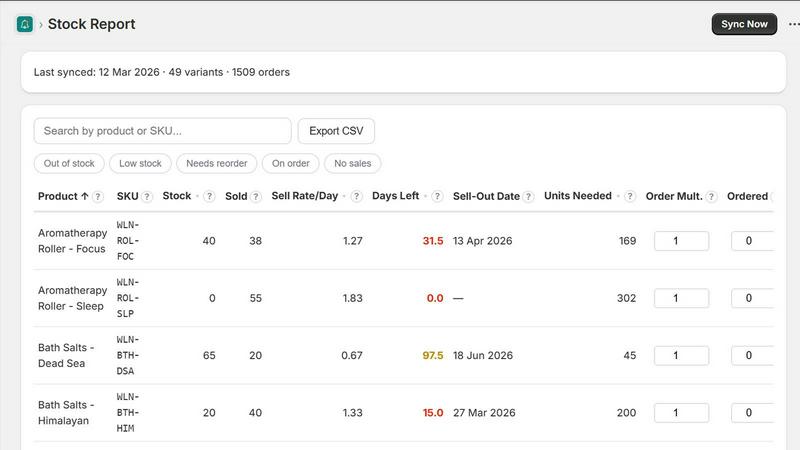
Alertr automatically syncs your product data and recent orders from Shopify every day. This ensures that you are always updated with the latest information on your inventory levels and can react promptly to any changes in demand.
Smart Reorder Alerts
Receive notifications via email or Slack when your stock drops below your predefined thresholds. Alertr not only alerts you but also provides specific recommendations on how many units to reorder based on your calculated sell rates and lead time, making the reorder process seamless.
Inventory Dashboard
Alertr provides a comprehensive dashboard that displays all your SKUs in one easy-to-read view. You can see vital information such as days of stock remaining, sell rates, and reorder quantities, allowing you to manage your inventory effectively at a glance.
Configurable Thresholds
You have the flexibility to set your own lookback window, lead time, and alert frequency according to your business needs. This customization ensures that Alertr works in alignment with your unique inventory management strategy.
DeliveryNote.io
Easy-to-Use Interface
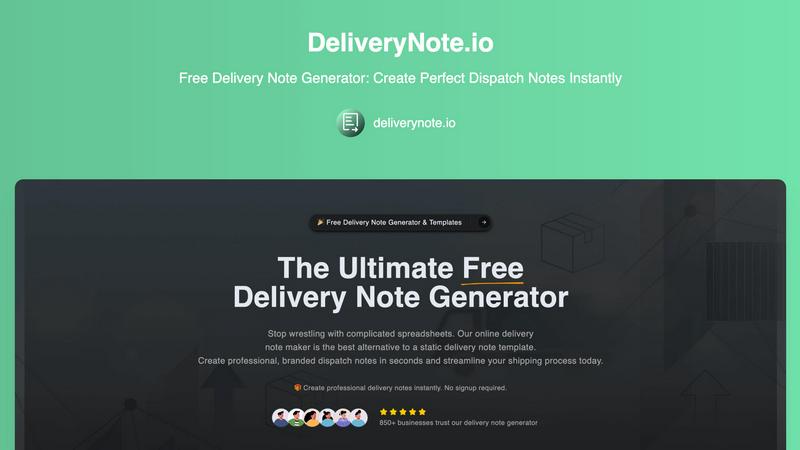
DeliveryNote.io features a user-friendly interface that allows anyone to create delivery notes quickly and efficiently. With intuitive navigation, users can easily enter details, customize their notes, and generate documents without any technical skills required.
Instant PDF Generation
With just a click, DeliveryNote.io allows you to convert your customized delivery note into a high-quality PDF. This feature ensures that your documents are ready for printing or sharing, maintaining a professional appearance every time.
Customizable Templates
Users can personalize their delivery notes by adding logos, changing colors, and modifying layouts to align with their brand identity. This customization enhances brand recognition and ensures that your delivery notes represent your business effectively.
Automated Formatting and Calculations
The platform automates the formatting and calculations involved in generating delivery notes. This means you can trust that every document will be accurate, polished, and error-free, saving you time and reducing the risk of mistakes.
Use Cases
Alertr: Inventory Management
Small Business Owners
Small business owners can benefit immensely from Alertr by automating their inventory management processes. This saves them valuable time and prevents stockouts, allowing them to focus on sales and customer service.
E-commerce Entrepreneurs
E-commerce entrepreneurs can leverage Alertr to maintain optimal stock levels in their online stores. The app's predictive capabilities help them avoid running out of popular items, ensuring they never miss a sale due to low stock.
Retail Managers
Retail managers can use Alertr to streamline their inventory checks and reorder processes. The daily sync feature means they can manage their stock more effectively, leading to improved operational efficiency.
Direct-to-Consumer Brands
DTC brands, especially those experiencing rapid growth, can utilize Alertr to manage their inventory without the complexity of traditional systems. The app provides clear insights that help them make informed decisions on inventory purchases.
DeliveryNote.io
Freelancers
Freelancers can use DeliveryNote.io to quickly generate professional delivery notes for their clients. Whether they are sending project deliverables or products, this tool simplifies the documentation process, allowing them to focus on their work.
E-commerce Sellers
For e-commerce sellers, DeliveryNote.io is an essential tool for creating delivery notes for each shipment. This not only helps in streamlining operations but also enhances customer satisfaction by providing clear and professional documentation.
Logistics Companies
Logistics companies can benefit from using DeliveryNote.io to manage the documentation of numerous shipments. The tool's efficiency ensures that they can maintain a high standard of professionalism across all delivery notes.
Small Business Owners
Small business owners can utilize DeliveryNote.io to manage their deliveries effortlessly. By generating branded delivery notes, they can create a more trustworthy image in the eyes of their customers, fostering loyalty and repeat business.
Overview
About Alertr: Inventory Management
Alertr is a powerful yet simple inventory management app designed specifically for Shopify merchants. It eliminates the hassle of manual stock checks and outdated spreadsheets, providing a streamlined solution that helps you keep track of your inventory effortlessly. With Alertr, you can set it up in just one click, allowing you to focus more on growing your business rather than getting bogged down in stock management. The app tracks your sell rates, predicts stockouts, and alerts you when it's time to reorder, ensuring you never run out of stock unexpectedly. Whether you're running a small online store or managing a larger inventory, Alertr offers the insights you need to maintain optimal stock levels and increase your sales. The user-friendly interface and daily sync with Shopify means you will always have accurate data at your fingertips, making inventory management smarter and more efficient.
About DeliveryNote.io
DeliveryNote.io is an innovative, completely free web-based tool designed to revolutionize the way you create delivery notes. Gone are the days of manually filling out cumbersome spreadsheets or struggling with outdated static templates. This platform empowers users to generate professional, branded, and error-free delivery notes in mere seconds. It caters to a diverse range of users, including solo freelancers, small business owners, e-commerce sellers, and logistics companies. The main value proposition of DeliveryNote.io is its ability to streamline the documentation process, providing instant, high-quality delivery notes without any costs, sign-up barriers, or complexity. Users can easily add their logo, customize delivery details, and export a ready-to-print PDF, turning what was once a tedious administrative task into a seamless part of their workflow. With DeliveryNote.io, you can focus on your core business while ensuring every shipment is documented with professionalism and accuracy.
Frequently Asked Questions
Alertr: Inventory Management FAQ
How does Alertr sync with my Shopify store?
Alertr automatically pulls your product data and recent orders from Shopify on a daily basis, ensuring that your inventory information is always up-to-date and accurate.
What happens if my stock runs low?
When your stock levels drop below your configured thresholds, Alertr will notify you via email or Slack, providing you with specific reorder recommendations based on your sell rates.
Can I try Alertr for free?
Yes! Alertr offers a 14-day free trial on the Pro plan, allowing you to explore all its features without any commitment. You can cancel anytime if it does not meet your needs.
Is there a limit to how many SKUs I can manage with Alertr?
With the Free plan, you can manage up to 50 SKUs. However, if you opt for the Pro plan, you can manage unlimited SKUs, making it ideal for growing brands.
DeliveryNote.io FAQ
Is DeliveryNote.io really free to use?
Yes, DeliveryNote.io is completely free to use with no hidden charges or sign-up requirements. You can create as many delivery notes as you need without any cost.
Can I customize my delivery notes?
Absolutely! DeliveryNote.io allows you to customize your delivery notes by adding your logo, adjusting colors, and modifying layouts to reflect your brand identity.
How do I export my delivery notes?
Once you have created your delivery note, you can easily export it as a high-quality PDF with just one click, making it ready for printing or sharing with clients.
What types of users can benefit from DeliveryNote.io?
DeliveryNote.io is designed for a wide range of users, including freelancers, small business owners, e-commerce sellers, and logistics companies. Anyone looking to streamline their delivery documentation can benefit from this tool.
Alternatives
Alertr: Inventory Management Alternatives
Alertr: Inventory Management is an intuitive tool designed for e-commerce businesses to streamline their inventory control processes. This app simplifies the management of stock levels by providing alerts when inventory is running low and suggesting optimal reorder times. With its straightforward 1-click setup, it helps users avoid the pitfalls of manual stock checks and outdated spreadsheets, making it a valuable asset in any online store's toolkit. Many users seek alternatives to Alertr due to various reasons including pricing, specific feature needs, or compatibility with other platforms. As businesses grow and evolve, their inventory management needs become more complex, prompting a search for tools that offer greater flexibility or advanced functionalities. When considering an alternative, look for features that match your unique business requirements, ease of use, integration capabilities, and overall cost-effectiveness to ensure the best fit for your operations.
DeliveryNote.io Alternatives
DeliveryNote.io is a free, web-based tool designed to simplify the creation of delivery notes, making it an essential resource for businesses in the shipping and logistics category. Users often seek alternatives to DeliveryNote.io for various reasons, including specific feature sets, integration capabilities, user interface preferences, or pricing structures that may better suit their unique requirements. When considering alternatives, it's important to evaluate factors such as ease of use, customization options, quality of output, and any additional functionalities that can enhance your shipping processes. Choosing the right alternative should focus on finding a tool that meets your operational needs while ensuring it remains user-friendly and efficient. Look for platforms that offer templates for quick note creation, allow for branding customization, and provide reliable document export options. By carefully assessing these criteria, you can find an alternative that aligns perfectly with your business goals.