conceptviz vs NanoBanana 2
Side-by-side comparison to help you choose the right tool.

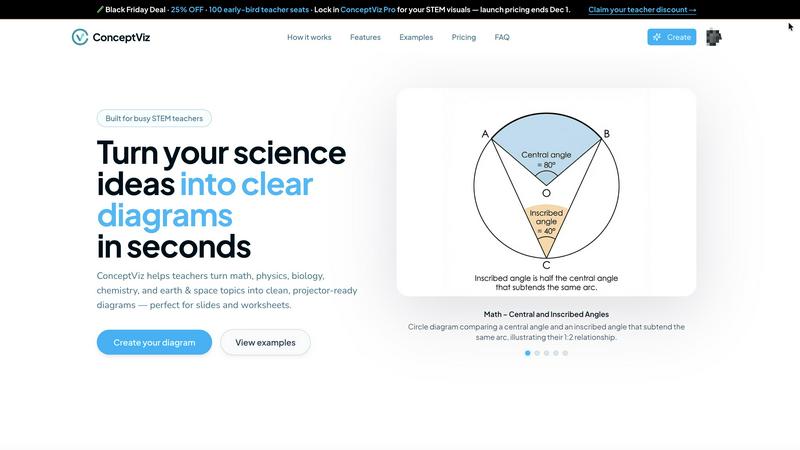
ConceptViz instantly creates clear, classroom-ready science and math diagrams from your simple description.
Last updated: March 1, 2026

NanoBanana 2
Nano Banana 2 is your AI design agent for professional photo enhancement and intelligent retouching in one click.
Last updated: March 18, 2026
Visual Comparison
conceptviz
NanoBanana 2

Feature Comparison
conceptviz
Subject & Grade Level Presets
ConceptViz comes with quick-start presets for core STEM subjects like Physics, Biology, and Chemistry, as well as Math and Earth & Space. These presets are finely tuned for real classroom use, aligned with U.S. grade bands from elementary to high school. This means you don't need any design or drawing skills to get started. Simply select your topic and grade level, and the AI is primed to generate an age-appropriate and curriculum-relevant diagram, saving you from having to explain basic context every time.
Projector-Ready Clarity
Every diagram is engineered for maximum visibility in a classroom setting. ConceptViz automatically uses thick, legible lines and clear, readable labels against simple backgrounds with minimal visual noise. This thoughtful design ensures diagrams stay sharp and understandable from the front row to the back of the room, whether displayed on a classroom projector or a smart board, eliminating squinting and confusion.
Slide & Worksheet Friendly Format
The tool is built to integrate seamlessly into your existing workflow. Diagrams are generated in a widescreen aspect ratio perfect for presentation slides like PowerPoint or Google Slides. They also come with clean white or light backgrounds ideal for printing on worksheets or handouts. You can download high-resolution PNG images and paste them straight into your teaching materials without any need for tedious resizing or reformatting.
Time-Saving Prompt Reusability
ConceptViz helps you build a personal library of visual assets. Once you craft the perfect text prompt to generate a diagram for a specific concept, you can save and reuse it across different classes, sections, or semesters. This consistency saves prep time and ensures you always have a reliable, high-quality visual that matches exactly how you teach a particular topic, year after year.
NanoBanana 2
Smart Auto-Enhancement
This feature intelligently analyzes every detail of your uploaded image and automatically applies the optimal enhancements. It adjusts exposure, contrast, and color balance to give your photos a professional polish instantly, making it perfect for beginners who want great results without any manual tweaking.
Advanced Portrait Retouching
NanoBanana 2 includes a specialized mode for portraits that understands facial features. It performs natural skin smoothing, reduces blemishes, and enhances eyes and teeth while meticulously preserving the subject's unique details and textures, ensuring edits look authentic and never artificial.
AI-Powered Noise Reduction
Say goodbye to grainy photos. Using advanced denoising technology, this feature effectively eliminates digital noise from low-light or high-ISO images. It smartly distinguishes between noise and important fine details, ensuring your pictures are clean and sharp without looking soft or over-processed.
Efficient Batch Processing
Save immense time by editing multiple images at once. Upload a whole folder of photos, and NanoBanana 2 will apply your chosen enhancements or presets to all of them simultaneously. This ensures a consistent look across your entire project and is ideal for processing event shoots or social media content batches.
Use Cases
conceptviz
Creating Lesson Plan Visuals
Teachers can quickly generate custom diagrams to illustrate key points in their daily lesson plans. For example, a middle school science teacher can type "photosynthesis process with labeled chloroplast" and get a clear, accurate diagram to embed in their slides, making abstract concepts tangible and engaging for students without spending hours on preparation.
Enhancing Student Worksheets and Assessments
Educators can use ConceptViz to produce precise, uncluttered diagrams for inclusion in quizzes, tests, and homework assignments. A high school physics teacher can generate a specific free-body diagram for an incline plane problem, ensuring the visual on the test is perfectly aligned with the lesson material and is easy for students to interpret.
Supporting Student Projects and Reports
Students from middle school to university level can use the tool to create professional-quality figures for their science fair projects, research papers, or presentation slides. A biology student can easily generate a detailed, labeled sequence of mitosis stages for their report, helping them communicate their understanding clearly and professionally.
Aiding Academic Research and Publishing
Researchers and graduate students can utilize ConceptViz to draft clean, explanatory figures for papers, theses, or conference presentations. While not for final publication, it's perfect for quickly sketching out a concept, like a chemical reaction mechanism or a geological process, to use in drafts, lab meetings, or grant proposals to visually explain complex ideas.
NanoBanana 2
Social Media Content Creation
Content creators and influencers can use NanoBanana 2 to quickly polish their daily photos and videos. The one-click enhancement and portrait tools ensure every post looks vibrant, professional, and engaging, helping to grow their audience with high-quality visual content without a steep learning curve.
Professional Photography Workflow
Photographers can integrate NanoBanana 2 into their post-production to handle time-consuming tasks like initial color correction, noise reduction, and basic retouching. This speeds up their workflow dramatically, allowing them to deliver client galleries faster and focus their expertise on fine-art adjustments.
E-commerce Product Image Editing
Online sellers can use the batch processing feature to uniformly enhance dozens of product photos. The AI can correct lighting, sharpen details, and ensure color accuracy across all images, creating a cohesive and professional-looking online catalog that boosts customer trust and sales.
Personal Photo Restoration and Enhancement
Anyone with old, faded, or damaged photos can use NanoBanana 2 to breathe new life into them. The AI can restore color, reduce scratches and noise, and enhance clarity, making it easy to preserve precious memories in digital albums with stunning, renewed quality.
Overview
About conceptviz
ConceptViz is a specialized AI tool designed to save educators, students, and researchers immense time by creating perfect, classroom-ready diagrams in seconds. It transforms complex scientific and mathematical concepts into clear, accurate, and projector-ready visuals with just a simple text description. Instead of spending hours searching for imperfect images online or struggling with complex drawing software, you can generate a tailored visual aid that matches your exact lesson plan. The tool understands the unique needs of a real classroom, producing diagrams with high contrast, legible labels, and minimal visual noise to ensure every student can see and understand, whether the diagram is on a screen or a printed handout. It covers a wide range of STEM subjects including Physics, Biology, Chemistry, Earth & Space, and Math, with presets tuned for different grade levels from elementary school to university research. Built for ultimate practicality, ConceptViz allows you to drop generated images directly into your existing lesson slides, worksheets, and assessments, ensuring your teaching visuals are always precise, professional, and effective.
About NanoBanana 2
NanoBanana 2 is a powerful, next-generation AI image editing model designed to make professional-grade photo enhancement accessible to everyone. It builds upon the success of the original Nano Banana, offering a significant upgrade with sharper edits, stronger creative control, and a more premium workflow. At its core, NanoBanana 2 is your intelligent design agent, using advanced deep learning algorithms to analyze and transform your images. Whether you're looking to enhance colors, retouch portraits, reduce noise, or apply stunning artistic effects, this tool handles it with intelligent, context-aware processing. It's built for photographers, designers, social media creators, and anyone who works with images and wants to achieve high-quality results quickly and effortlessly. With features like one-click processing and batch editing, NanoBanana 2 saves you hours of manual work, allowing you to focus more on your creativity and less on complex software. The platform is trusted by over 10,000 creators and has enhanced millions of images, proving its reliability and quality in real-world use.
Frequently Asked Questions
conceptviz FAQ
What subjects does ConceptViz cover?
ConceptViz is specialized for STEM education and covers a wide range of subjects including Physics, Biology, Chemistry, Earth & Space, and Mathematics. It offers presets and is tuned to generate accurate diagrams for concepts from elementary school basics all the way up to university-level research topics.
Do I need any design skills to use it?
No, you do not need any design or drawing skills whatsoever. ConceptViz is built specifically for educators and researchers, not graphic designers. You simply describe the diagram you need in plain English, and the AI handles the creation process, delivering a professional, classroom-ready visual.
Can I use the diagrams in printed handouts?
Absolutely. Diagrams are created with printing in mind. They feature clean white or light backgrounds, high contrast, and legible labels, making them perfect for photocopying or including in student worksheets, study guides, and printed assessments without losing clarity or detail.
Is there a free trial available?
Yes, you can try ConceptViz for free. You can sign in with a free account and start creating diagrams without needing a credit card. The free tier allows you to generate diagrams, including in 4K Ultra HD resolution, so you can fully test the tool's capabilities in your teaching or research workflow.
NanoBanana 2 FAQ
Is there a free version of NanoBanana 2?
Yes! You can start creating for free with NanoBanana Lite. This free plan allows you to experience the core AI editing capabilities, making it a great way to test the platform's features and see the quality of results before deciding to upgrade for more advanced tools and higher usage limits.
What image formats does NanoBanana 2 support?
NanoBanana 2 supports all major image formats, including JPEG, PNG, and WEBP. You can upload files up to 30MB in size. This wide compatibility ensures you can work with almost any photo from your camera, smartphone, or other editing software without needing to convert files first.
How does the AI ensure natural-looking edits?
The model is built on state-of-the-art deep learning algorithms trained on millions of images. It understands the context of your photo, distinguishing between elements like skin, sky, and textures. This allows it to apply enhancements selectively, preserving natural details and avoiding the "over-edited" look common in simpler tools.
Can I use NanoBanana 2 for commercial work?
Absolutely. NanoBanana 2 is designed for professional use, and the images you enhance or create are yours to use. Thousands of professional photographers, designers, and businesses trust it for their commercial projects, from client portraits to marketing materials, thanks to its reliable, high-quality output.
Alternatives
conceptviz Alternatives
ConceptViz is an AI-powered tool in the content creation and data visualization category. It specializes in generating clear, classroom-ready science and math diagrams from simple text descriptions, saving educators significant preparation time. Users often explore alternatives for various reasons. They might be looking for different pricing models, need a tool that integrates with a specific platform, or require features beyond diagram generation, such as full presentation design or advanced data plotting. It's a natural part of finding the perfect fit for your workflow and budget. When evaluating other options, consider your primary need. Look for tools that match your subject expertise, produce visuals with the right level of clarity for your audience, and fit seamlessly into your existing lesson preparation process. The goal is to find a solution that feels like a helpful assistant, not another complicated piece of software to learn.
NanoBanana 2 Alternatives
NanoBanana 2 is a next-generation AI image editing model, representing a powerful tool in the category of AI assistants for creative work. It uses advanced artificial intelligence to help users enhance and edit their photos with ease, building upon the success of its predecessor. People often look for alternatives to software like this for various reasons. You might be exploring options due to budget, needing a different set of features, or because you require a tool that works on a specific device or platform. It's a normal part of finding the perfect fit for your unique creative workflow and needs. When choosing an alternative, focus on what matters most to you. Consider the core AI capabilities for photo enhancement, how user-friendly the interface is, and the value you get for the price. A good fit should feel intuitive and empower you to achieve your editing goals without frustration.