Changeflow vs Refbox
Side-by-side comparison to help you choose the right tool.

Changeflow
Changeflow delivers AI-driven insights on crucial market changes, ensuring you never miss important updates again.
Last updated: March 4, 2026

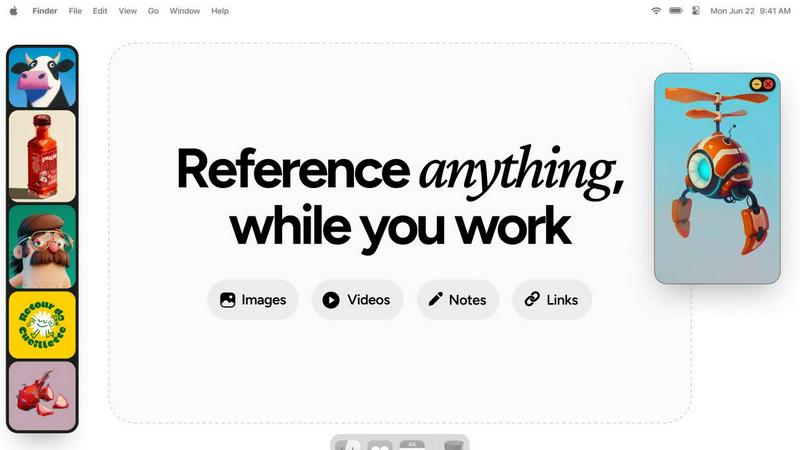
Refbox keeps your images, videos, and notes easily accessible above your workspace for a smoother workflow.
Last updated: February 28, 2026
Visual Comparison
Changeflow

Refbox
Feature Comparison
Changeflow
AI-Powered Monitoring
Changeflow uses advanced AI technology to intelligently monitor web pages, ensuring users receive only the most relevant updates. This feature reduces noise and false alerts, allowing teams to focus on what truly matters.
Natural Language Setup
Setting up Changeflow is a breeze. Users can simply describe what they want to track in plain English, without any technical jargon or complex configurations. This user-friendly approach makes it accessible to everyone.
Customized Summaries
With Changeflow, users receive AI-generated summaries that highlight what has changed and explain why it matters to their specific business needs. This feature saves time and enhances decision-making by providing clarity.
Advanced Anti-Blocking Technology
Changeflow employs sophisticated anti-blocking strategies to access content on challenging websites. This means users can rely on it to monitor updates even on sites that may restrict access to automated tools.
Refbox
Always-On-Top Frames
Refbox allows you to keep your references visible at all times with floating frames that stay on top of other applications. This feature ensures that your sources of inspiration are always accessible without interrupting your creative process.
Resizable Sidebar
The app features a floating, resizable sidebar where you can organize and view all your pinned media, including images, GIFs, videos, and notes. This customizable layout helps you manage your references in a way that suits your workflow.
Quick Media Access
Easily add media from various sources such as websites, your computer, or even your clipboard. This quick access feature eliminates the hassle of searching through folders, allowing you to focus on your creative work instead.
Efficient Organization
Refbox provides the ability to categorize your references into Collections, making it simple to switch between different sets of inspiration with just one click. This organized approach helps streamline your workflow and enhances overall productivity.
Use Cases
Changeflow
Competitor Pricing Tracking
Businesses can use Changeflow to keep an eye on competitor pricing strategies. By monitoring specific web pages, teams can receive timely updates on price changes, helping them to stay competitive in the market.
Regulatory Change Monitoring
Legal teams and compliance officers can monitor regulatory changes by following relevant government websites and publications. Changeflow ensures that they are promptly informed of any updates, allowing for swift adjustments.
News Mentions Tracking
Public relations and marketing teams can track news mentions of their company or industry. Changeflow provides insights into how the brand is perceived, enabling teams to respond proactively to public sentiment.
Market Movement Monitoring
Changeflow is useful for financial analysts and business strategists who need to keep tabs on market movements. By monitoring key financial news sites and reports, they can make informed decisions based on real-time data.
Refbox
Graphic Design
Graphic designers can use Refbox to pin color swatches, typography samples, and layout references directly on their workspace. This allows for quick comparisons and inspiration, ensuring that the design process remains fluid and efficient.
Animation
Animators benefit from the ability to keep reference videos and animations visible while working on their projects. By having these references always on hand, animators can easily refer back to motion styles and techniques during the creative process.
UI/UX Development
UI and UX developers can use Refbox to reference design guidelines, inspiration boards, and user flow examples while building interfaces. This keeps essential resources at their fingertips, reducing the time spent switching between tabs.
Photography
Photographers can utilize Refbox to display mood boards, lighting diagrams, and editing tutorials while editing photos. This enables them to maintain a consistent vision throughout the editing process, leading to more cohesive results.
Overview
About Changeflow
Changeflow is an innovative web monitoring tool designed to help businesses stay informed about vital changes on the internet. It goes beyond basic monitoring by not just alerting users when something has changed, but by providing clear and concise summaries of what those changes mean. The platform employs advanced AI technology to read web pages, understand the context, and filter out irrelevant information, ensuring that users are only notified of what truly matters to them. Changeflow is ideal for various professionals, including business teams tracking competitor pricing, legal librarians monitoring court dockets, and compliance teams keeping an eye on regulatory updates. With a simple setup process requiring only a URL and a brief description of what to monitor, users can quickly start receiving valuable insights. Changeflow’s sophisticated features, including shared workspaces and API access, make it an essential tool for any organization looking to enhance their web monitoring capabilities.
About Refbox
Refbox is an innovative floating reference app designed specifically for creatives who want to keep their sources of inspiration visible while they work. It addresses a common challenge faced by artists, designers, and other creative professionals: the constant need to switch between applications and windows to access reference materials. With Refbox, you can pin images, GIFs, videos, and notes in always-on-top frames that hover above your applications. This functionality allows you to maintain your creative flow seamlessly while sketching, designing, animating, or modeling. The app enables you to easily add media from various sources, including the web, your computer, or your clipboard, and organize them in a floating, resizable sidebar. By consolidating all your references in one accessible location, Refbox enhances productivity and creativity, providing instant access to inspiration without the distractions of window switching. It is an essential companion for modern creatives seeking to optimize their workflow and focus on their craft.
Frequently Asked Questions
Changeflow FAQ
How does Changeflow monitor web pages?
Changeflow monitors web pages by using an AI agent that checks for updates based on user-defined parameters. It navigates to the pages, assesses changes, and provides concise summaries of what is relevant.
Is it easy to set up Changeflow?
Absolutely! Users only need to provide a URL and a brief description of what they want to track. There is no complicated setup process, making it easy for anyone to get started.
Can I collaborate with my team using Changeflow?
Yes, Changeflow offers shared workspaces that allow teams to collaborate effectively. This feature ensures everyone is on the same page regarding crucial updates and changes.
What type of support does Changeflow offer?
Changeflow provides comprehensive support, including email and chat assistance. Users can also benefit from onboarding calls and fast troubleshooting to resolve any issues quickly.
Refbox FAQ
What platforms does Refbox support?
Refbox is designed to work on both Windows and Mac operating systems, making it accessible to a wide range of users in the creative field.
Can I customize the size of the floating frames?
Yes, the floating frames in Refbox are resizable, allowing you to adjust them according to your needs and workspace preferences for the best visibility and accessibility.
Is there a limit to how many references I can pin?
There is no strict limit to the number of references you can pin in Refbox. You can organize them into Collections, making it easy to manage as many references as you need.
Can I use Refbox for collaborative projects?
Yes, Refbox can be an excellent tool for collaborative projects as it allows multiple users to access the same reference materials and inspirations, enhancing teamwork and creativity.
Alternatives
Changeflow Alternatives
Changeflow is an AI-driven tool that specializes in providing market and competitor insights by monitoring changes on web pages. It falls within the Productivity & Management category, catering to businesses and teams seeking to stay updated on critical information without the hassle of manual tracking. Users often seek alternatives for various reasons, such as pricing concerns, the desire for additional features, or the need for compatibility with specific platforms. When choosing an alternative, it's essential to consider the effectiveness of the tool, its ease of use, and the specific insights it can provide to meet your unique requirements. --- [{"question": "What is Changeflow?", "answer": "Changeflow is an AI-driven tool that monitors web pages for changes, providing users with detailed insights on what matters most."}, {"question": "Who is Changeflow for?", "answer": "Changeflow is designed for business teams, legal librarians, and compliance teams who need to track market movements, regulatory changes, and competitor information."}, {"question": "Is Changeflow free?", "answer": "The provided content does not specify whether Changeflow offers a free version."}, {"question": "What are the main features of Changeflow?", "answer": "Main features include tracking competitor pricing, monitoring regulatory changes, API access, and shared workspaces for team collaboration."}]
Refbox Alternatives
Refbox is an innovative floating reference app designed for creatives, allowing users to keep images, videos, and notes visible above their workspace for instant access. As a productivity tool, Refbox enhances workflow by eliminating the need to switch between windows, enabling users to maintain their creative momentum while working on various projects. Users often seek alternatives for a variety of reasons, including pricing, specific feature sets, or compatibility with different platforms. When choosing an alternative, consider factors such as the ease of use, the types of media supported, and how well the app integrates into your existing workflow. Finding an option that matches your creative needs can significantly improve your productivity and overall experience.