BarBrain vs SupaSidebar
Side-by-side comparison to help you choose the right tool.

BarBrain
BarBrain is your digital inventory assistant that cuts counting time in half for bars and restaurants.
Last updated: April 4, 2026

SupaSidebar
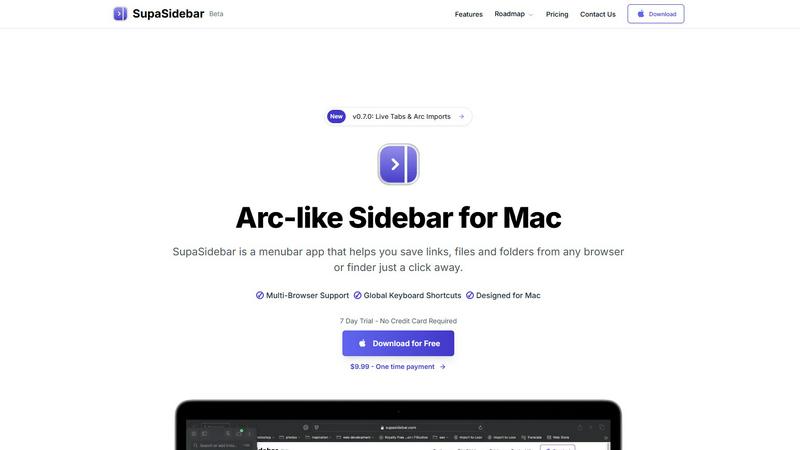
SupaSidebar is a Mac app that saves and organizes links, files, and folders for instant access with simple shortcuts.
Last updated: February 28, 2026
Visual Comparison
BarBrain

SupaSidebar
Feature Comparison
BarBrain
Lightning-Fast Digital Counting
Ditch the clipboard and spreadsheet forever. BarBrain's mobile app for iOS and Android allows your team to count inventory quickly and accurately using smartphones or tablets. The intuitive interface includes a fill-level slider for partially used items like open bottles or food containers, capturing real-world usage with a single tap. You can even have multiple staff members count different sections simultaneously, slashing inventory time by more than half.
Vast Pre-Loaded Product Catalog
Hit the ground running with a massive built-in catalog of over 30,000 products. From spirits, wines, and AFGs (alcohol-free beverages) to food ingredients and housekeeping supplies, the items you need are likely already in the system. This eliminates the tedious task of manually entering every product from scratch. The BarBrain team is also ready to help you customize and set up your own catalog to perfectly match your specific menu and offerings.
Automatic, Error-Free Reporting
Say goodbye to manual data entry and calculation errors. Immediately after each count, BarBrain automatically generates a comprehensive inventory report. This report provides you with reliable, accurate numbers on your stock levels, usage, and costs without any need for time-consuming post-processing. You get a clean, professional document that gives you confidence in your financial data for better decision-making.
Real-Time Cost & Waste Tracking
BarBrain goes beyond simple counting to protect your profits. By integrating your recipes and portion sizes, the software calculates your exact cost per drink and dish. It actively monitors your inventory to flag discrepancies, potential theft (shrinkage), and spoilage in real time. This instant visibility allows you to identify problems early, reduce waste, and ensure your pricing accurately reflects your costs.
SupaSidebar
Instant Saving and Copying
With SupaSidebar, saving links and files is a breeze. Use the global keyboard shortcuts CMD + CTRL + S to save items and CMD + CTRL + C to copy the current website link directly to your sidebar. This feature eliminates the tedious steps of manually saving or copying URLs, allowing you to focus on your tasks.
Recents Tracking
Never lose track of your browsing history again with the Recents feature. SupaSidebar automatically tracks every website you have visited in the last 48 hours, making it easy to find your work quickly. This is particularly useful for those who switch between multiple projects or need to revisit recent research.
Pinned Items for Quick Access
SupaSidebar allows you to pin your favorite links, files, and folders at the top of your sidebar. This feature ensures that your most-used items are always front and center, so you can access them with just a click, reducing time wasted searching for frequently used resources.
Fast Global Search
Switching between apps can slow down your productivity, but not with SupaSidebar. Just press CMD + CTRL + K and start typing to find any file, folder, website, or app instantly. This feature provides a powerful, efficient way to navigate your digital workspace without the hassle of digging through numerous tabs or folders.
Use Cases
BarBrain
Independent Bars & Restaurants
For single-location owners, BarBrain is a game-changer. It replaces chaotic, error-prone manual counts with a simple digital process. You gain clear insight into which drinks are most profitable, where ingredients are being wasted, and exactly when to reorder from suppliers. This control helps independent operators strengthen their margins and run a tighter, more profitable business without needing a large management team.
Multi-Location Restaurant Groups
Managing inventory across several venues is complex. BarBrain provides a unified system for all locations, ensuring consistent counting procedures and reporting. Headquarters can get a holistic, real-time overview of stock levels, costs, and performance metrics across the entire group. This enables standardized operations, bulk purchasing advantages, and easy comparison of performance between different sites.
Hotels and Resorts
Hotels require inventory management for everything from minibars and banquet catering to restaurant kitchens and housekeeping supplies. BarBrain is built to handle this full spectrum of Food & Beverage (F&B) and operational items. It helps large hospitality operations streamline their monthly counts, track usage across multiple revenue centers, and maintain precise cost controls for their diverse service offerings.
Nightclubs and High-Volume Venues
In fast-paced environments like nightclubs, speed and accuracy are critical. BarBrain's parallel counting feature allows teams to complete inventory swiftly after closing, getting staff out faster. The real-time tracking helps managers monitor high-value spirit usage closely, identify potential issues quickly, and ensure that the rapid turnover of stock translates directly into revenue, not loss.
SupaSidebar
Efficient Research for Students
Students can greatly benefit from SupaSidebar during research projects. By saving important links and documents directly to the sidebar, they can easily access their sources without getting lost in a sea of browser tabs, allowing for a smoother and more organized study experience.
Project Management for Creatives
Creative professionals can use SupaSidebar to manage multiple projects simultaneously. By pinning relevant files, folders, and websites for each project, they can switch contexts quickly and efficiently, ensuring they stay in the flow without unnecessary interruptions.
Streamlined Web Browsing
For anyone who spends significant time online, SupaSidebar enhances the browsing experience by providing quick access to favorite sites and recent visits. This eliminates the frustration of endlessly scrolling through bookmarks or searching for previously opened tabs.
Enhanced Workflow for Remote Workers
Remote workers can leverage SupaSidebar to maintain an organized workspace while navigating various tasks. With easy access to necessary documents and links, they can streamline their workflow, increase productivity, and reduce the time spent switching between applications.
Overview
About BarBrain
BarBrain is a modern inventory management solution built specifically for the unique challenges of the hospitality industry. It understands that bars, restaurants, and hotels aren't warehouses. Traditional software fails because it doesn't account for pours, recipes, or perishable items. BarBrain fixes this. It's a clean, intuitive tool designed to help owners and managers count stock in minutes instead of hours, giving them back precious time and providing crystal-clear financial insight. The platform automatically calculates your exact cost per drink and dish, flags waste and shrinkage as it happens, and centralizes all your supplier orders. Whether you run a single cozy cocktail bar or manage a multi-location restaurant group, BarBrain delivers the reliable numbers you need to protect your profit margins, make smarter purchasing decisions, and stop leaving money on the table. With over 1,000 satisfied customers already saving 75% of their inventory time, BarBrain is the trusted partner for taking control of your food and beverage operations.
About SupaSidebar
Welcome to SupaSidebar, the ultimate productivity booster designed specifically for Mac users! If you often find yourself juggling too many browser tabs, struggling to recall that important link from yesterday, or simply wish to access your favorite files and websites more quickly, SupaSidebar is the perfect solution for you. This beautifully crafted, lightweight menubar app transforms your browsing experience by providing an Arc browser-inspired sidebar that integrates seamlessly with your entire Mac. With SupaSidebar, you transform your workspace into a universal command center, allowing you to save, find, and open anything with just a click or a keyboard shortcut. Whether you are a student conducting research, a creative professional managing multiple projects, or someone who wants to enhance web browsing efficiency, SupaSidebar has got you covered. It works flawlessly with all major browsers—Safari, Chrome, Firefox, Arc, and Brave—keeping your vital links, files, and folders always within reach. Your data remains secure on your Mac, and with its native macOS design, SupaSidebar feels like an integral part of your computer, empowering you to work smarter, not harder.
Frequently Asked Questions
BarBrain FAQ
How does BarBrain save so much time on inventory?
BarBrain saves time by digitizing the entire process. Instead of writing on paper and later typing into a spreadsheet, staff count directly into a user-friendly mobile app. Features like the fill-level slider for open bottles and the massive pre-loaded product catalog make counting faster. Most importantly, multiple people can count different areas at the same time, and the system automatically generates the final report, eliminating hours of manual consolidation and calculation.
Is my data safe and secure with BarBrain?
Yes. BarBrain takes data security seriously. Your business's inventory, recipe, and cost data is stored securely in the cloud. This means your information is protected and accessible only to authorized users you designate. You can learn more about their specific security measures and data handling policies by contacting their team directly during a demo.
Can I try BarBrain before committing?
Absolutely! BarBrain encourages potential customers to schedule a free, personalized demo. This is a no-obligation session where their team will walk you through the software, answer your specific questions, and show you exactly how it would work for your unique operation. It's the best way to see the value firsthand.
What kind of support is available during setup and use?
BarBrain is designed to be intuitive, but comprehensive support is part of the package. Their team offers assistance during the initial account setup and catalog creation. Furthermore, ongoing support is available to help you and your staff with any questions as you use the platform, ensuring a smooth and successful experience from your very first digital inventory count.
SupaSidebar FAQ
Is SupaSidebar a browser extension?
No, SupaSidebar is a standalone menubar app designed for Mac that works across all major browsers, providing a unified experience for saving and accessing links and files.
Which browsers does SupaSidebar work with?
SupaSidebar is compatible with all major browsers, including Safari, Chrome, Firefox, Arc, and Brave, ensuring that you can access your important resources regardless of your preferred browser.
What macOS version do I need?
SupaSidebar requires macOS 13 or later to function properly, ensuring that users have the latest features and security enhancements.
Where is my data stored?
All your data is securely stored on your Mac, ensuring that you have complete control and privacy over your saved links, files, and folders without any external data sharing.
Alternatives
BarBrain Alternatives
BarBrain is a specialized inventory management tool designed specifically for bars and restaurants. It falls into the category of productivity and management software, helping owners and managers track stock, calculate costs, and reduce waste with ease. It's built to solve the unique challenges of the hospitality industry, like tracking pours and perishables. People often look for alternatives to software like BarBrain for various reasons. Common factors include budget constraints, needing different features, or requiring compatibility with a specific point-of-sale system. Some businesses might also be looking for a tool that better fits the scale of their operation, whether it's a single venue or a large chain. When evaluating other options, focus on what matters most for your business. Key considerations should include ease of use, accurate cost and pour tracking, real-time reporting capabilities, and reliable customer support. The right tool should feel intuitive for your staff and provide clear insights to help protect your profit margins.
SupaSidebar Alternatives
SupaSidebar is a productivity-focused application designed for Mac users, providing an Arc-style sidebar experience that allows for quick access to links, files, and folders. This lightweight menubar app serves as a universal command center, helping users manage their digital lives more efficiently. However, many users often seek alternatives due to factors such as pricing, specific feature sets that may better meet their needs, or compatibility with different platforms or workflows. When choosing an alternative to SupaSidebar, it’s essential to consider what features are most important for your productivity. Look for options that offer similar functionality, such as quick search capabilities, easy access to open tabs, and seamless integration with your preferred browsers. Additionally, evaluate the user interface and overall design to ensure it aligns with your workflow preferences and enhances your computing experience.