
Ayn8n vs Hush Touch | Voice-to-Text for MacOS
Side-by-side comparison to help you choose the right tool.

Ayn8n
Ayn8n is your open library of ready to use AI automation templates for any workflow.
Last updated: February 28, 2026

Hush Touch | Voice-to-Text for MacOS
Hush Touch offers smart offline voice-to-text for Mac, learning your vocabulary and simplifying dictation for just $20.
Last updated: February 26, 2026
Visual Comparison
Ayn8n
Hush Touch | Voice-to-Text for MacOS

Feature Comparison
Ayn8n
Massive Open Library
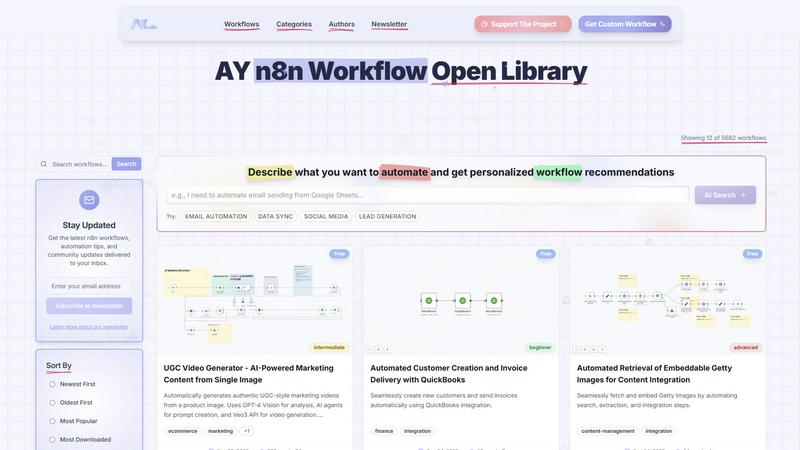
Ayn8n boasts a vast and ever-growing collection of over 6,150 pre-built n8n workflows. This extensive library acts as your starting point for almost any automation task, eliminating the need to build complex logic from scratch. You can browse workflows by category, popularity, or complexity, making it easy to find the perfect automation "recipe" for your specific needs, whether you're managing marketing campaigns or processing data.
AI-Powered Search & Discovery
Struggling to find the right workflow? Ayn8n's intelligent AI Search feature allows you to simply describe what you want to automate in plain English. For example, you can type "EMAIL AUTOMATION" or "LEAD GENERATION," and the system will provide personalized workflow recommendations. This smart discovery tool helps both beginners and experts quickly cut through the noise and find the most relevant automations for their goals.
Community-Driven & Curated
The strength of Ayn8n lies in its community. Workflows are submitted and shared by a diverse group of creators, from automation experts to fellow "vibe coders." You can browse workflows by specific authors, see what's most popular or downloaded, and benefit from the collective knowledge of thousands of users. This collaborative environment ensures the library is full of practical, tested, and innovative automation solutions.
Easy Import and Customization
Every workflow on Ayn8n is designed for immediate use. Once you find one you like, you can import it directly into your n8n instance with a single click. The workflows are fully open and editable, so you can tweak, adjust, and personalize them to fit your exact apps, data, and processes perfectly. This feature makes powerful automation truly accessible, allowing you to start with a professional-grade template and make it your own.
Hush Touch | Voice-to-Text for MacOS
Dual Engine Recognition
Hush Touch employs a dual-engine recognition system that combines DictationTranscriber for natural flow and punctuation with SFSpeechRecognizer for enhancing your custom vocabulary. Together, they ensure that your dictation is not only accurate but also contextually relevant.
Custom Vocabulary
The app allows users to build a custom vocabulary of up to 500 terms, which it learns and adapts over time. This feature is particularly beneficial for professionals with specialized jargon, such as medical or technical terminology, ensuring that Hush Touch understands and accurately transcribes what you say.
Smart Text Processing
Hush Touch incorporates smart text processing features that include filler word removal and auto-correction. It detects unnecessary words and corrects common errors in real time, making your dictation cleaner and more professional without any extra effort on your part.
Context Modes & Hands-Free Operation
With context modes tailored for General, Email, Code, and Notes, Hush Touch adapts to your specific dictation needs. You can also activate hands-free dictation by saying "Hey Siri, start touch," allowing for a completely hands-free experience that automatically inserts text after a pause.
Use Cases
Ayn8n
Marketing & Social Media Automation
Automate your entire content marketing strategy with workflows from Ayn8n. You can find automations that generate AI-powered social media posts, schedule them across platforms like X and LinkedIn, create UGC-style marketing videos from a single image, and even scrape directories for lead generation. This saves countless hours on manual posting and content creation, allowing you to maintain a consistent and engaging online presence effortlessly.
Sales & CRM Process Streamlining
Supercharge your sales pipeline with automated workflows. Use Ayn8n to automate lead generation from online directories, scrape and enrich LinkedIn profiles for targeted outreach, and automatically add new customer information to your CRM or accounting software like QuickBooks. This ensures no lead falls through the cracks and your team can focus on closing deals instead of manual data entry.
Content Management & Creation
Elevate your content production with AI-driven automations. Discover workflows that automatically generate SEO-friendly blog post ideas, create AI music tracks, retrieve and embed licensed images from sources like Getty, or audit your website for readability and LLM compatibility. These tools help content creators and managers produce high-quality, diverse content at scale without constant hands-on effort.
Data Integration & Processing
Connect your apps and manage data seamlessly. Ayn8n is perfect for workflows that sync data between platforms, migrate information from Airtable to Postgres, process incoming email attachments, or clean and organize large datasets. These automations act as the glue between your favorite tools, eliminating manual exports and imports while ensuring your data flows smoothly and accurately across your business.
Hush Touch | Voice-to-Text for MacOS
Drafting Emails
Hush Touch is perfect for busy professionals who need to draft emails quickly. With hands-free dictation and customizable command phrases, you can compose messages without interrupting your workflow, ensuring efficient communication.
Taking Notes
Students and professionals alike can benefit from using Hush Touch to take notes during lectures or meetings. You can focus on listening and understanding while the app captures your thoughts accurately, allowing you to revisit important information easily.
Writing Content
For writers and content creators, Hush Touch offers a unique way to brainstorm and draft articles or blog posts. Its ability to recognize context and specialized vocabulary makes it an invaluable tool for producing high-quality written content effortlessly.
Managing Tasks
You can also use Hush Touch to manage your daily tasks or create to-do lists by simply dictating your tasks. This feature helps you stay organized without needing to type, making it easier to keep track of your responsibilities.
Overview
About Ayn8n
Welcome to Ayn8n, your friendly and vibrant gateway to the world of automation! Created by AY Automate LLC, Ayn8n is a massive, open library dedicated to n8n workflows. Think of it as a community-powered recipe book where, instead of cooking meals, you're cooking up incredible automations that save you time and supercharge your productivity. Whether you're a complete beginner just curious about what automation can do, a developer seeking inspiration, or a "vibe coder" who loves tinkering with tools, Ayn8n is designed with you in mind. Its core mission is to make powerful automation accessible to everyone by providing over 6,150 pre-built, ready-to-use workflows. You don't need to start from a daunting blank canvas. Instead, you can simply browse the extensive library, discover a workflow that fits your need, and with just a few clicks, import it directly into your own n8n instance. From there, you can easily customize it to perfection. Ayn8n turns complex technical processes into simple, manageable tasks, empowering you to focus on what truly matters in your work and creative projects. It's more than just a library; it's a thriving hub where you can find workflows for syncing data, generating AI content, managing customer relationships, and so much more.
About Hush Touch | Voice-to-Text for MacOS
Hush Touch is a revolutionary voice-to-text application designed specifically for MacOS users who seek a fast, natural, and private dictation experience. This app operates entirely on-device, ensuring that your dictation is processed offline, which enhances privacy and speed. By utilizing two advanced Apple transcription engines combined with an Apple Intelligence final processing pass, Hush Touch delivers cleaner and more accurate text output. Ideal for professionals and everyday users alike, it streamlines tasks such as drafting emails, messages, notes, and documents without the need for typing. With its lightweight installation of just 5.5 MB, Hush Touch seamlessly integrates into your daily writing workflow, allowing you to dictate hands-free or with customizable voice commands. Experience the convenience of accurate dictation without relying on cloud services, making it the perfect tool for anyone who values privacy and efficiency.
Frequently Asked Questions
Ayn8n FAQ
What is n8n, and do I need it to use Ayn8n?
n8n is a powerful, open-source workflow automation tool. Ayn8n is a dedicated library of pre-built workflows for n8n. To use the workflows you find on Ayn8n, you will need your own n8n instance, which you can self-host or use via n8n.cloud. Think of Ayn8n as a recipe book and n8n as your kitchen where you prepare the meals.
Is Ayn8n completely free to use?
Yes, the vast Ayn8n library is completely free to browse, search, and use. The platform offers over 6,150 workflows that you can import into your n8n instance at no cost. The website also mentions a "Get Custom Workflow" option, which may be a paid service for personalized automation development, but accessing and using the shared library workflows is free.
I'm new to automation. Is Ayn8n suitable for me?
Absolutely! Ayn8n is designed specifically to be beginner-friendly. You don't need to know how to code. Start by browsing workflows filtered by "Beginner" complexity. These are simpler automations that are easy to understand and customize. The AI search also lets you describe your goal in plain language, and the ability to import a ready-made workflow gives you a perfect starting point to learn by doing.
How do I import a workflow from Ayn8n into my n8n?
Importing is a simple process. First, you need to be logged into your n8n instance. Then, on the Ayn8n website, navigate to the workflow you want and look for an "Import" button or a downloadable workflow template file (usually a .json file). In n8n, you can use the "Import from File" function or paste a shared workflow URL to instantly load the entire automation structure into your editor, ready for you to configure with your own credentials.
Hush Touch | Voice-to-Text for MacOS FAQ
How does Hush Touch ensure privacy?
Hush Touch processes all voice data entirely on your Mac, with no reliance on cloud services. This means that your voice and dictation data is not collected or stored online, ensuring maximum privacy.
Can I customize my vocabulary in Hush Touch?
Yes! Hush Touch allows you to create a custom vocabulary of up to 500 terms, which can be learned over time. This is particularly useful for those who frequently use specialized jargon or unique terminology.
Is Hush Touch compatible with all MacOS versions?
Hush Touch is designed for MacOS and is compatible with a wide range of versions. However, it's always recommended to check the specific system requirements on the official website before downloading.
What is the pricing model for Hush Touch?
Hush Touch offers a one-time purchase option for a lifetime license at just $20. There are no subscriptions or ongoing fees required, making it a cost-effective solution for voice-to-text needs.
Alternatives
Ayn8n Alternatives
Ayn8n is a fantastic open library of ready-to-use automation templates, specifically designed for the n8n platform. It falls into the category of AI assistants and workflow automation tools, acting as a massive community recipe book to help you build automations without starting from scratch. People often explore other options for various reasons. You might be looking for a different pricing model, need features that work with another automation platform besides n8n, or require a tool that integrates with a specific set of apps for your business. It's a common and smart step to compare what's available. When you're evaluating different tools, focus on a few key areas. Consider the total cost, the types of pre-built templates or workflows offered, and which other software platforms it connects with. Also, think about how easy it is to use and whether it has a supportive community or good customer help to guide you as you learn.
Hush Touch | Voice-to-Text for MacOS Alternatives
Hush Touch | Voice-to-Text for MacOS is an innovative app designed to provide seamless dictation for macOS users. As a part of the AI Assistants category, it offers an offline solution that combines advanced transcription technology with an emphasis on privacy and user control. Many users seek alternatives to Hush Touch for various reasons, including pricing concerns, feature sets, and specific platform requirements. When considering alternatives, it's essential to evaluate factors such as compatibility with your operating system, the accuracy of voice recognition, ease of use, and whether the solution supports offline functionality. Additionally, think about the licensing model and whether it aligns with your budget and long-term needs.