AI Formatter vs WA Reminders
Side-by-side comparison to help you choose the right tool.
Transform your text into stunning professional documents with AI Formatter's smart templates, all for free and in.
Last updated: March 1, 2026

WA Reminders
Schedule WhatsApp messages from your calendar to save time and never miss a client reminder.
Last updated: April 4, 2026
Visual Comparison
AI Formatter
WA Reminders

Feature Comparison
AI Formatter
Intuitive Document Upload
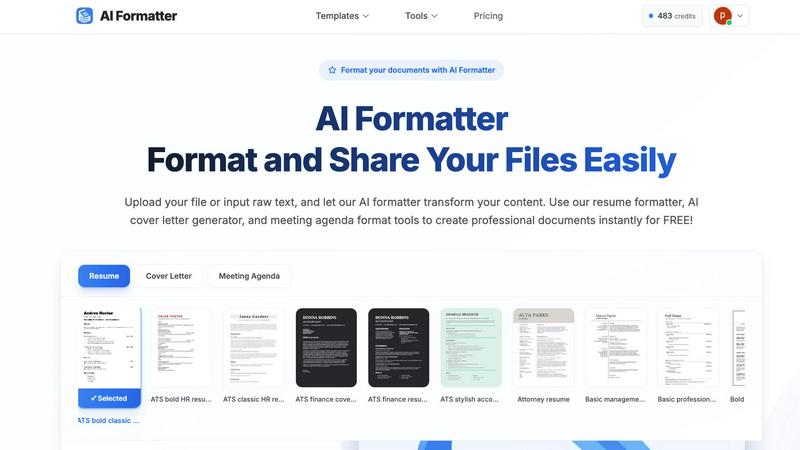
AI Formatter allows users to effortlessly upload existing files or input raw text directly into the platform. It supports multiple formats, including PDF, DOC, DOCX, and TXT, making it easy to get started with your document formatting.
Extensive Template Library
Choose from a diverse library of over 162 professionally designed templates tailored for various document types. Whether you need an ATS-optimized resume or a polished cover letter, the extensive selection ensures you find the perfect fit for your needs.
Automated Formatting
Once your content is uploaded or pasted, AI Formatter automatically processes it and applies the selected template. This feature ensures your documents maintain professional formatting and structure without the hassle of manual adjustments.
Multi-Format Export Options
After editing your document, you can easily download it in multiple formats, including Word, PDF, and more. This flexibility allows you to share your documents in the format that best suits your needs, whether for online applications or physical submissions.
WA Reminders
Seamless WhatsApp Linking
Linking your WhatsApp account is as easy as using WhatsApp Web. You simply scan a QR code with your phone, and you're connected. This secure process means WA Reminders acts as a bridge to schedule messages, but all conversations remain in your official WhatsApp app. You don't need to share passwords or use a separate phone number, keeping your communication personal and secure.
Schedule from Google Calendar
This feature integrates your scheduling directly into a tool you already use. You can schedule a WhatsApp reminder by just adding an internationally formatted phone number to the title or description of any Google Calendar event. When the event time arrives, WA Reminders automatically sends the message. It's perfect for those who already manage their appointments in Calendar, eliminating the need to switch between apps.
Schedule from the WA Reminders App
For more direct control, you can schedule messages from the WA Reminders app itself. A major benefit here is the automatic contact list import. The app pulls your full contact list from your phone, so you don't have to manually type in numbers. You can easily select a contact, type your message, set the date and time, and let the app handle the rest.
Recurring Message Scheduling
WA Reminders understands that many reminders happen on a regular basis. You can set up messages to repeat daily, weekly, monthly, or on a custom schedule. This is ideal for weekly class reminders, monthly payment follow-ups, or regular check-ins. You can set it once and forget it, ensuring your clients receive consistent communication without you lifting a finger each time.
Use Cases
AI Formatter
Job Seekers
Job seekers can benefit from AI Formatter by creating polished and ATS-friendly resumes and cover letters. This tool helps individuals stand out in the competitive job market, ensuring their applications are visually appealing and professionally formatted.
Business Professionals
Business professionals can use AI Formatter to standardize their company documents, including invoices and meeting agendas. This feature helps maintain consistency across documents, making them look credible and organized.
Academics and Students
Academics and students can utilize AI Formatter to format research papers and reports effortlessly. The tool saves time and ensures that documents meet the required formatting standards, allowing users to focus more on content than presentation.
Entrepreneurs and Freelancers
Entrepreneurs and freelancers can quickly generate professional invoices and receipts using AI Formatter. This feature streamlines the billing process, enabling them to present polished documents to clients and maintain a professional image.
WA Reminders
Reducing No-Shows for Appointments
Clinics, salons, and consultants can dramatically reduce missed appointments. By scheduling a friendly reminder message for the day before or a few hours before an appointment, clients are much more likely to confirm, reschedule, or show up on time. This saves lost revenue and keeps daily schedules running smoothly for the business owner.
Automating Payment Follow-Ups
Freelancers, coaches, and small service providers can use WA Reminders to send polite payment reminders. When an invoice is due, a scheduled message can be sent directly to the client's WhatsApp, providing a convenient and personal nudge that often leads to faster payments, improving cash flow without awkward conversations.
Managing Class or Workshop Reminders
Fitness trainers, tutors, and workshop organizers can schedule recurring reminders for their weekly sessions. A message sent to all registered participants a day before the class improves attendance rates. This ensures everyone is prepared and informed, leading to better engagement and client satisfaction.
Streamlining Customer Follow-Ups
Small shops or service businesses can schedule follow-up messages after a purchase or service is completed. A simple "How was your experience?" or "Thank you for your purchase!" message sent a day later shows customers you care, helps gather feedback, and encourages repeat business, all through automated yet personal communication.
Overview
About AI Formatter
AI Formatter is your ultimate AI-powered assistant designed to simplify the document creation process. Whether you are a job seeker polishing your resume, a professional crafting a business invoice, or an academic formatting a research report, AI Formatter is here to help. With just a few clicks, you can upload your existing files or input raw text, and the intelligent AI will transform your content using one of over 100 professional templates. The tool is especially beneficial for those looking to pass automated resume screenings (ATS) or for anyone who wants to create visually appealing documents quickly. The main value proposition of AI Formatter is its ability to save you over 2 hours per document, allowing you to focus on what truly matters. With its user-friendly interface, secure sharing options, and multi-format exports, AI Formatter makes creating professional documents accessible and remarkably easy for everyone.
About WA Reminders
WA Reminders is a smart, user-friendly tool designed to help you schedule WhatsApp messages in advance. It works seamlessly with both your personal WhatsApp and WhatsApp Business accounts. The core idea is simple: stop worrying about forgetting to send important messages and let automation handle your reminders. You can schedule messages directly within the WA Reminders app or, even more conveniently, by simply adding details to events in your Google Calendar. This powerful sync means your existing workflow doesn't have to change. The main goal is to save you precious time and significantly reduce missed appointments, or "no-shows," by ensuring clients receive timely, automated reminders directly from your own WhatsApp number. This product is the perfect solution for independent professionals like therapists and consultants, clinics, small shops, and any business that relies on appointments and follow-ups. If your time is valuable and you want to communicate more reliably with your clients, WA Reminders is the tool for you. It brings efficiency to your communication, allowing you to focus on running your business while it handles the important task of sending reminders.
Frequently Asked Questions
AI Formatter FAQ
How does AI Formatter work?
AI Formatter works by allowing users to upload their documents or input raw text. After selecting a template, the AI processes the content and applies professional formatting, making it ready for download and sharing.
What types of documents can I create with AI Formatter?
You can create a variety of documents with AI Formatter, including resumes, cover letters, business invoices, meeting agendas, and more. The tool is versatile, catering to the needs of different users.
Is AI Formatter free to use?
Yes, AI Formatter offers a free version that allows users to format documents using the available templates. There may be premium features or templates available for a fee, but basic functionalities are free.
Can I customize my documents after formatting?
Absolutely! After AI Formatter processes your document, you can use the intuitive editor to make adjustments and customize the content. This ensures that your final document reflects your unique style and preferences.
WA Reminders FAQ
How will my WhatsApp reminder messages look?
Your messages will appear to the recipient exactly as if you sent them manually from your own WhatsApp account. They will see your name, profile picture, and the message content you scheduled. The conversation will continue in your main WhatsApp chat thread, allowing you to reply naturally to any responses they send back.
Can I send reminders directly from Google Calendar?
Yes, absolutely! This is a key feature. You can schedule a WhatsApp message by simply creating an event in your Google Calendar and including a phone number (in international format, like +1234567890) in the event title or description. WA Reminders will detect this and send the reminder at the event's scheduled time.
Do you have a Calendly integration?
Yes, WA Reminders works with Calendly through Google Calendar integration. When you connect your Calendly to your Google Calendar, any appointment booked will create a calendar event. As long as the client's phone number is included in that event (which Calendly can be set up to do), WA Reminders will automatically send a WhatsApp reminder based on that event.
Can I import or use the contacts from my phone?
Yes. When you use the WA Reminders app to schedule a message, it automatically imports and syncs your phone's full contact list. This means you can easily select any contact to send a reminder to without having to manually enter their phone number, saving you time and preventing errors.
Alternatives
AI Formatter Alternatives
AI Formatter is an innovative tool that falls under the productivity and management category, specifically designed to streamline the document creation process. It leverages advanced AI technology to transform raw text into beautifully formatted professional documents, such as resumes, cover letters, and business invoices. Users often seek alternatives to AI Formatter for various reasons, including pricing, desired features, or specific platform compatibility that better meets their unique needs. When searching for an alternative to AI Formatter, consider factors such as ease of use, the variety of templates available, and the ability to export documents in multiple formats. Additionally, look for tools that offer robust support and security features to ensure that your sensitive information remains protected during the document creation process. Finding the right balance of functionality and affordability is key to selecting an alternative that suits your requirements.
WA Reminders Alternatives
WA Reminders is a productivity and management tool designed to help businesses schedule WhatsApp messages. It’s perfect for sending appointment reminders, reducing no-shows, and keeping your client communications organized from one central place. People often explore other options for various reasons. You might need features beyond basic scheduling, have a specific budget in mind, or require integration with other software your business uses. It's common to look for a solution that fits your unique workflow and growth plans. When evaluating different tools, consider what’s most important for your operation. Key factors often include ease of use, reliability, cost, and how well the tool connects with your existing calendar or customer management systems. Finding the right fit means balancing these needs with the core goal of saving time and improving client attendance.